Camera settings – Kandao QooCam 8K Enterprise 360 Camera User Manual
Page 5
54
55
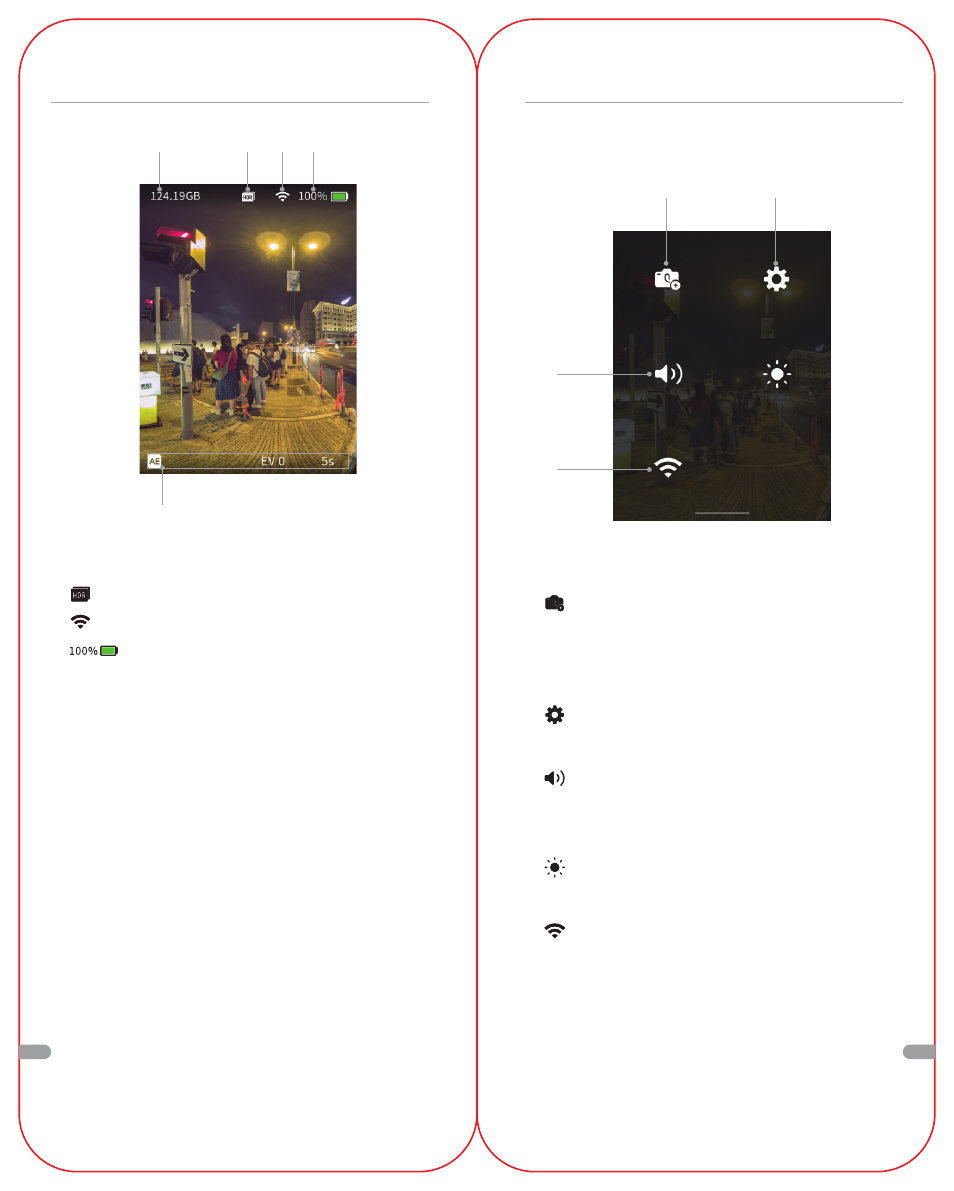
Camera Settings
❶
Custom Template Management
Click again to save the current shooting parameters as a
custom mode and save up to 4 custom modes. Short
press the Q button to switch between the custom modes.
❷
More settings
Dive Case mode switch, language, date, time-lapse, etc.
❸
Sound
After clicking the icon, move the slider to adjust the
volume of the sound
.
❹
Brightness
After clicking the icon, move the slider to adjust the brightness.
❺
Wi-Fi Switch
Open by default, short press the icon to gray, turn off Wi-Fi
Long press the icon to jump to WI-FI management, display
the QR code generated by SSID and password, and use
QooCam APP scan code to quickly connect to WI-FI.
Swipe down to enter the [Camera Settings] menu
❷
❶
❸
❺
Operating the Touchscreen
❺
❷
❶
❸ ❹
❶
Memory remaining capacity
❷
Current shooting mode
❸
Connected WI-FI
❹
Remaining battery
❺
Camera parameters of the current shooting mode
EN
EN