The rollers, P. 45) – Canon imageFORMULA RS40 Photo and Document Scanner User Manual
Page 45
Advertising
45
3
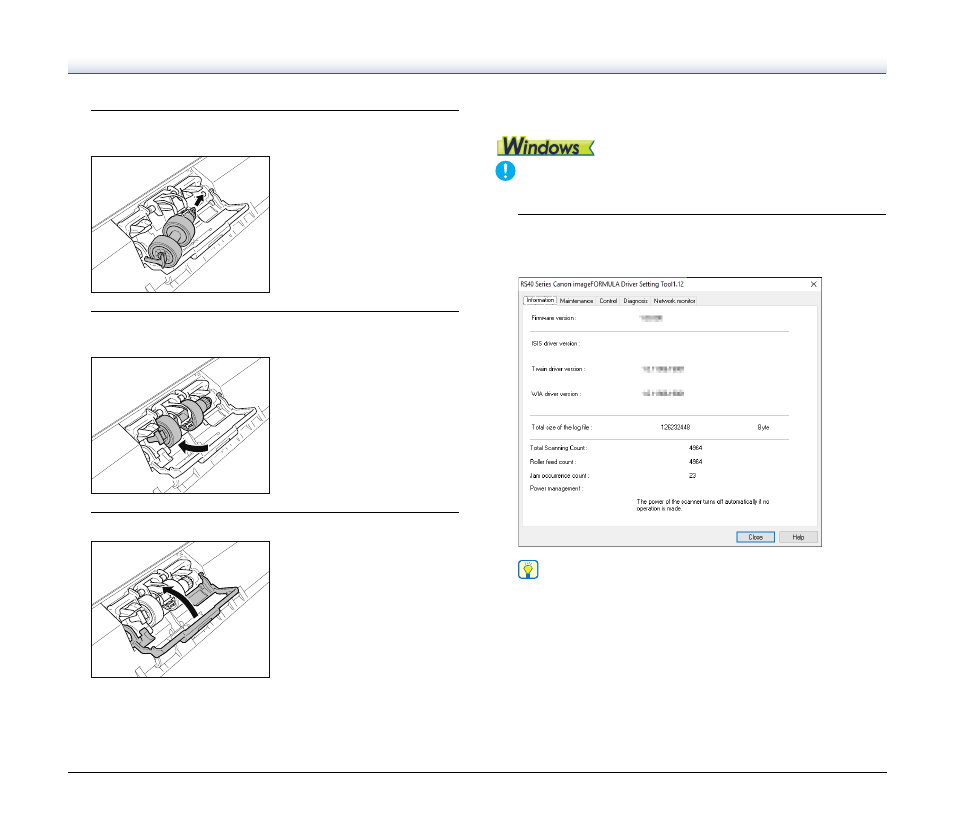
Install the new retard roller by inserting the right side
first.
4
Push the left side of the retard roller to secure it to the
scanner.
5
Close the roller cover.
Resetting the counter
IMPORTANT
Log on to Windows as an Administrator.
1
Click the Start button, and then click [Canon RS40], and
[Canon imageFORMULA Driver Setting Tool].
imageFORMULA Driver Setting Tool starts.
Hint
In Windows 8.1, it is registered at the following location.
Advertising
See also other documents in the category Canon Scanners:
- CanoScan LiDE110 (31 pages)
- CanoScan LiDE110 (32 pages)
- CanoScan Lide210 (2 pages)
- CanoScan LiDE 200 (2 pages)
- CanoScan 8800F (16 pages)
- CanoScan D646U (21 pages)
- CANOSCAN N676U (19 pages)
- CanoScan N650U (2 pages)
- IMAGEFORMULA DR-X10C (67 pages)
- 220E (44 pages)
- Desktop Scanner DR-2080C (4 pages)
- M11037 (71 pages)
- CANOSCAN 9000F (19 pages)
- DR-7550C (2 pages)
- DR-4080U (56 pages)
- DR-M160 (56 pages)
- CANOSCAN LIDE 600F (73 pages)
- MF 3240 Series (136 pages)
- Image Filing Systems DR-5010C (4 pages)
- DR-3080C (60 pages)
- SCANFRONT 300P (193 pages)
- DR-6080 (108 pages)
- DR-2010C (4 pages)
- D660U (2 pages)
- DR-5060F (89 pages)
- DR-5060F (92 pages)
- P-150M (105 pages)
- Scanner (4 pages)
- CANOSCAN LIDE 700F (19 pages)
- CANOSCAN LIDE 700F (2 pages)
- FB320P (79 pages)
- DR-4010C (142 pages)
- 800 (51 pages)
- CanoScan LiDE60 (2 pages)
- D1230U/D2400U (24 pages)
- IMAGEFORMULA DR-7090C (2 pages)
- S 400 MS 500 (6 pages)
- CR-50 (58 pages)
- IMAGE FORMULA DR-2010C (118 pages)
- CanoScan 3200 (20 pages)
- FB330P/FB630P (82 pages)
- MS-350 (4 pages)
- FORMULA CR-50 (24 pages)
- CS-S 4.3 (109 pages)
- IMAGEFORMULA DR-2010M (36 pages)