Fitting, Lay the cable through the headrest, Insert the mounting frame in the headrest – Blaupunkt IVMS-5802 User Manual
Page 7: Inserting the monitor
DANSK
19
ENGLISH
DEUTSCH
FRANÇAIS
IT
ALIANO
NEDERLANDS
SVENSKA
ESP
AÑOL
PORTUGUÊS
FITTING
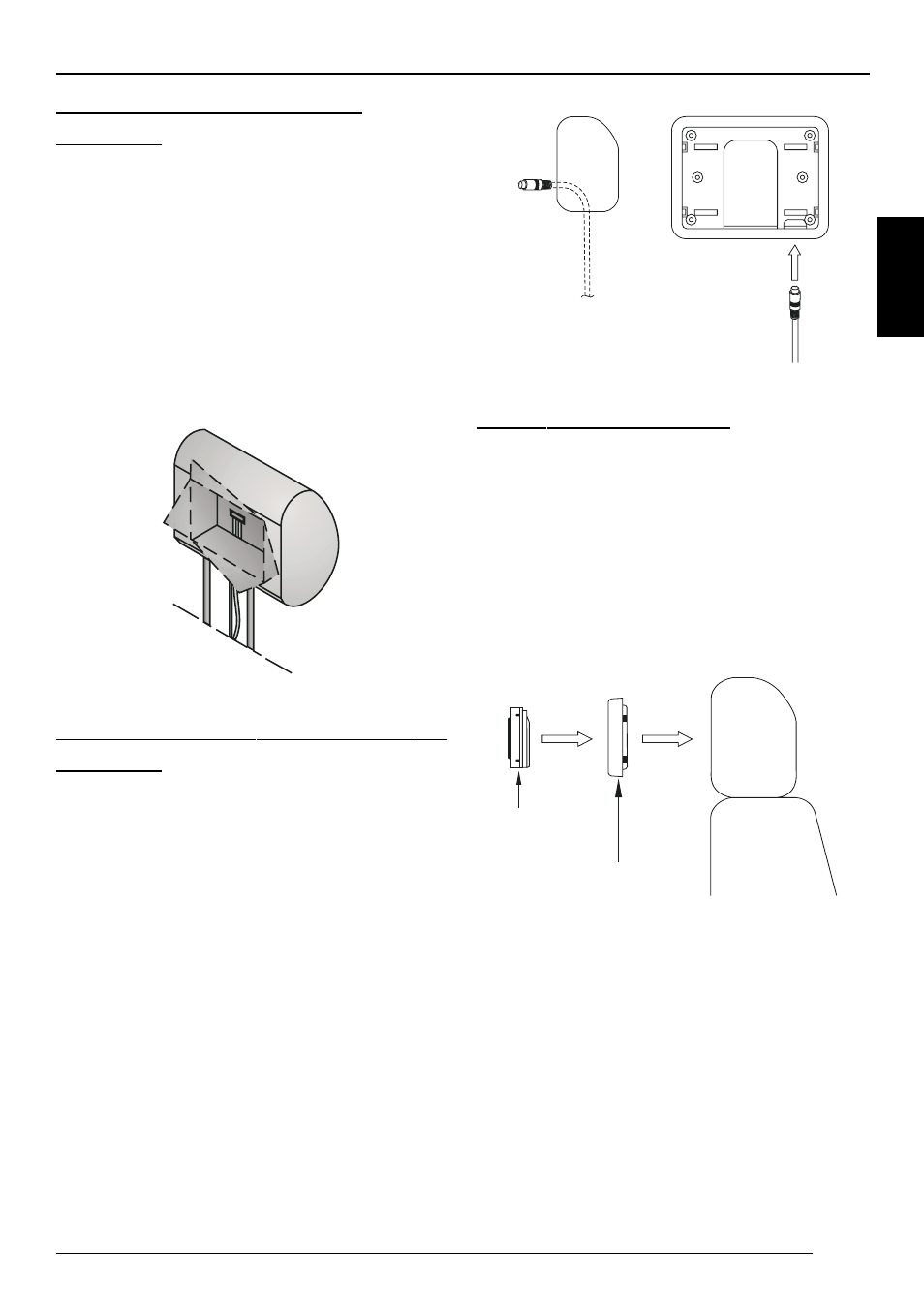
Lay the cable through the
headrest
➮
Now pass the supplied cables throu-
gh the opening so that they emerge
from the underneath of the headrest.
➮
If possible, cover the cable with a ca-
ble tunnel.
➮
Now connect the power supply,
ground and video signal cables, to
check that the monitor is working.
Insert the mounting frame in the
headrest
➮
Before connecting the monitor, pass
the connecting cables through the
holes provided in the mounting pla-
te, as shown in the illustration.
➮
Insert the mounting plate into the
area that has been cut out, and fix it
in place with appropriate fastenings.
Inserting the monitor
➮
Before connecting the monitor, pass
the connecting cables through the
holes provided in the mounting pla-
te, as shown in the illustration.
➮
Insert the monitor into the mounting
plate, and attach it with appropriate
fastenings.
Monitor
Mounting plate