Lenco L-3866 USB User Manual
Lenco Video
•
Connect the turntable to the USB port of the PC (do not connect the red and white connectors to the PC)
•
Install the Audacity software on the PC (follow the on-screen instructions)
remark: when using Vista Professional, install the software as administrator
•
Launch the Audacity software.
•
In Audacity, select "Edit" in the menu bar, then select “preferences”.
•
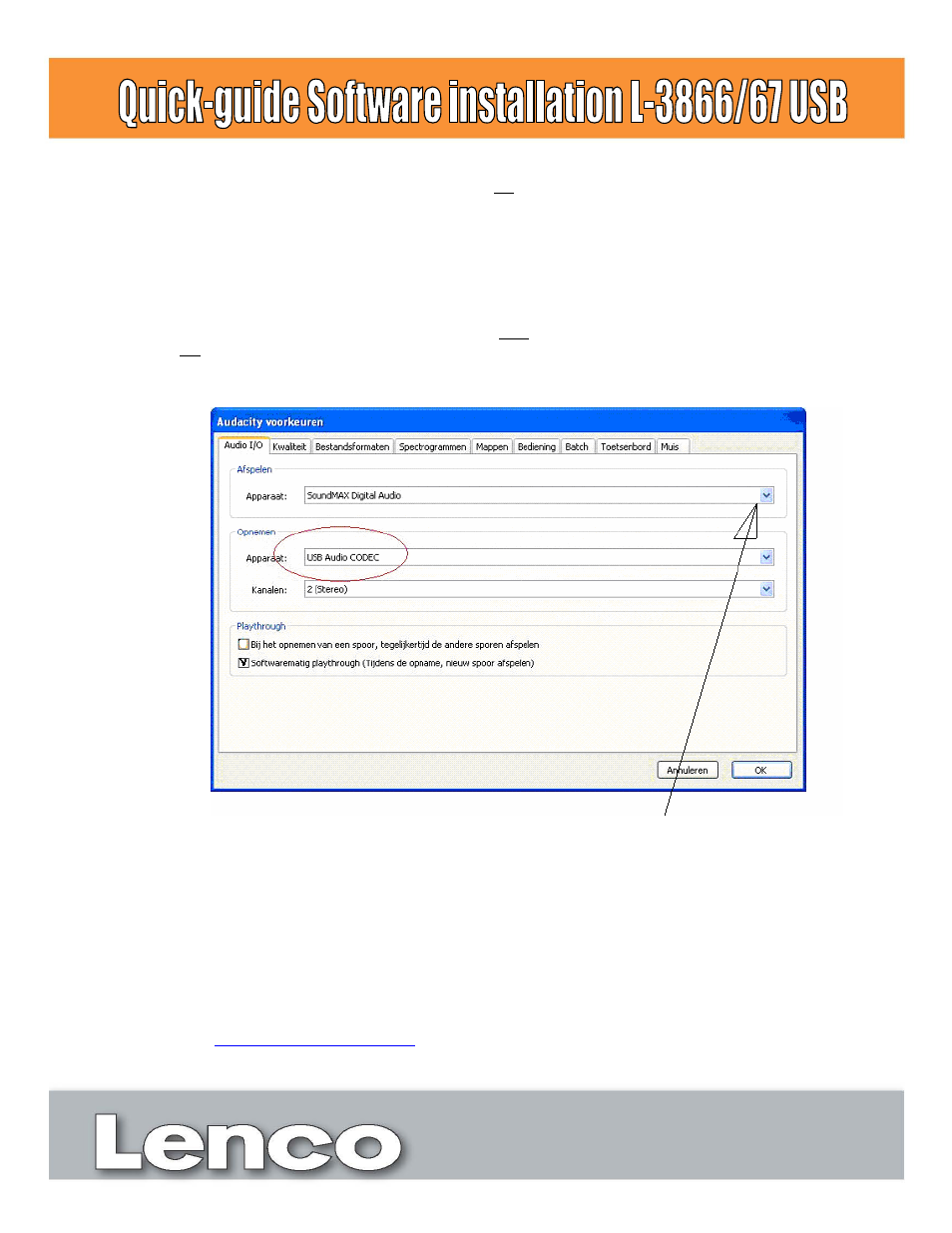
In Audio I/O, select “USB audio Codec” in the pull-down menu (recording device)
remark: if the turntable is connected to the USB port after launching the software, the “USB audio Codec”
will not be available in the pull-down menu.
•
Highlight the second option under “Playthrough”.
Playback of the recorded track can’t be heard: select the soundcard in the pulldown menu. Depending on the
PC’s configuration, the soundcard can be different from the one shown on the image,.
•
As a test we recommend you to execute the following steps.
•
Play a record, in Audacity press the record button, a new “Track” will appear automatically. During recording
you’ll see the Level meters blink.
•
Stop the recording where you want with the stop button
•
Press the play button to check the recorded part.
•
For a more detailed description of how to use the software and turntable please refer to the manual.
•
Check
http://audacity.sourceforge.net/
for more information about Audacity.