Rear view, Bottom view – NEXCOM MRC 2200 User Manual
Page 21
Advertising
Copyright © 2010 NEXCOM International Co., Ltd. All Rights Reserved.
8
MRC 2200 User Manual
Chapter 2: Getting Started
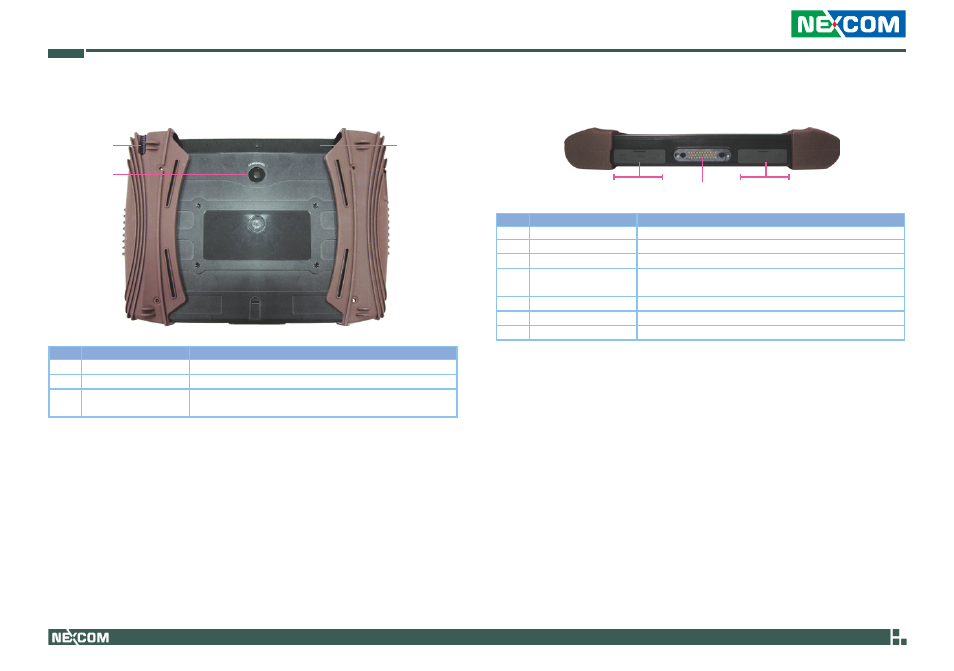
Rear View
1
2
3
Part
Function
1
Stylus Pen
Stylus Pen designed for resistive touch screen
2
Camera
2.0M Pixel CMOS camera
3
Battery /
SIM Card Holder
Location of the 2600mAh battery pack
Location of the SIM card holder
Bottom View
1 2 3
Part
Function
1
Mini USB
1 USB2.0
2
USB
USB2.0
3
Power Connector
DC-in 19V / 3.42A (65W)
4
Docking Connector
1 x 32-pin Po Go connector for connecting a docking
station
5
USB
USB2.0
6
Mic-in
3.5 mm Mic-in jack
7
Line-out
3.5 mm Line-out jack; Used to connect speakers
5 6 7
4
Advertising