Settings, Route guidance settings, Route options – Becker MAP PILOT OPERATION GUIDE User Manual
Page 45
45
SETTINGS
>>>
> D
> GB
> F
> I
> E
> P
> NL
> DK
> S
> N
> FIN
> TR
> GR
> PL
> CZ
> H
> RUS
Settings
To call up the settings, select
Settings
from the main menu.
The Settings menu appears.
You can now select from the following set-
tings:
•
Guidance settings
Settings relating to the route guidance
•
Map settings
Settings relating to the map display
•
TMC settings
Settings relating to the receiving of
TMC messages
•
System settings
Basic settings relating to the Becker®
MAP PILOT
Route guidance settings
The route guidance settings contain the
settings that are relevant to route guid-
ance.
> In the settings menu, select
Guidance
settings
.
The route guidance settings are displayed.
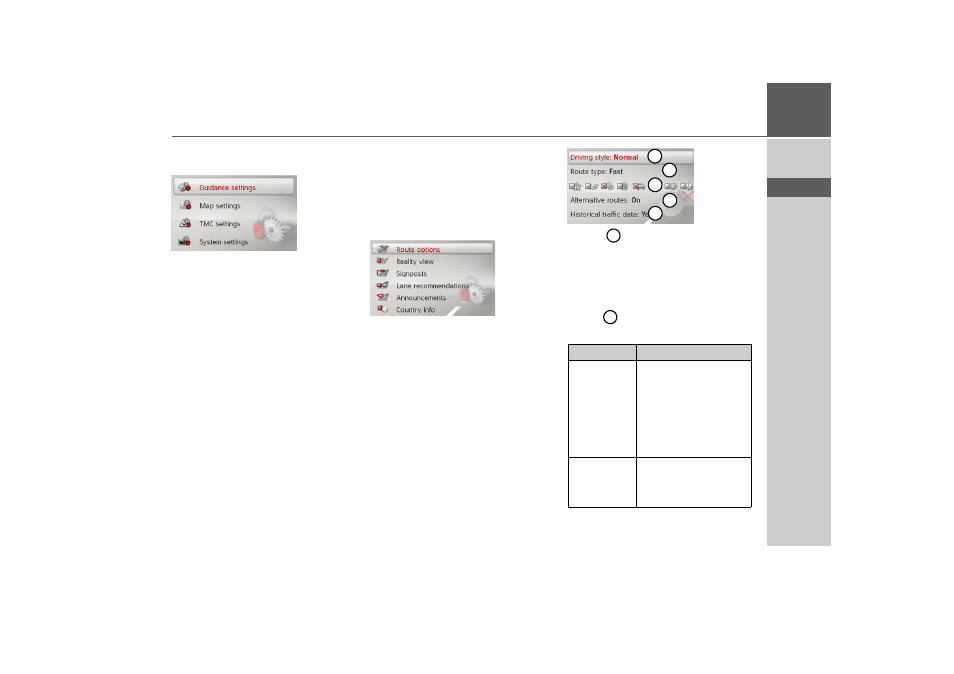
Route options
You can set your driving profile. The set-
tings made here have an effect on the
route selection and on the calculation of
the estimated journey times.
> Select
Route options
in the route guid-
ance settings.
> With
select your mode of travel
(
Unhurried
,
Normal
and
Sporting
).
This setting influences the calculation of
your estimated time of arrival.
> With
select one of the following op-
tions.
Option
Meaning
Economical
With this option, the
most economical route in
terms of travel time and
mileage is calculated tak-
ing into consideration
further parameters such
as gradients, for example.
Fast
With this option, the
fastest route in terms of
travel time is calculated.
1
2
3
4
5
1
2