Set mode, Set mode programming, D set mode operation – Icom IC-M73 Plus User Manual
Page 33: D set mode items
25
8
SET MODE
New2001
1
2
3
4
5
6
7
8
9
10
11
12
13
14
15
16
■
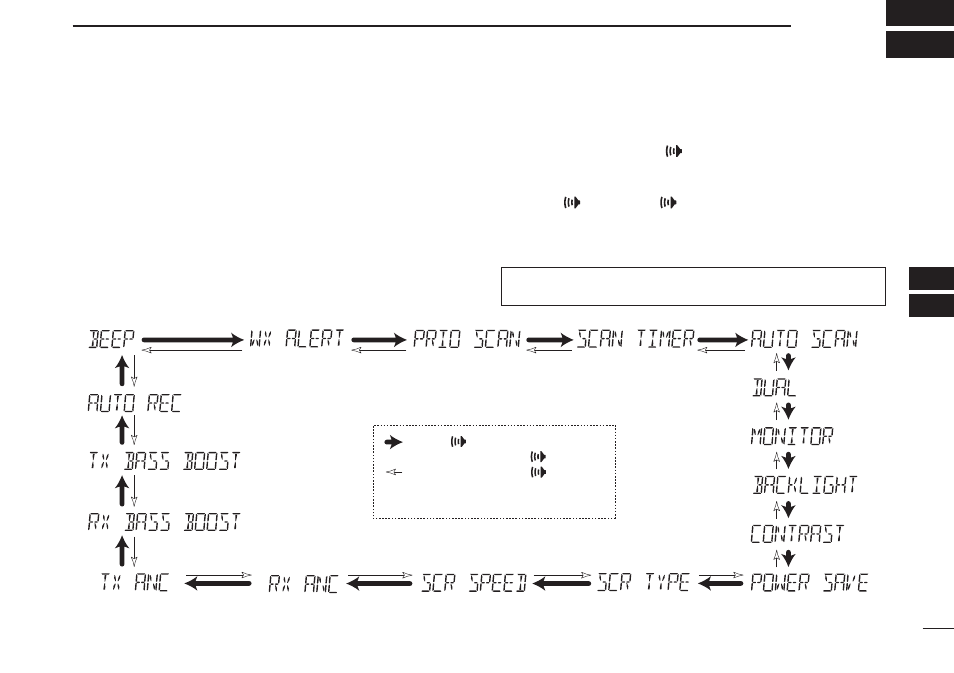
SET mode programming
The SET mode is used to change the status of 17 transceiver
functions
†
: Beep tone function, Weather alert function
†
, Prior-
ity scan, Scan resume timer, Auto scan start function, Dual/
Tri-watch function, Monitor key action, Display backlight, LCD
contrast selection, Power save function, Scroll type selection,
Scroll speed selection, RX noise cancel function
†
, TX noise
cancel function
†
, RX bass boost function
†
, TX bass boost func-
tion
†
and the Automatic recording threshold level selection
†
.
D
SET mode operation
q
Turn OFF power.
e
w e
While holding down [
], turn ON power to enter the
SET mode.
• The “BEEP” (Beep tone function setting) appears.
e
e e
Push [
], or push [
] and [Y]/[Z] to select the de-
sired item.
r
Push [Y]/[Z] to select the desired option of the item.
t
To exit the SET mode, push [16/C].
D
SET MODE ITEMS
Beep tone function*
Weather alert function
†
Priority scan
†
Scan resume timer
†
Auto scan start function
†
Dual/Tri-watch
function
†
Monitor key
action
Display
backlight
LCD contrast
selection
Automtic recording
threshold level selection
†
TX bass
boost function
†
RX bass
boost function
†
Power save function
Scroll type selection
Scroll speed selection
RX noise cancel function
†
TX noise cancel function
†
: Push
[ ], or
while holding down
[ ], push [
Y]
: While holding down
[ ], push [
Z]
*Starting item
†
Depending on versions