9.0 m, Mode o, M- zoom 24 – Metz MECABLITZ 64 AF-1 digital Olympus User Manual
Page 169: Slave o, Channel o
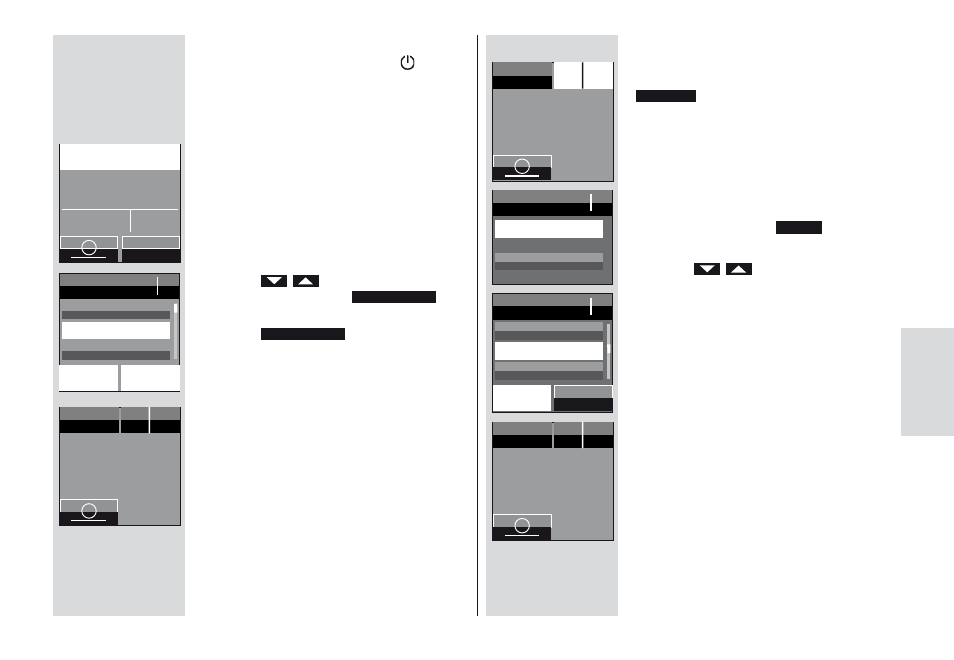
10.2.1 Remote slave flash mode settings
• Switch on the flash unit with the
ባ
button. The start screen appears.
Thereafter, the flash unit always switches
on with the mode of operation that was
used last (e.g. TTL flash mode).
• Press the displayed mode of operation on
the touch display as many times as it takes
for the display for selecting the mode of
operation to appear.
• Press the
sensor buttons on the
touch display and select
.
• Press the
s ensor button on
the touch display.
Remote slave mode is set.
In addition, the selected slave group (e.g. A)
and the remote channel (e.g. CH 1) are dis-
played.
REMOTE SLAVE
REMOTE SLAVE
10.2.2 Setting the slave channel
• Press the sensor button on the touch
display for the channel group (e.g.
).
The window for selecting the channel and
group appears.
• Press the sensor buttons on the touch
display for the channel
.
• Press the
sensor buttons on the
touch display and select the desired
channel.
• Press the selected channel on the touch
display.
The setting will take effect immediately.
“CH2” appears on the display.
Gr A I Ch1
CHANNEL
169
+
0.8- 9.0 m
F
5,6
M-
Zoom
35
m
m
TTL
i
EV
MODE
O
q
p
STROBO
REMOTE SLAVE
SERVO
M-
Zoom 24
REMOTE
SLAVE
Gr
Ch
A
1
i
m
m
M-
Zoom 24
REMOTE
SLAVE
Gr
Ch
A
2
i
m
m
M-
Zoom 24
REMOTE
SLAVE
Gr
Ch
A
1
i
m
m
SLAVE
O
CHANNEL
GROUP
CHANNEL
O
q
p
CHANNEL 1
CHANNEL 2
CHANNEL 3
k