Status icons – TAG Heuer LINK User Manual
Page 31
Advertising
31
English
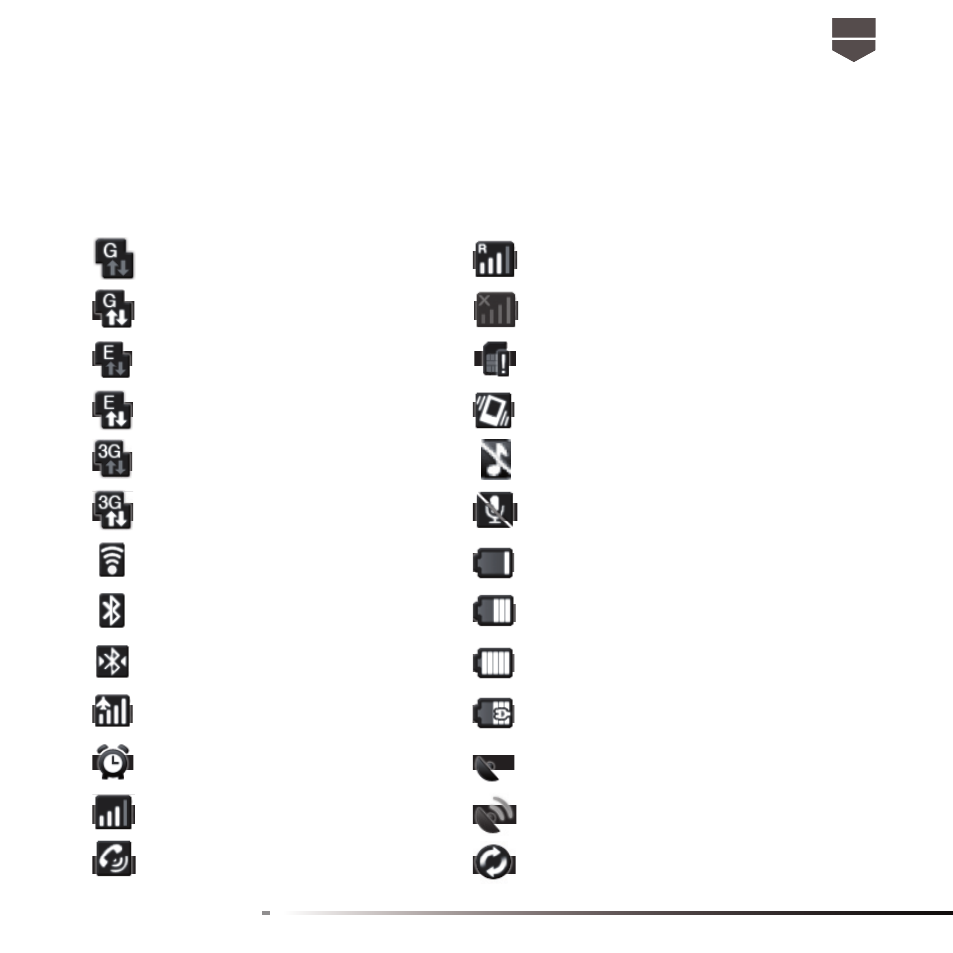
Status icons
These are the icons that may appear in the status bar :
GPRS connected
Roaming
GPRS in use
No signal
EDGE connected
No SIM card installed
EDGE in use
Vibrate mode
3G connected
Phone speaker is mute
3G in use
Phone microphone is mute
Connected to a Wi-Fi network
Battery is very low
Bluetooth is on
Battery is low
Connected to Bluetooth device
Battery is full
Airplane mode
Battery is charging
Alarm is set
GPS is on
Signal strength
GPS is connected
Speakerphone on
Data is syncing
Advertising
This manual is related to the following products: