Teletronics TBC-800 User Manual
Page 12
Advertising
•
Upload via web browser: Select this option and click Next. Click on the Browse
to select the upgrade firmware file and click Upload file to upgrade.
•
Download from http or ftp URL: Select this option to download and upgrade the
firmware from a specific URL.
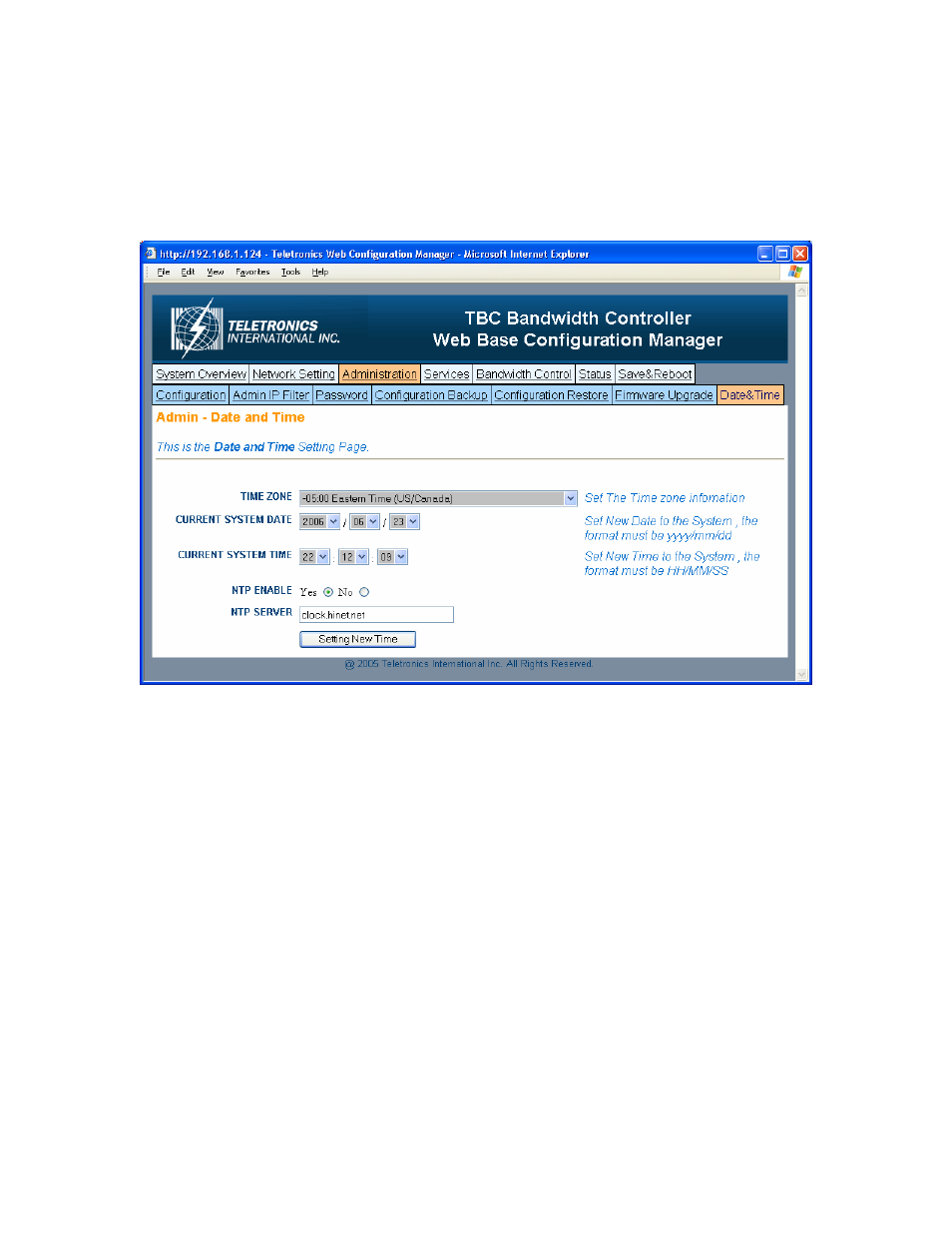
- Date & Time
•
Time Zone: Set the Time Zone
•
Current System Date: Set System Date with yyyy/mm/dd format
•
Current System Time: Set System Time with hh/mm/ss format
•
NTP Enable: Enable or disable Network Time Protocol. NTP is used to
synchronize the time.
•
NTP Server: If you enable NTP, bandwidth controller will need a NTP server to
request precise time.
12
Advertising
See also other documents in the category Teletronics Communication:
- EZPlatform Quick Start (2 pages)
- EZStation2 Quick Start (2 pages)
- EZMIMO (8 pages)
- EZPlatform (41 pages)
- TT 900 Quick Start (2 pages)
- TT 5800 (64 pages)
- TT 5800 Quick Start (2 pages)
- EZStation2 (58 pages)
- EZMesh (58 pages)
- TT 2400X Quick Start (2 pages)
- TT 5800X Quick Start (2 pages)
- TBC-800 Quick Start (2 pages)
- VERSA 5800 (2 pages)
- EZBridge AP (2 pages)
- EZBridge Station Bridge (2 pages)
- WL-CPE-ROUTER (28 pages)
- EZStation5 (187 pages)
- EZBridge Sample Applications (2 pages)
- EZ Bridge 802.11G Product Guide (6 pages)
- EzBridge 5800 (47 pages)
- EZBackhaul (62 pages)
- Wi-Fi VoIP Phone (2 pages)
- EZ Bridge 802.11G (61 pages)
- Wi-Fi 3rdGen Quick Start (7 pages)
- USB VoIP Phone (2 pages)
- IP-PBX Server Quick Start (2 pages)
- LANPhone (2 pages)
- FX04 (2 pages)
- FX06 (2 pages)
- MiniLink (32 pages)
- FXS1 (2 pages)
- FXS1 Plus (2 pages)
- FXS4 (2 pages)
- FXS2 Plus (2 pages)
- Enterprise SIP Server (38 pages)
- Enterprise SIP Server Quick Start (2 pages)
- WLAN Inter-Building AP XI-1500 (10 pages)
- WL11000SA-N (22 pages)
- USB Adapter (11 pages)
- SmartAmp 900 (13 pages)
- UDC-5800H (7 pages)
- WINC2400C (27 pages)
- WINC900A (43 pages)
- IP-PBX Server (84 pages)