Casio QV-5700 3 User Manual
Page 30
CONNECTING TO EXTERNAL EQUIPMENT
148
●
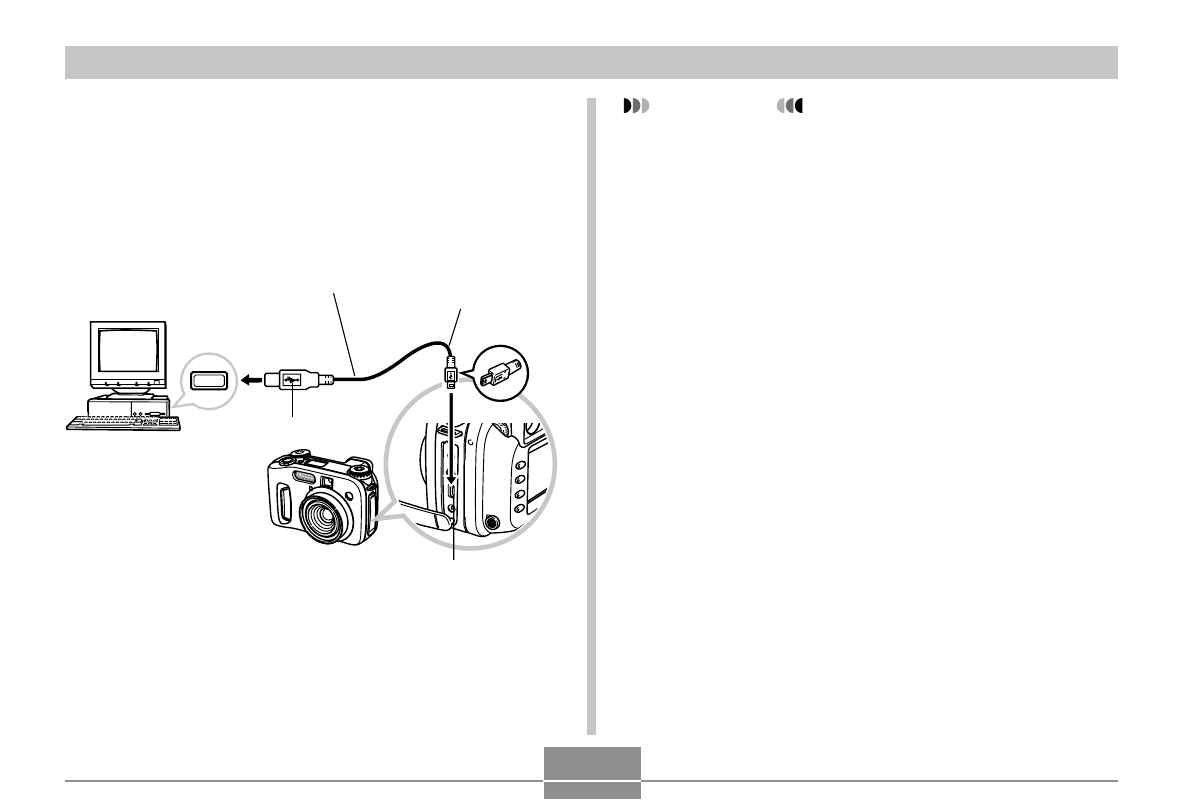
To connect the USB Cable
1.
Turn on the camera.
2.
Open the terminal panel cover and then use the
USB cable to connect the camera to the com-
puter.
3.
Import the images to the computer.
4.
After image data transfer is complete, discon-
nect the USB cable.
• For details, see “Terminating a USB Connection.”
USB port
USB cable (bundled)
USB
Large connector (A)
Small connector
(Mini-B)
IMPORTANT!
• Be sure to read the applicable information in the user
documentation that comes with your computer before
connecting the USB cable.
• Do not leave the same image displayed on your com-
puter screen for a long time. Doing so can cause the
image to “burn in” on the screen.
• Take care when connecting the USB cable to the cam-
era. The USB port and the cable plug are shaped for
proper positioning.
• Plug the USB cable into the ports securely as far as it
will go. Proper operation is not possible if connections
are not correct.
• The camera does not draw power over the USB cable.
Be sure to connect the AC adaptor to the camera for
power.
• The optionally available CASIO QC-1U USB cable
cannot be used with this camera.
• Never disconnect the USB cable while the PC is ac-
cessing camera memory (indicated by a flashing USB
lamp). Doing so can cause data to become corrupted.
• You can perform USB data communication while the
camera is in a recording mode or in the Play Mode.