PLANET UMG-2000 User Manual
Page 107
107
*** Use ATA-150 to register to UMG-2000:
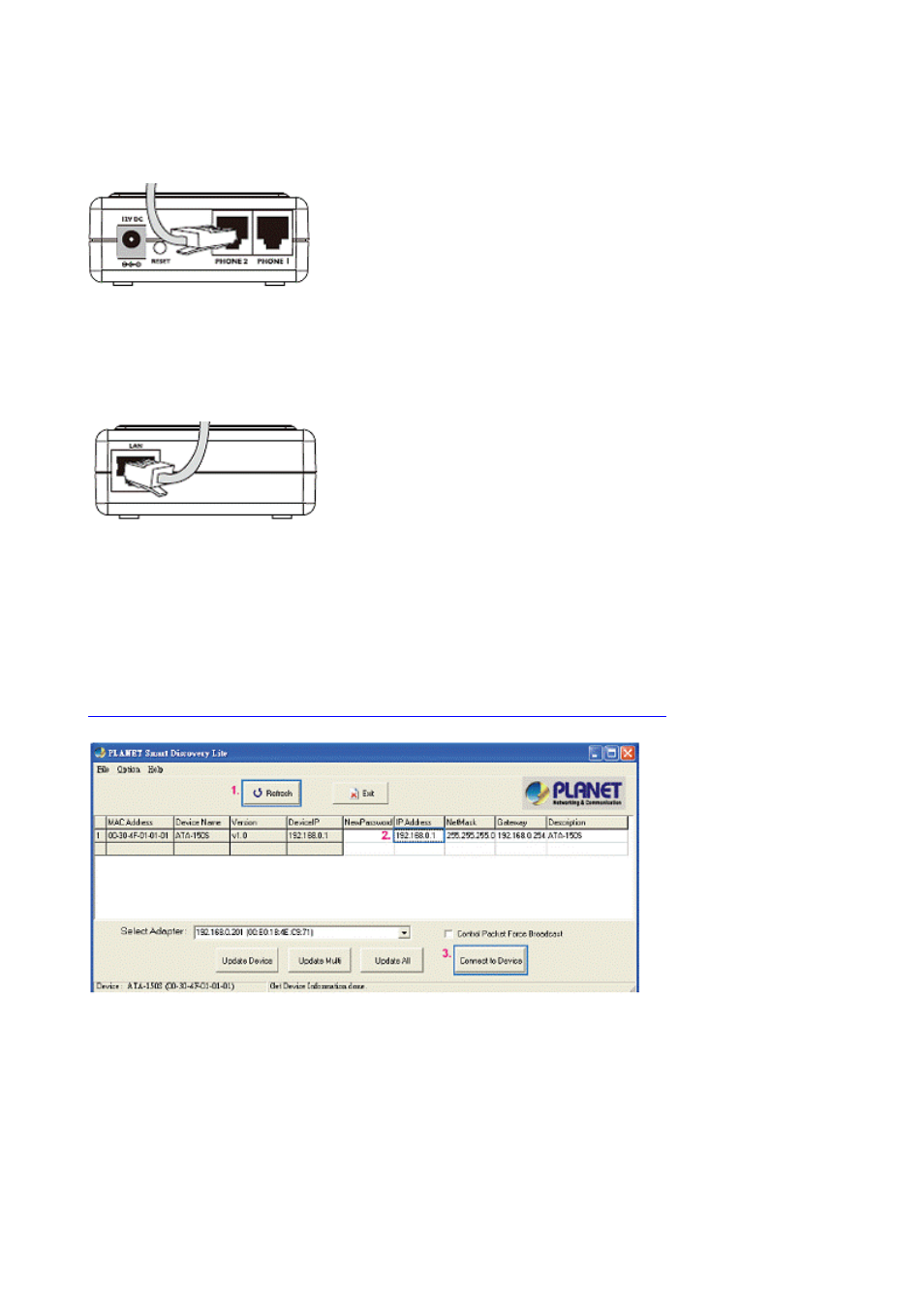
Step1.Connecting Telephone:
Using a telephone cable, connect your telephone to the Phone port of the Phone Adapter.
Step2. Connecting Network and Power AC Power:
Connect the included Ethernet network cable to the LAN port of the Phone Adapter.
Connect the included power adapter to the POWER port of the Phone Adapter.
The PWR, LNK/ACT, and RING LEDs will be solidly lit when the Phone Adapter is ready for
use.
Step3. Basic Configuration & Administration Interface:
Using for soft utility to search SIP ATA from current network.
The utility not only easy-to-use and provides user more convenience for configuration
access.
At the some time if you forget this IP address can also found that via the utility.
Please download the “SmartDiscoveryLite_v10.rar” at our FTP Server:
ftp://surve_guest:[email protected]/SmartDiscoveryLite_v10.rar
To press “Refresh” the button to show out the SIP ATA, then click IP Address item and
press the “Connect to Device” button.
Step4. Login to your ATA-150 Web-UI:
You will connect to SIP ATA via your web browser automatically.
ATA will prompt for logon username/ password, please enter: admin / 123 to continue
machine administration.