Roll browser, Deleting / exporting rolls – Samsung WM55B Flip Pro 55" 4K Interactive Touchscreen LED Display User Manual
Page 30
30
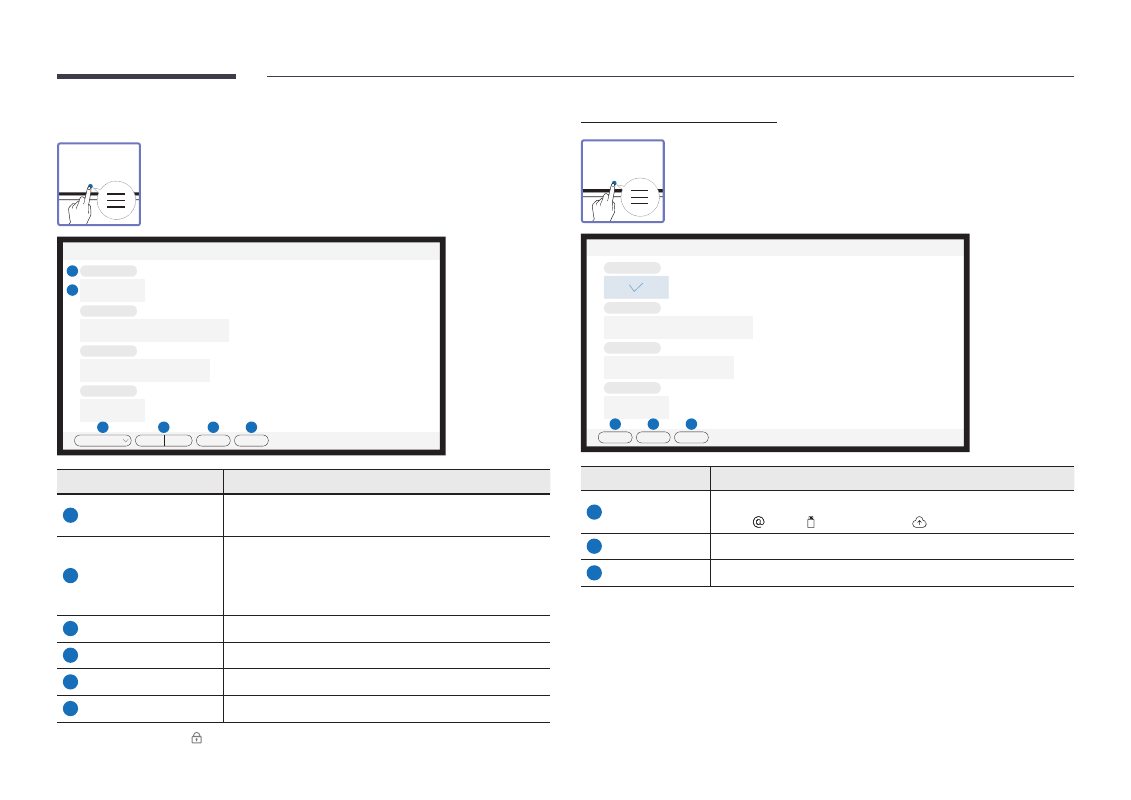
Roll Browser
→
ROLL BROWSER
Open, browse and manage rolls via Roll Browser.
Roll Browser
5
****-**-**_****
**/**/**** **:** **
6
****-**-**_****
**/**/**** **:** **
****-**-**_****
**/**/**** **:** **
****-**-**_****
**/**/**** **:** **
1
2
3
4
All
By date
By name
Edit
Close
Parts
Description
1
All
You can view the list by the mode you want.
•
All
/
Pen Mode
/
Brush Mode
2
By date
By name
Set the sort order of files.
•
By date
: The rolls are sorted by recent date. This is the
default sort option.
•
By name
: The rolls are sorted by name of the rolls.
3
Edit
Select multiple rolls to export or delete.
4
Close
Close Roll Browser.
5
File name
Rename the file.
6
Rolls
Browse and open a desired roll.
"
To open a locked roll ( ), press the six-digit password.
Deleting / Exporting rolls
→
ROLL BROWSER
→
Edit
You can select multiple rolls to export or delete.
Select
****-**-**_****
**/**/**** **:** **
****-**-**_****
**/**/**** **:** **
****-**-**_****
**/**/**** **:** **
****-**-**_****
**/**/**** **:** **
1
2
3
Export
Delete
Cancel
Parts
Description
1
Export
Share the selected rolls any way you like.
Email
( ) /
USB
( ) /
Network Drive
( )
2
Delete
Delete the selected rolls.
3
Cancel
Deselect the roll.