Opening/closing the camera – LEICA M6 Rangefinder Camera User Manual
Page 26
CAMERA OPERATION ▸ REPLACING THE FILM PACK
26
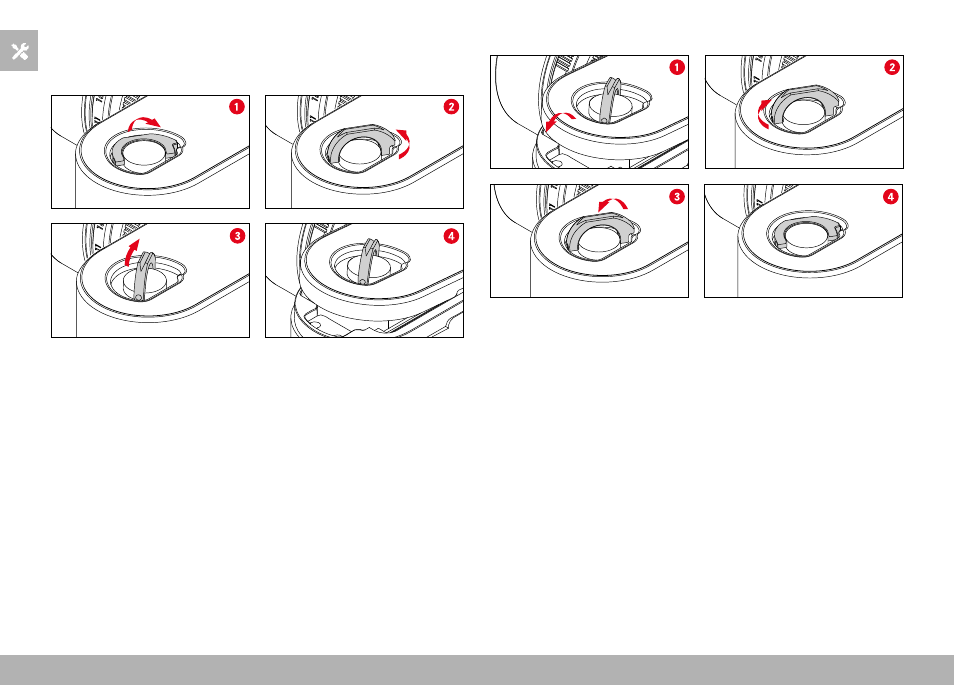
OPENING/CLOSING THE CAMERA
OPEN
▸
Hold the camera with the base facing up
▸
Click up the locking toggle
▸
Turn the locking toggle in anti-clockwise direction
▸
Remove the bottom cover
▸
Flip open the rear cover
Note
• The exposure counter is automatically set back to zero when the
bottom cover of the camera is opened.
CLOSE
▸
Hold the camera with the base facing up
▸
Flip the rear cover closed
▸
Hook the bottom cover onto the hinge pin on the side of the
camera
▸
Flip the bottom cover closed
• The rear cover must be pressed in completely and sit under the
lip of the bottom cover.
▸
Turn the locking toggle in clockwise direction
▸
Click down the locking toggle
▸
Check that the bottom cover was inserted and closed correctly