Ad5012, Front panel controls, Rear panel controls – AudioSource 12 x 50W Digital Multi-Zone Power Amplifier User Manual
Page 3: Owner’s manual
TRIGGER
IN OUT
_
+
BUS 1
TREB
ON
TRIGGER
AU
TO
BUS 2
TREB
BUS 1
BASS
BUS 2
BASS
BUS 1
LEVEL
BUS 2
LEVEL
+
+ -
-
BUS 1
OPTICAL
PCM AUDIO
ONLY
1
1
2
2
BUS
INPUT
LEFT RIGHT
FUSE: T12AL 250VAC FOR 120VAC 60HZ
FUSE: T6.3AL 250VAC FOR 230VAC 50HZ
POWER
RATING:
_
+
_
+
BR
ST
L R
LINE IN LINE IN
SPEAKER SPEAKER
_
+
BRIDGE
1 2 LINE IN 1 2 LINE IN
ZONE 5
VOL
VOL
_
+
_
+
BR
ST
L R
LINE IN LINE IN
SPEAKER SPEAKER
_
+
BRIDGE
1 2 LINE IN 1 2 LINE IN
ZONE 6
VOL
VOL
_
+
_
+
BR
ST
L R
LINE IN LINE IN
SPEAKER SPEAKER
_
+
BRIDGE
ZONE 3
VOL
VOL
_
+
_
+
BR
ST
L R
LINE IN LINE IN
SPEAKER SPEAKER
_
+
BRIDGE
1 2 LINE IN 1 2 LINE IN
ZONE 4
VOL
VOL
1 2 LINE IN 1 2 LINE IN
_
+
_
+
VOL
BR
ST
L R
LINE IN LINE IN
SPEAKER SPEAKER
BUS BUS
BUS BUS
BUS BUS
BUS BUS
BUS BUS
BUS BUS
1 2 LINE IN 1 2 LINE IN
_
+
BRIDGE
VOL
ZONE 1
_
+
_
+
BR
ST
L R
LINE IN LINE IN
SPEAKER SPEAKER
_
+
BRIDGE
1 2 LINE IN 1 2 LINE IN
ZONE 2
VOL
VOL
~120V60Hz/230V50Hz 1000W
3076079
3-30V 12
SMALLEST MAX
20MA
1.0A
AD5012
OWNER’S MANUAL
13970 SW 72nd Ave, Portland, OR 97223 • 503.914.4688 • www.audiosource.net
3
1.
2.
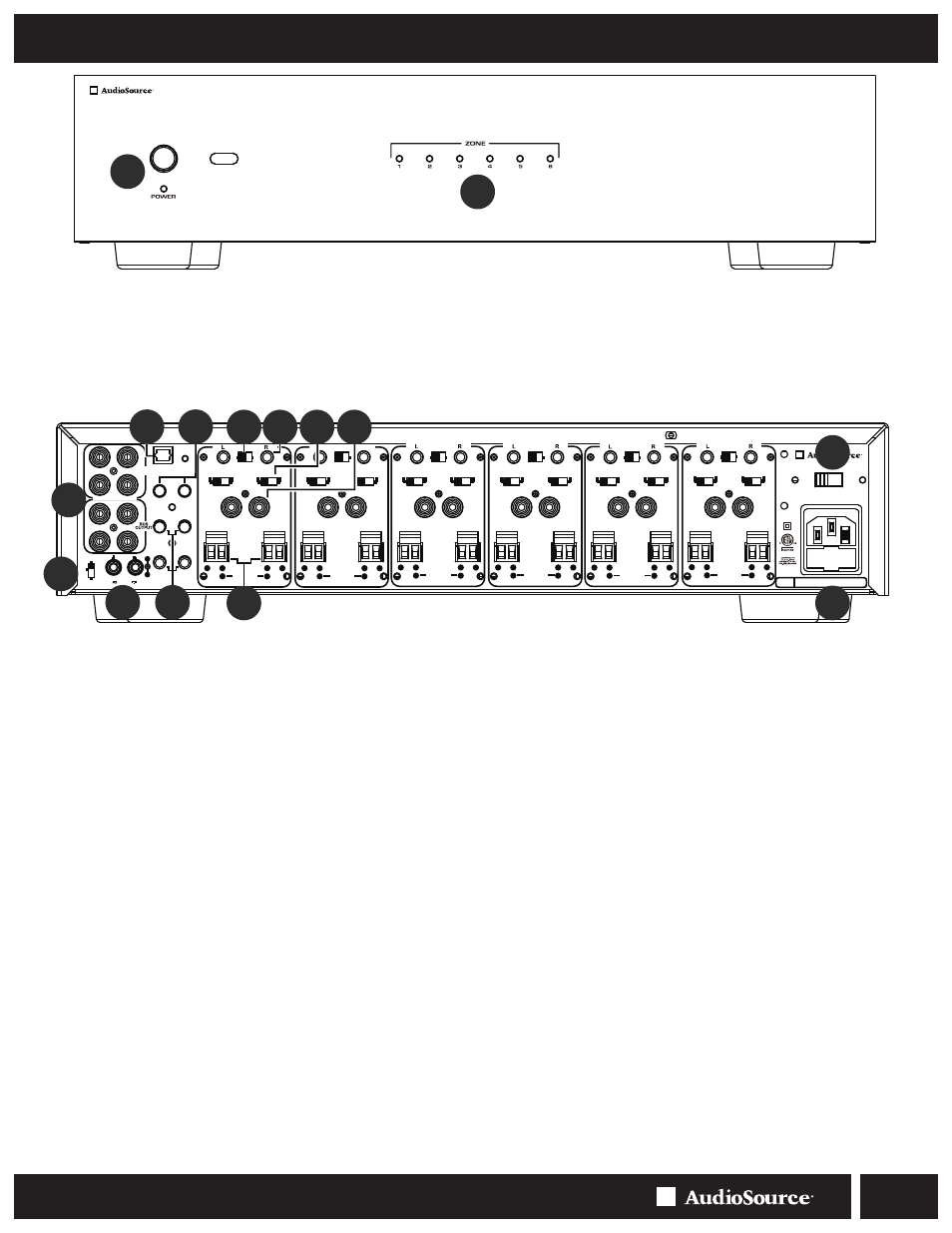
FRONT PANEL CONTROLS
4.
5.
6.
8.
REAR PANEL CONTROLS
Figure 1. Front Panel
3.
9.
10.
11.
Figure 2. Rear Panel
Master Power Switch / Indicator LED
Front panel pushbutton power switch tur
ns the amplifier on and off
. When the
s
witch is on and the indicator LED is red, the amplifier is in stand
by mode. When
the LED is blue
, the amplifier is fully acti
ve. The master power switch will tur
n off
the amplifier no matter which p
ower mode has been selected with the rear panel
Power Mode switch.
Zone Status Indicators
Each pair o
f
channels or zones has a bi-color LED to indicate its operational
status. These indicators provide quick and easy troubleshooting o
f
the system. I
f
the
circuitry determines that a channel must be shut down due to excessive heat or low
impedance (a short), only the channels that are a
ff
ected will be turned o
ff
causing
the zone LED to turn red. The remaining zones will continue to operate and maintain
a blue LED status. Once the condition has been corrected
f
or the zone in question,
the status LED will return to blue.
Note:
When the power LED is red and the zone status LEDS are not lit (o
ff
) indicates
the unit is in stand by mode.
Bus Line Inputs / Outputs
The AD5012 has two common or Bus inputs that receiv
es audio signals from
standard line-level audio sources and sends them to any or all channels. The Bus
line outputs are direct
f
eed-through to allow the Bus inputs to be
f
ed to other
amplifier
s. Be sure to use high quality RCA cables that
f
eature low impedance,
shielding and high quality connectors.
Power Mode Switch
This switch selects the turn-on stimuli that will put the ampl
ifier in ready mode.
“Trigger” setting relies on 3-30Vdc voltage
going
into
the
trigger
input
to
activate the
amplifie
r. “Auto” setting senses a signal on the RCA line-level inputs
and automatically puts the amp in ready mode. “On” setting puts the amp
constantly in ready mode so that it can be controlled by the master power switch
on the
front
panel.
In “Auto” mode, the amplifier will take approximately 10
minutes to return from ready to standby mode.
Trigger Input / Output
The trigger input is a handy
f
eature when connecting
the amplifier to an
automated audio system. The 3.5mm mini plug jack will accept a 3-30Vdc, 20mA
output
from
another device, or
from
a separate power supply. When the trigger
input is energized, the amp turns
f
rom standby to ON mode. When using the
AD5012 with a receiver without a trigger output, the voltage can come
from
a 12V
wall wart (3.5mm tip-positive connector) plugged into the receiver’s switched outlet
and the trigger input. The A5012 can also provide an output trigger voltage (12Vdc,
1.0A)
to
turn
on and
off
other
devices
in the audio
system .
When
the amplifier
turns off (standby mode), the voltage will drop to zero.
Optical Input
This input uses a fiber optic cable to transmit a digital signal to the amplifie
r.Use
of this input is recommended for advanced users who are familia
r with the
audio source’s OSD system. When using the Optical input, make sure the
source unit the cable is plugged into is in
Digital PCM (2 Channel) Mode
.
Please refer to your source
’s operating manual when using this input.
NOTE:
Optical Input will not decode 5.1 or 7.1 signals; only Digital PCM signals.
Bus Level Controls
Each Bus has its own independent level adjustment. This allows the output level
of each Bus to be adjusted to make up for different source levels, or to group 2
different source’s volume levels
. These controls are rotary encoders, with 1dB
“click” increments. The remote control can also increase or decrease these levels
independently.
7.
12.
AD5012
DIGITAL
MULTI-ZONE POWER AMPLIFIER
1
2
3
4
5
6
7
8
Bus 1 and Bus 2 Bass and Treble Controls
These controls can adjust bass and treble frequencies +/- 12dB
at 100Hz
and 10kHz on Bus 1 and Bus 2 independently.
Bridging Switch
By simply flipping a single switch, two channels can be combine
d to increase the
total power output. This is helpful when
extra power is needed in certain areas.
Note:
The minimum impedance
f
or bridged channels is 8 ohms. Also, please
observe the proper speaker wiring when bridging channels. Input selection and
volume settings
f
or bridged channels will be controlled by the le
f
t channel. “BR” is
bridged mode and “ST” is non-bridged or stereo mode.
Channel Gain Control
Each channel has its own independent level adjustment. This allows the output
lev
el of each spea
ker to be per
f
ectly matched to its area. It can also be used to
limit the maximum audio level in a certain area.
Input Selection Switch
Each channel is capab
le of deli
ver
ing the source from one of three input
s. The
three main inputs are Bus 1, Bus 2 and LINE IN. The selection
f
or these inputs
is done via the Input Selection switch associated with each channel. Select the
desired source input. Set the Input Selection switch to Bus 1 (will play source
connected to the Bus 1 input), Bus 2 (will play source connected to the Bus 2
input) or LINE IN (will play source connected to that channel’s LINE IN).
Individual Channel Input
All twelve channels have their own dedicated input that allo
ws the connection of
audio sources in addition to the common Bus inputs.
This is useful when using
the AD5012 with an audio matrix switcher.
Speaker Output Terminals
The AD5012 uses high quality Phoenix style connectors
f
or the speaker
connections. Use 14-18 gauge stranded two-conductor loudspeaker wire.
Ensure that at least 2 inches of each conductor are sepa
rated. Strip away ¼
inch of insulation from each conducto
r. Connect the appropriate conductor
to each screw terminal, observing correct polarity. Also, please observe proper
speaker wiring when bridging channels.
9 10 11 12
13
13.
14
15