Defining input / output sliders – Kramer 4x4 Audio and Dante Mixer User Manual
Page 23
Kramer Electronics Ltd.
FC-404NETxl
– Using Embedded Webpages
21
Defining Input / Output Sliders
This section describes the function of the input and output sliders.
Note
–
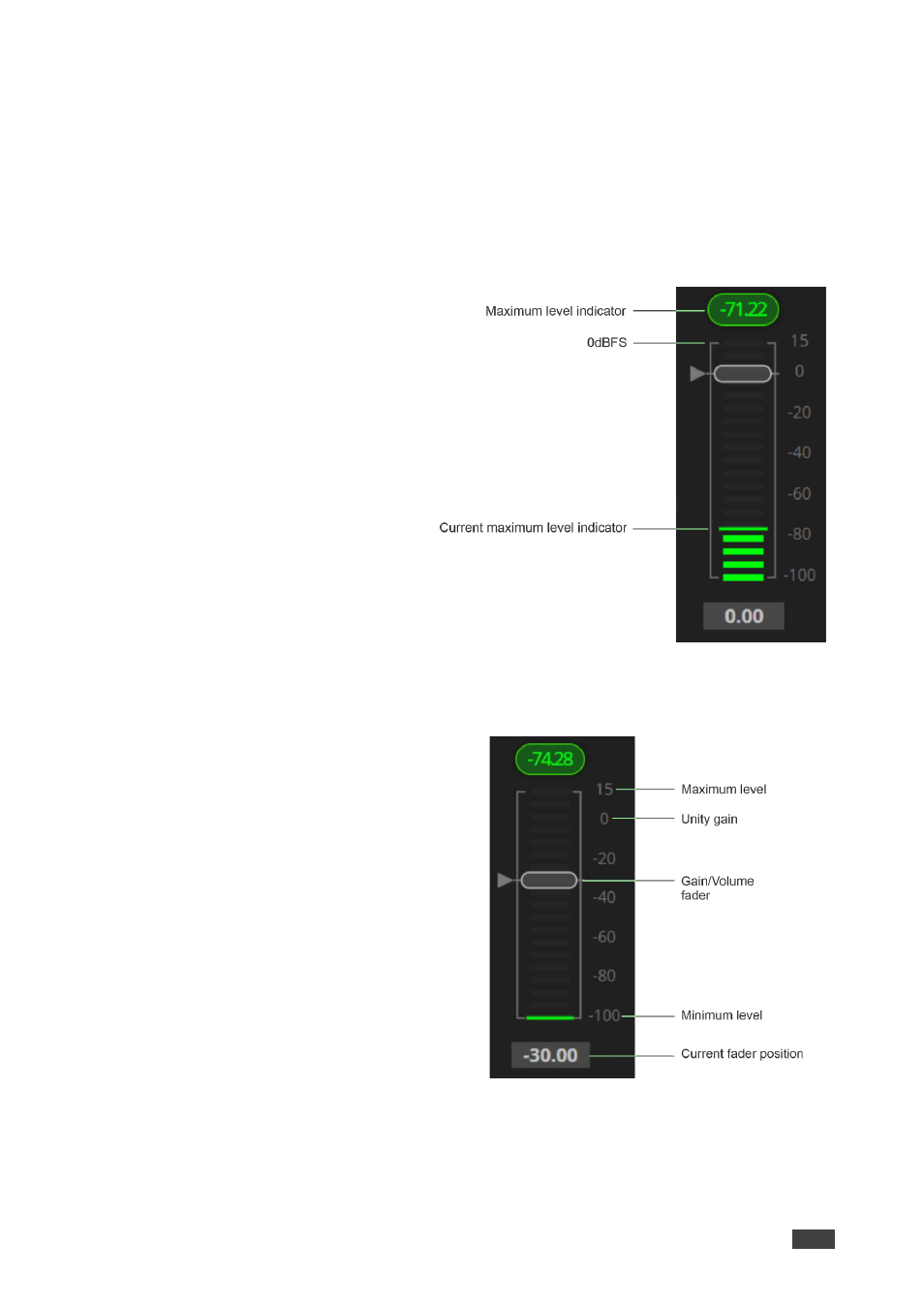
In figures 23 and 24 below, meters (left side) display on a scale of -100 dBFS to 0
dBFS maximum (above this is clipping or audio saturation). On the right side, the gain level
points to amplification for positive values and attenuation for negative values.
Level Measurement Indicators
:
The audio signal enters the digital system
at a certain level and is measured in
dBFS units (dB relative to full scale, the
maximum value).
•
Maximum level indicator
– Shows
the highest registered level (in RMS)
and can change only if a higher level
is detected.
Click the indicator to reset to the
current maximum value.
•
0dBFS
– Refers to the maximum
signal level that can enter the
system. Signal levels higher than the
system limit are clipped.
•
Current maximum level indicator
–
Displays the current maximum level
and holds it until a higher value is
detected.
Figure 23: Level Measurement Indicators
Gain/Attenuation Fader
•
Maximum level
– 15dB is the maximum
gain.
•
Unity gain
– When volume fader is set
to 0dB, the input level is not changed.
•
Gain/Volume fader
– Slide to increase
or decrease the audio level on the input
(gain) and the output (volume).
•
Minimum level
– -100dB is the
maximum attenuation.
•
Current fader position
– Shows the
current position of the fader. You can
also type the desired volume level into
this box and press
Enter
on your PC.
Figure 24: Channel Fader