Termination switch setting sfm-2xvf installation – CNB SFM-21VF User Manual
Page 8
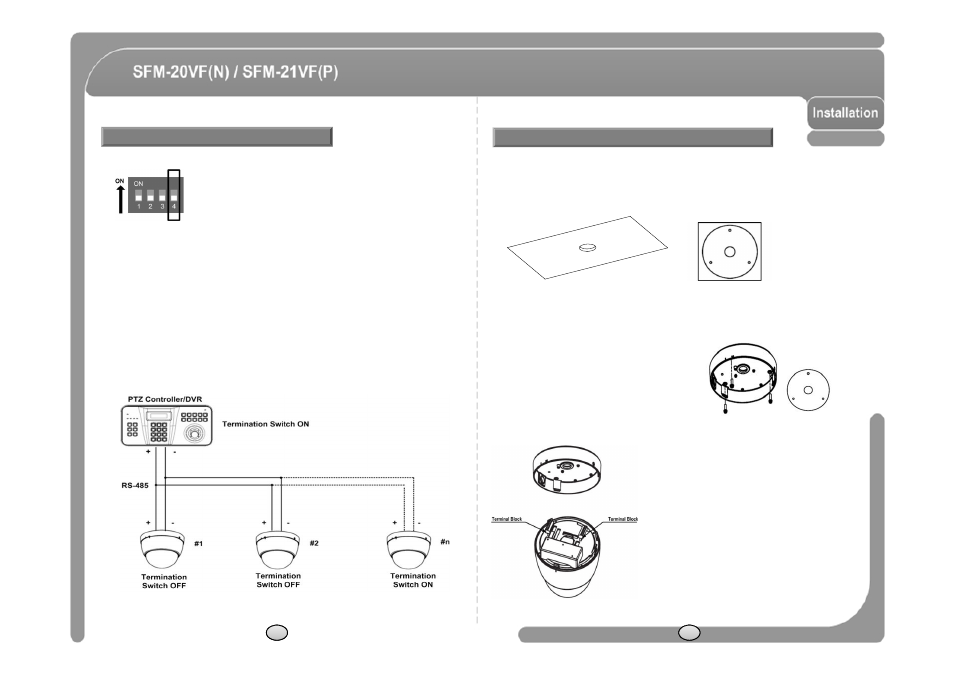
◎ Termination switch (Pin 4) is used in cases listed below.
◎ Long-distance communication between the controller and the camera
(1-to-1 connection)
- When the connecting distance between the two units is especially long,
communication errors may occur due to the impedance of transmission cable. In
this case, set the termination switch of both units to ON.
◎ Controlling multiple cameras (Multiple connection)
- The camera may not operate correctly if multiple cameras are connected and
Termination Switch Setting
SFM-2XVF Installation
◎ This model should start to be installed under the condition which
peeling the dome cover.
① To pass cables to upside of ceiling, please, make about 50~60mm hole on the
ceiling panel.
You can use “Guide Pattern” for the making holes.
- The camera may not operate correctly if multiple cameras are connected and
controlled. In this case, set the termination switch of the controller and the last
connected camera to ON and the switch of other cameras is OFF.
② Detach the marked part from the rubber gasket
and screw the surface mount bracket to the
ceiling with fixing screw.
③ Wire cables to terminal block and connect
the terminal blocks to main unit.
12
13