Remote control – Lenco DVD-433 K User Manual
Page 6
Advertising
5
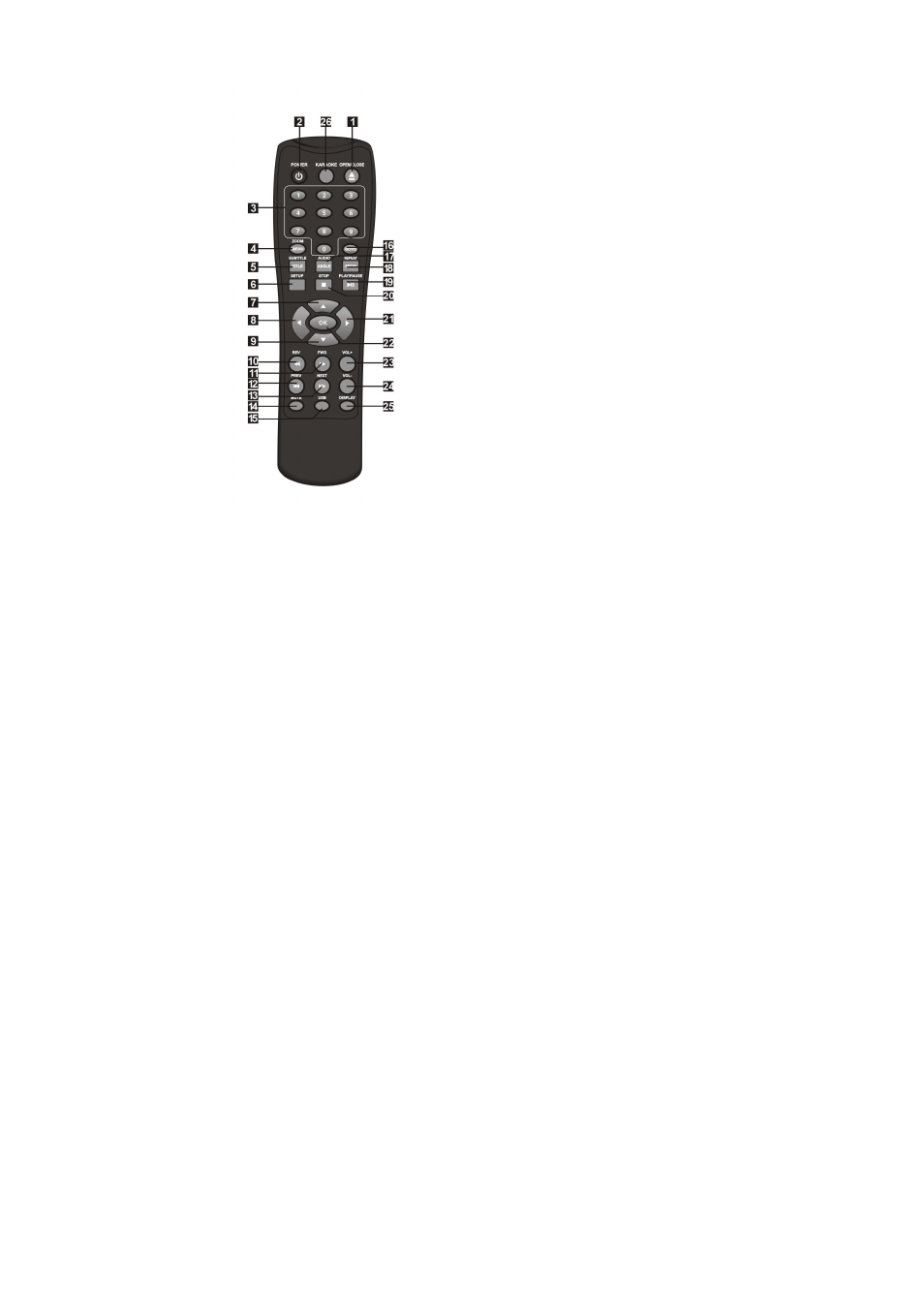
Remote Control
1.
OPEN/CLOSE
2.
POWER
3.
0-9 NUMBER KEY
4.
ZOOM/MENU
5.
SUBTITLE/TITLE
6.
SETUP
7.
UP
8.
LEFT
9.
DOWN
10. REVERSE
11. FORWARD
12. PREVIOUS
13. NEXT
14 MUTE
15 USB
16 GO TO
17 AUDIO/ANGLE
18 REPEAT/
PROGRAM
19 PLAY/PAUSE
20 STOP
21 RIGHT
22 OK
23 VOLUME INCREASE
24 VOLUME
DECREASE
25 DISPLAY
26 KARAOKE
•
Press 4, 5, 17, 18 for more than 1.5s, there will be functions
marked on these buttons(MENU, TITLE, ANGLE, PROG).
•
Press 4, 5, 17, 18 for less than 1s, there will be functions marked
above these buttons(ZOOM, SUBTITLE, AUDIO, REPEAT).
•
CONNECT DVD PLAYER TO TV SET WITH SCART SOCKET
Advertising