V17e, 17 inch hd monitor quickstart guide – ikan V17e User Manual
Page 2
V17e
17 inch HD Monitor QUICKSTART GUIDE
www.ikancorp.com
713-272-8822
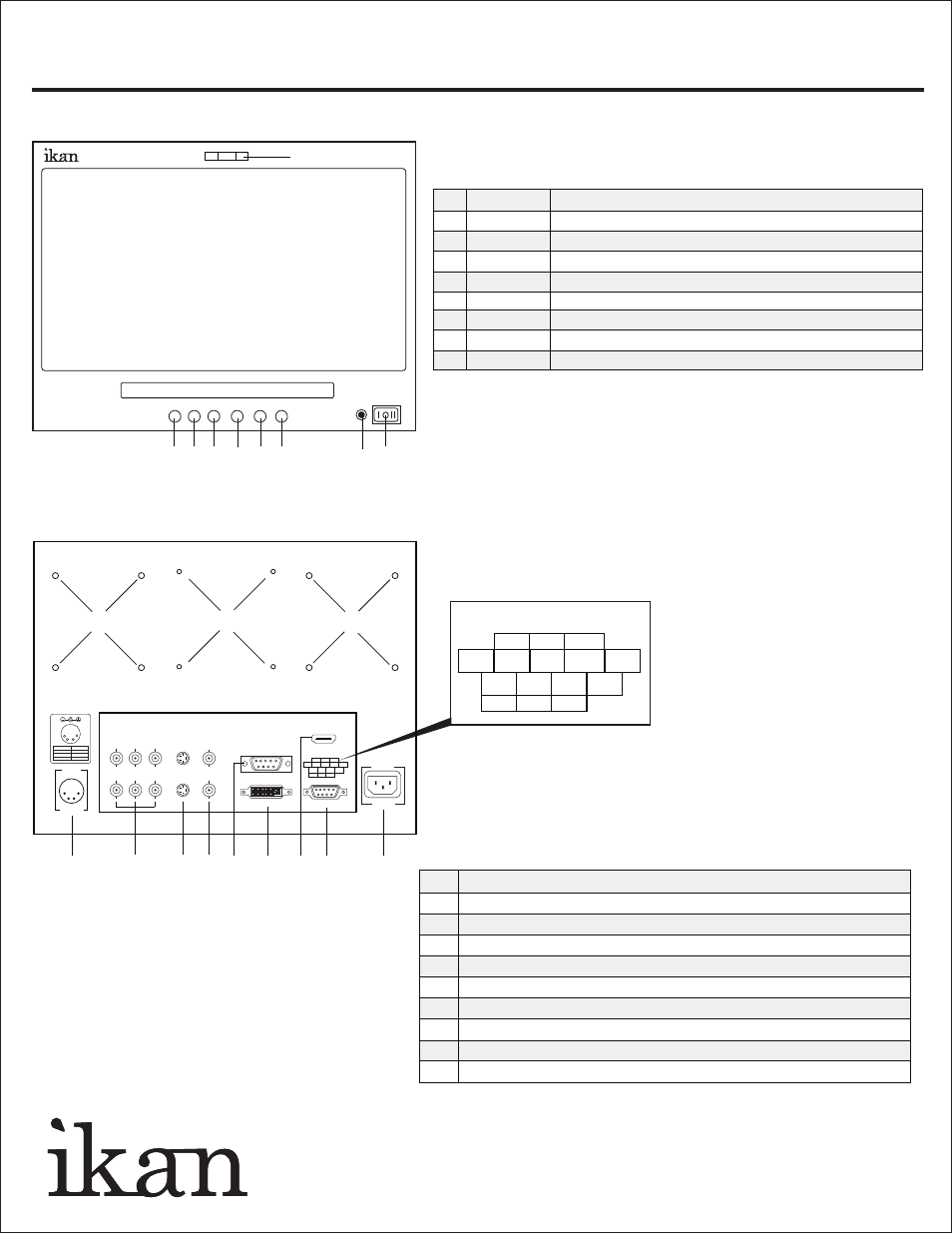
1. POWER
Power switch (I = AC On, O = Off, II = DC On)
2. LAMP
Power signal indicator
3. GUIDES
On-screen guide: 4:3 or 16:9
4. ASPECT
Aspect ratio: 4:3 or 16:9
5. INPUT
A/V (Composite), S-Video, SD/HD Component, HDMI
6. >
While in MENU mode, toggle as up adjust setting
7. MENU
Access to all monitor settings: Brightness, Hue, etc.
8. <
While in MENU mode, toggle as down adjust setting
9. LAMP
Tally Lights
1
2
3
4
5
6
7
8
9
[ Labeling Box ]
V17e
< MENU > INPUT ASPECT GUIDE
1. AC 110V-220V Power Connection
2. Tally
3. HDMI Input
4. DVI Connection
5. VGA Connection
6. A/V - I/O for standard definition composite signal
7. S-Video - I/O for standard definition S-Video signal
8. Component - I/O for standard definition, 720p, and 1080i HD signals
9. DC 12V-24V Power Connection
10. 100mm Holes for Vesa Mount / Pro Battery Mounting Plates
1
2
3
4
5
6
7
8
9
10
10
10
5
9
8
7
6
4
RED
GREEN
YELLOW
GND
GND
GND
3
2
1
Tally Light - Pin Configurations
Tally Light Operation
• Do not provide power to tally connections.
• Tally light system is unpowered and works by closing
the contact between any of the grounding pins and the
pin for the desired LED color.
VIDEO
S-VIDEO
Y
Pb
Pr
HDMI
12V-24V
DC IN
110~220v
5
9
8
7
6
4
RED
GREEN
YELLOW
GND
GND
GND
3
2
1
TALLY
AC IN
1
2
3
4
Pin number
Signal
1
2,3
4
GND
+12V
_
VGA
DVI