Skutch Electronics BA-5 User Manual
Introduction, Installation, Operation
•
Introduction
Thank you for purchasing the BA-5 Promotion-On-Hold Adapter. This
unit allows all phones on your lines to provide Promotion-On-Hold to your
customers. The BA-5 can be installed on any telephone you wish. Once
installed, all phones can access the unit. The unit is activated by pressing the
FLASH button or by performing a HOOK FLASH, on your telephone, and
then hanging up. The on-hold call can be picked up at any phone and the
BA-5 will automatically reset. The BA-5 is simple to use and is compatible
with almost every make and model of telephone.
•
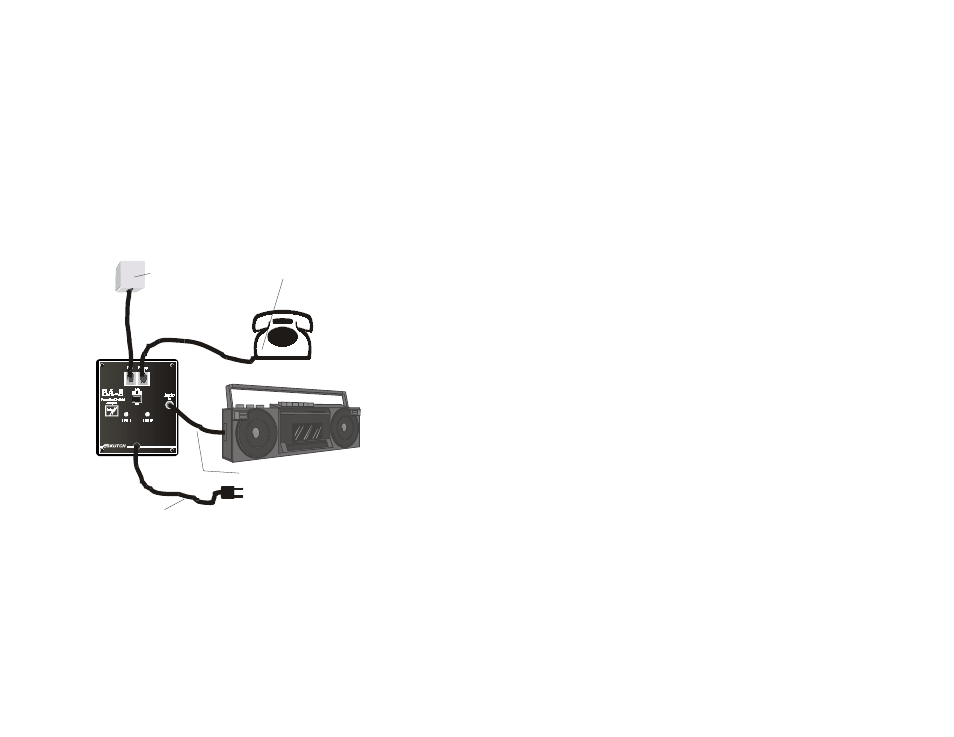
Installation
NOTE: If you connect the phone line to the BA-5 after you have
powered up the unit, both lines will initially go on hold. To clear the lines
simply pick up the phone and hang it up.
•
Operation
•
To place a call on hold
Do NOT press the hold button!!… Simply press the FLASH button on
your telephone, wait for music, then hang up.
If you do not have a FLASH button on your telephone, perform a
HOOK FLASH by momentarily depressing the HANG UP SWITCH
on your phone, for ½ second, wait for the conformation TONE, then
hang up.
The BA-5 will play music after the FLASH button has been
depressed. After the start of the music, you have 5 seconds to hang up.
After this time the BA-5 will reset.
•
To release the hold condition
Pick up any phone that is connected to that line, and the adapter
will automatically reset.
•
Trouble shooting
•
Hanging up on Callers?
Make sure that you wait until you hear the music in the telephone
before you hang up after pressing the FLASH button!
•
Lights
•
Steady On
Indicates that line is currently in use by a phone. They also stay on
when a line in not connected to the BA-5.
•
Fast Flash
Indicates that the unit has detected a FLASH and is ready for you to
hang up so that the BA-5 can hold the call.
1
2
3
4
Plu g su p p lie d M o d u la r
c o rd in to p h o n e ja c k,
th e n to LIN E in p u t o n
BA -5 .
C o n n e c t M o d u la r c o rd
fro m p h o n e to PH O N E
in p u t o n BA -5 .
C o n n e c t A u d io c a b le to
BA -5 , th e n to A u d io So u rc e .
C o n n e c t Po w e r c o rd fro m BA -5
to p o w e r o u tle t.
1
2
4
3