General description of hardware, 1 screen display description 3 – Swami 4000+ GPS User Manual
Page 4
Advertising
1.
General Description of Hardware
1.1
Screen Display Description
3
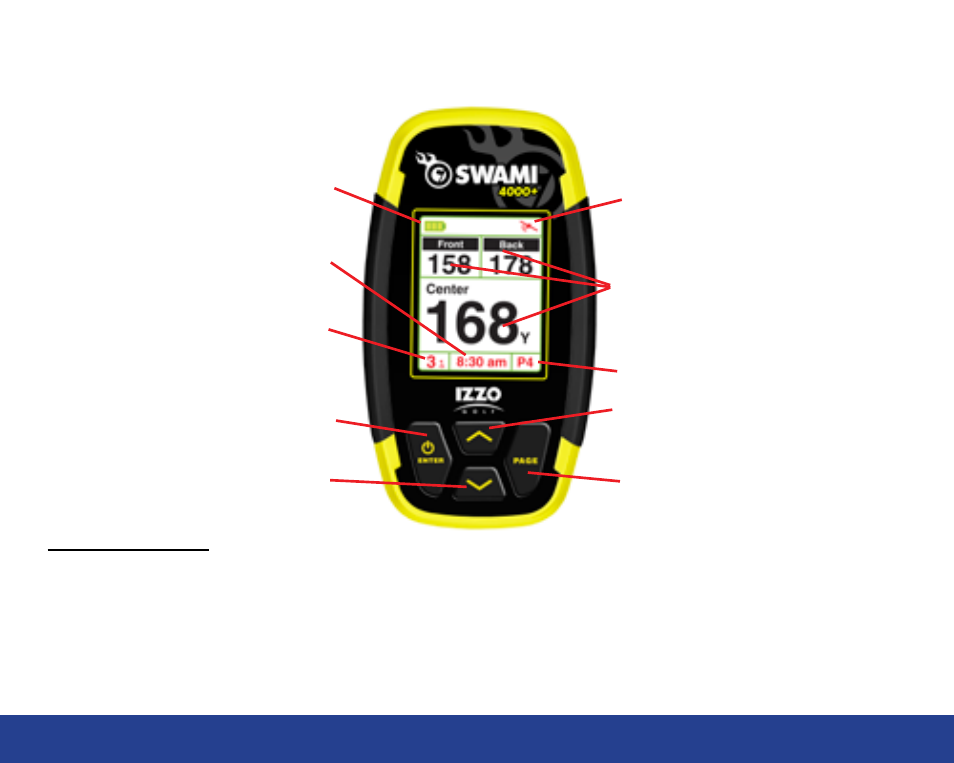
Key Description:
•
Enter / Power Key: Hold to power on, press to select options.
•
Page Key: Press to toggle between distances to Green or Hazards in Play Mode
•
Up Key: Scroll Up
•
Down Key: Scroll Down
Satellite Signal
Page Key
Up Key
Hole Number
Enter / Power Key
Down Key
Battery Level
Distance to the Front, Center
and Back of the Green
Time
General Description of Hardware
Hole Par
Advertising