Making settings on the settings panel screen, Connecting other equipment – Teac US-2X2 User Manual
Page 11
TASCAM US-2x2/US-4x4
11
Making settings on the Settings
Panel screen
8
Windows
From “All Apps” (All Programs), select “TASCAM US-2x2
& US-4x4 Settings Panel” under TASCAM.
8
Mac OS X
Select “TASCAM US-2x2 & US-4x4 Settings Panel” from
the Applications folder and launch it to open the
mixer panel on the computer display.
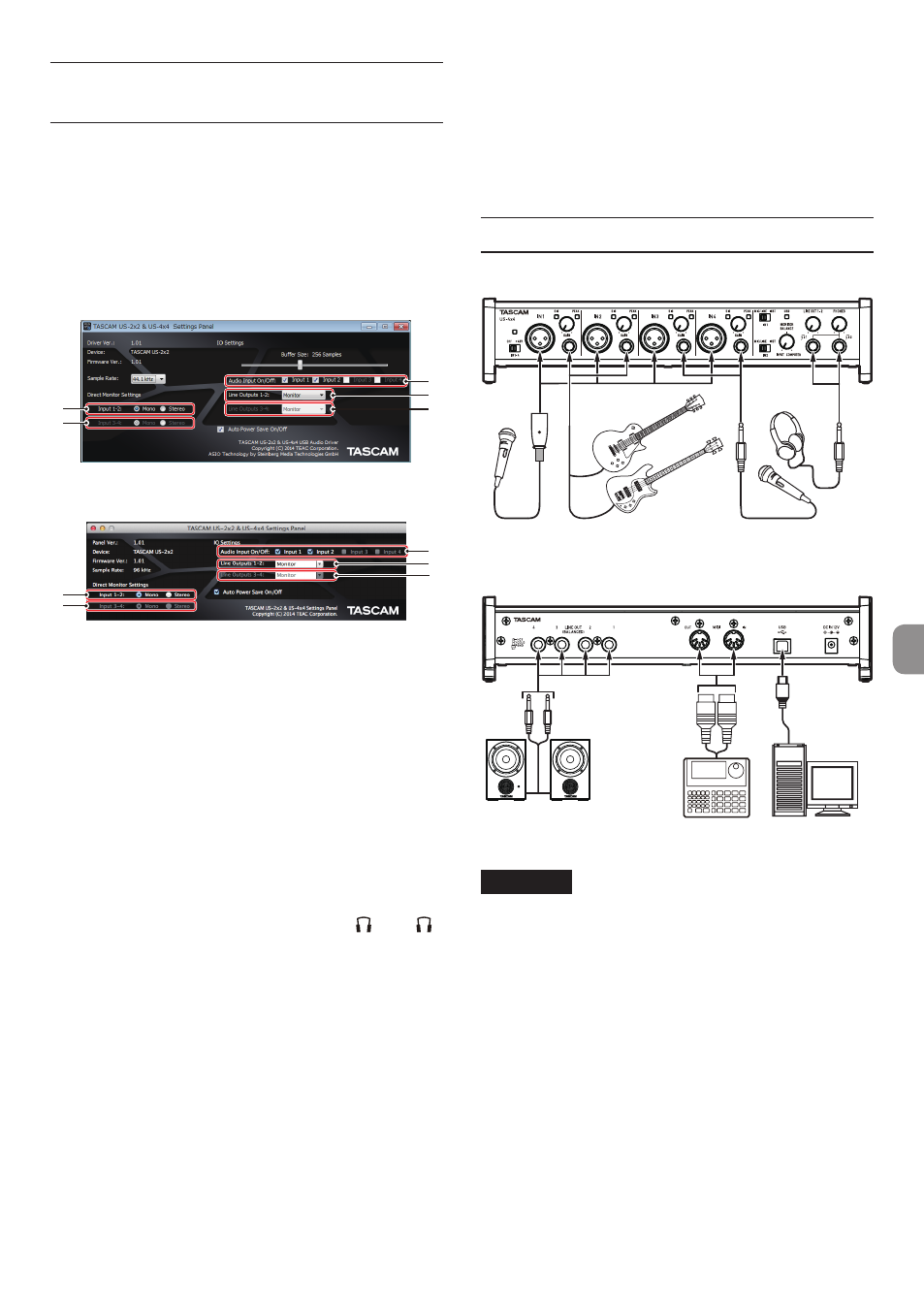
1
2
3
4
5
Windows Settings Panel screen
1
2
3
4
5
Mac Settings Panel screen
1
Direct Monitor Settings Input 1-2
Set the monitoring signal for the IN1/IN2 jacks to
Mono or Stereo.
2
Direct Monitor Settings Input 3-4 (US-4x4
only)
Set the monitoring signal for the IN3/IN4 jacks to
Mono or Stereo.
3
Audio Input On/Off
Turn input on/off for each channel separately.
4
Line Outputs 1-2
Select the signals to be output from the LINE
OUT (BALANCED) 1/2 and PHONES ( 1 and 2
jacks on US-4x4) jacks.
Options
Monitor: The signals input from all the input
connectors and the signals sent from the
computer by USB are mixed by the mixer and
output.
Computer 1-2: Only the signals sent from the
computer by USB are output.
5
Line Outputs 3-4 (US-4x4 only)
Select the signals to be output from the LINE
OUT (BALANCED) 3/4.
Options
Monitor: The signals input from all the input
connectors and the signals sent from the
computer by USB are mixed by the mixer and
output.
Computer 3-4: Only the signals sent from the
computer by USB are output.
For details about other settings, see “Settings Panel
screen” in “6 – Using the Settings Panel” of the
Reference Manual.
Connecting other equipment
Examples of connections to a US-4x4 (front)
Bass Guitar
Guitar
Headphones
Vocal mic
Vocal mic
Examples of connections to a US-4x4 (back)
Powered speakers with
balanced connections
Drum machine Computer
USB-B
plug
CAUTION
•
Before making connections, turn this unit and all
equipment to be connected off (standby).
•
The phantom power affects both US-2x2 input
channels (all four US-4x4 input channels) simul-
taneously. Do not turn phantom power on when
connecting a mic that does not require phantom
power.
•
Turning phantom power on when a dynamic mic
or other mic that does not require it is connected
could damage this unit and connected
equipment.
•
Do not connect or disconnect mics while
phantom power is on. Doing so could cause
a loud noise and might damage this unit and
connected equipment.
•
Set the LINE OUT and PHONES knobs to their
minimum values before turning phantom