Chapter 4 call flow editor – Welltech WG5260 V.6.2 User Manual
Page 27
Welltech Computer Co., Ltd.
WellGate 5260 User Guide – V6.2.0
- 27 -
Chapter 4 Call Flow Editor
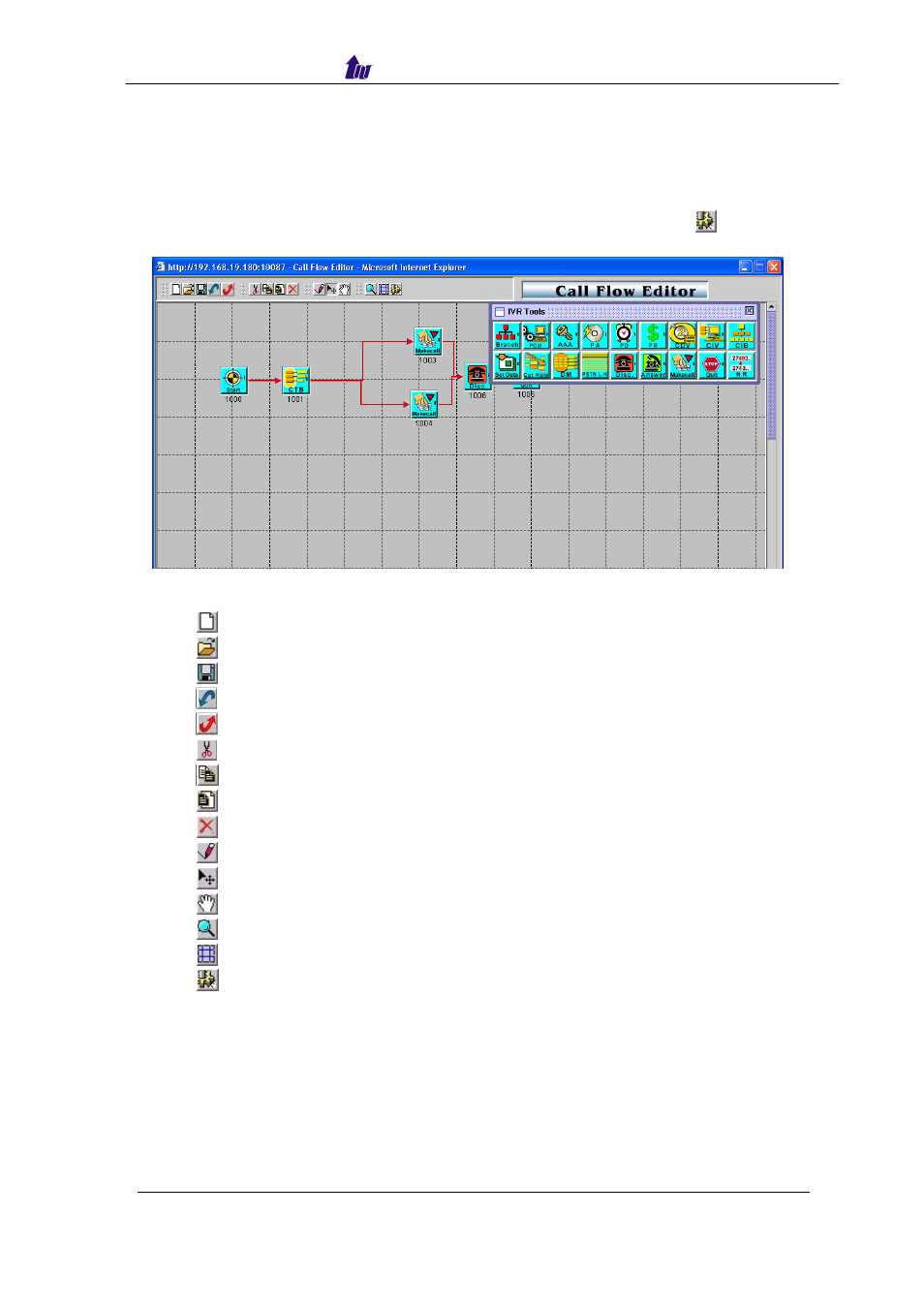
Call Flow Editor is used to control the call behavior including voice prompt,
AAA, DM…etc. It requires Java run time to run.
Step 1: Click Control>Call Flow Editor to create a Call Flow, click
button to
activate IVR Tool as figure 4-1.
Figure 4-1
Component Description:
•
New: Create a new call flow
•
Load Call Flow: Load call flow from WellGate 5260
•
Save: Save a call flow in WellGate 5260
•
Import: Import a call flow to WellGate 5260
•
Export: Export a call flow to WellGate 5260
•
Cut: Cut a component
•
Copy: Copy a component
•
Paste: Paste a component
•
Delete: Delete a component
•
Line: Connecting 2 components together
•
Select: Select the component at call flow workspace
•
Scroll: Scroll the call flow workspace
•
Zoom: Zoom in or zoom out the workspace
•
View Grid: View or not
•
Show Component Table: Show all component table
Step 2: Drag and prop the required component icon into the workspace as
figure 4-2.