Getting started, Zvbox 150 front panel, Zvbox 150 back panel – ZeeVee ZvBox 150 User Manual
Page 4
ZvBox www.zeevee.com
Page 4 of 8
Zv150_GGG_v1_0
Getting Started
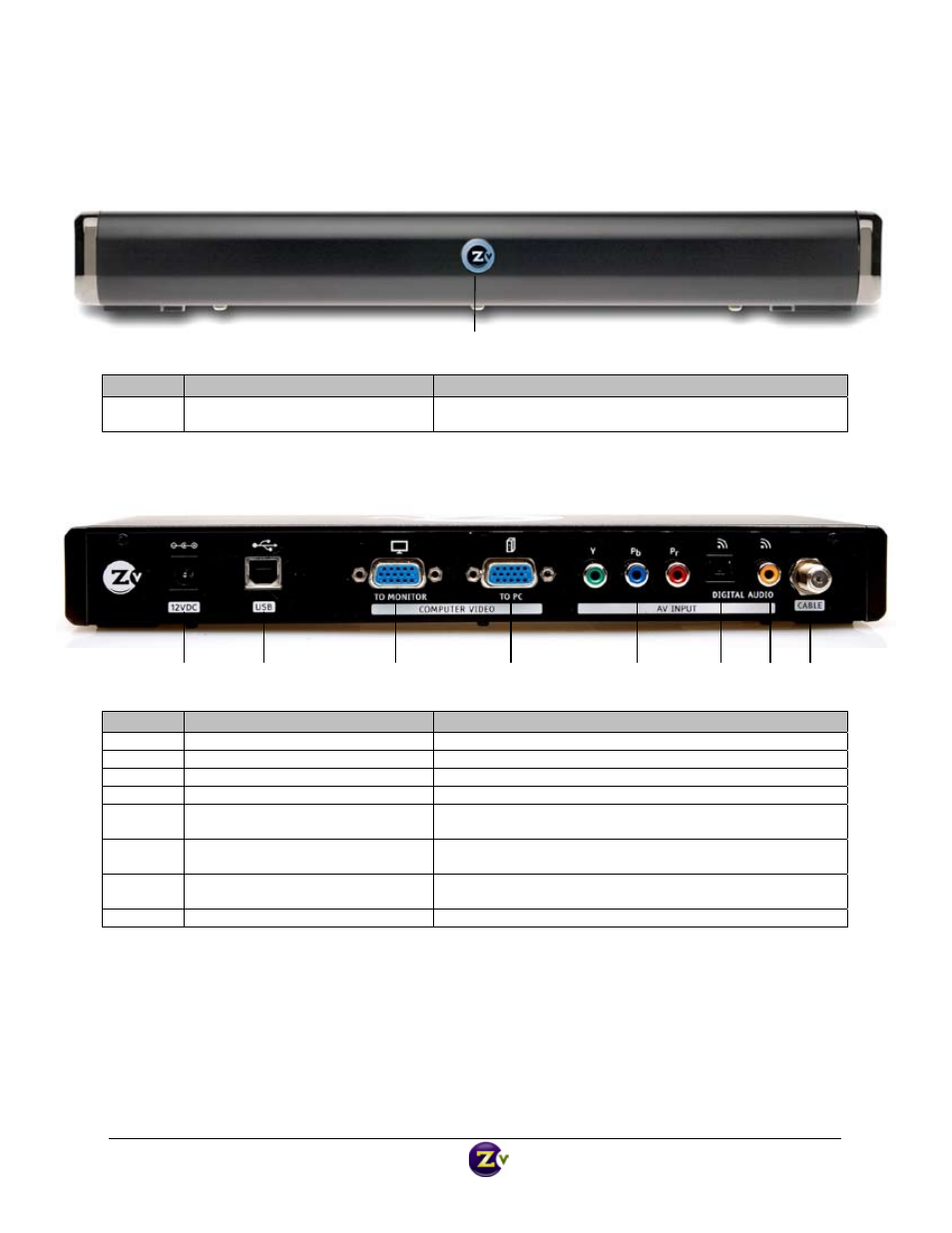
ZvBox 150 Front Panel
Item
Description
Function
LED /IR
Zv Status / IR in‐out
Signals the activity of ZvBox 150
Acts as a window for receiving and emitting IR codes
ZvBox 150 Back Panel
Item
Description
Function
1
DC Power
DC power input, 12 volt
2
USB Audio/Control
Operates as USB audio device connection or control interface
3
VGA Loop Through
Looped output from VGA (RGB) input
4
VGA Input; HD‐15 connector
Accepts standard VGA input
5
Component Video Input, RCA
connectors, 75 ohm
RCA connectors, accepts component video input
6
SPDIF digital audio input, Toslink
connector
Accepts digital audio input (PCM, or AC3)
7
SPDIF digital audio input, coaxial
connector
Accepts digital audio input (PCM, or AC3)
8
Coax Output
Outputs encoded video as a well‐formed QAM channel
3
4
5
6
7
2
8
1
LED / IR
Zv150_GGG_v1.1