Grass Valley Maestro Master Control v.2.4.0 User Manual
Page 127
123
MAESTRO User Manual
Section 2 — The Maestro Configuration Editor
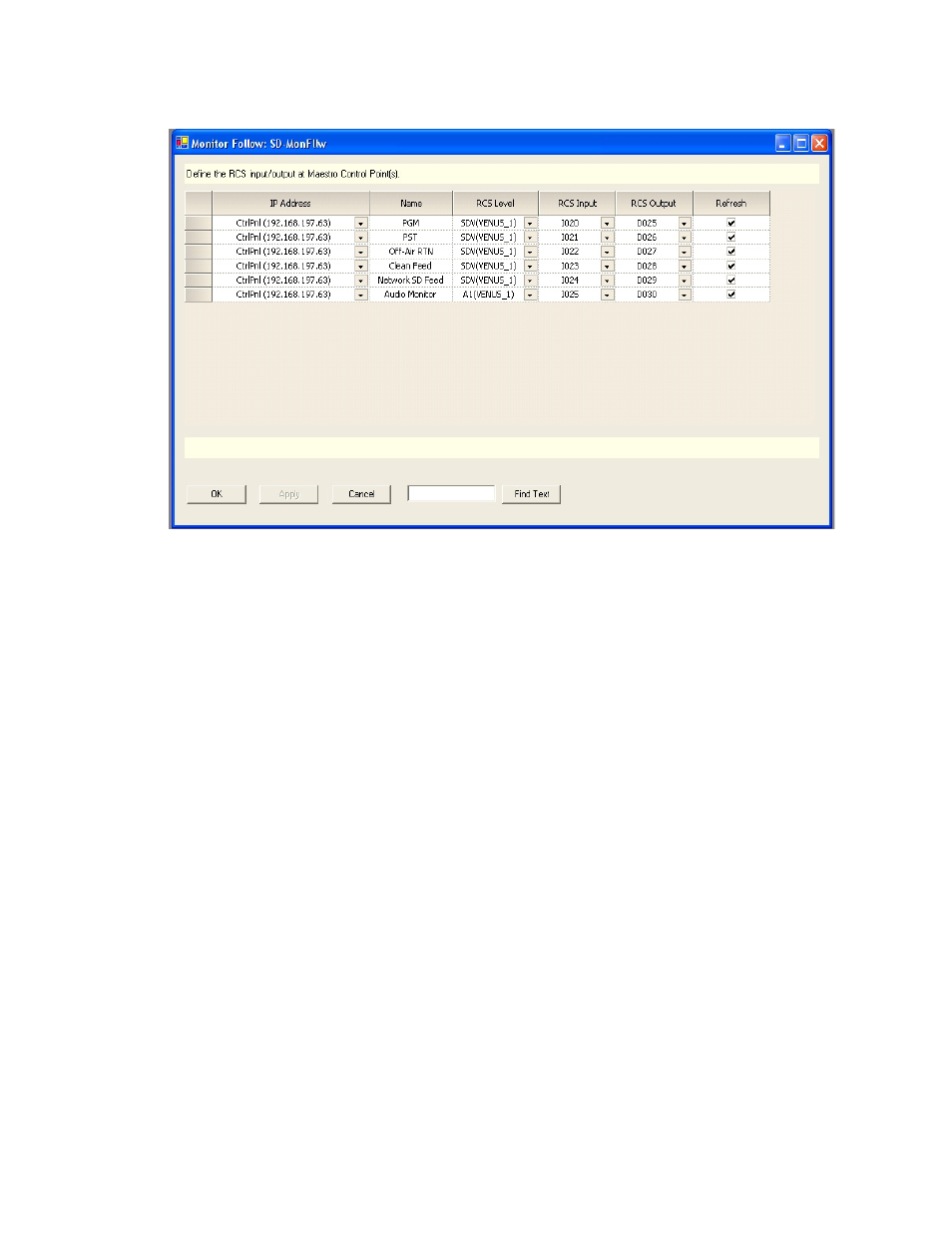
Figure 65. “SD” Channel Monitor Follow Configuration
In
sources defined as PGM, PST, Off-Air RTN, Clean Feed,
Network SD Feed and Audio Monitor are switched to the Master Control
room video and audio monitors when the channel “WXYZ-SD” is under
the control of the control panel at IP address 192.168.197.63. PGM, PST and
Clean Feed video as well as Audio Monitor are output from the SD Maestro
channel. Off-Air Return and SD Network Feeds are not Maestro outputs;
however they can be switched to the monitors whenever the “WXYZ-SD”
channel is the active channel on the control panel.
The first entry in SD-MonFllw table describes the following actions, phys-
ical connections and result (assuming this table is the assigned Monitor
Follow table for the channel “WXYZ-SD”):
•
When the control panel with IP address 192.168.197.63 takes control of
the channel “WXYZ-SD” the router will automatically perform the
switches defined in this row.
•
The PGM output on the Maestro rear panel for the channel “WXYZ-SD”
is wired to the router input labeled I020 on the SDV level.
•
Input I020 is switched to output D025 (also on the SDV level) which is
wired to the PGM video monitor in the master control room.
•
The video source currently active on the PGM bus of the Maestro
“WXYZ-SD” channel thus appears on the PGM monitor in the master
control room.
shows a sample configuration for an HD channel with discrete
5.1 surround audio.
- Maestro Master Control v.2.2.0 Maestro Master Control v.2.3.0 7600REF v5.0 Installation 7600REF v3.0.0.8 Installation 7600REF v3.0.0.8 7600REF v5.0 7620PX-5 Installation 2012 7620PX Installation 2012 Kayenne Installation v.3.0 Kayenne K-Frame Installation v.6.0 Kayenne K-Frame Installation v.7.0 Kayenne K-Frame Installation v.8.0 Karrera K-Frame S-Series Installation v.8.0 Karrera Video Production Center Installation v.6.0 Karrera Video Production Center Installation v.7.0 Karrera Video Production Center Installation v.4.1 Karrera Video Production Center Installation v.4.0 Kayenne Installation v.4.0 7620PX 2012 7620PX-5 2012 7620PX 2008 MVMC 3G VMCR 3G 8900F GeckoFlex Frames Concerto Compact Routing System Concerto Routing Matrix v.1.8.1 Concerto Routing Matrix v.1.7.6.1 Concerto Routing Matrix v.1.7.5 GPIO-4848 Jupiter Maestro Master Control v.2.0.0 Maestro Master Control Installation v.2.0.0 Maestro Master Control Installation v.2.3.0 Maestro Master Control Installation v.2.4.0 KayenneKayenne v.2.0 v.2.0 Maestro Master Control Installation v.1.5.1