Emergency panel – MCZ PowerBox COMPACT User Manual
Page 30
Chapter 4
INSTALLATION AND USE MANUAL
page
30
Operation
Technical service - Rights reserved MCZ S.p.A. - Reproduction prohibited
When replacing the batteries, ensure correct polarity
by observing the symbols on the internal
compartment of the remote control.
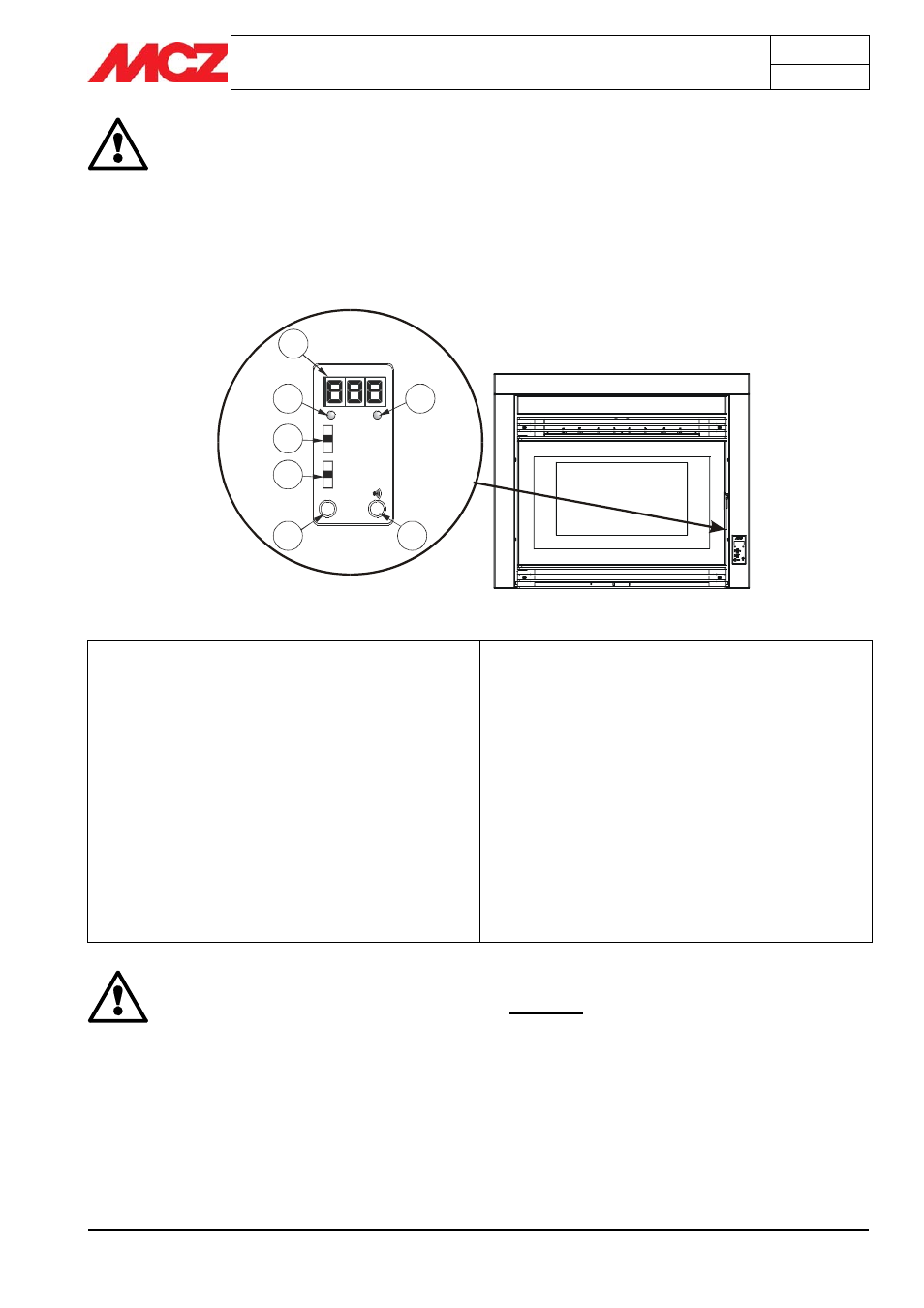
4.6. EMERGENCY PANEL
On the front part of the Powerbox, the emergency panel is installed. It
was designed to diagnose any operating anomalies, and also to control
the PowerSystem if the remote control is not working.
KEY
A. Three figure display which indicates a series of information
about the stove, as well as the identification code for any
operating anomaly.
B. GREEN
LED to indicate:
•
OFF = Stove off
•
FLASHING = Stove in lighting phase
•
ON STEADY = Stove on
C. RED
LED to indicate:
•
OFF = Stove on
•
FLASHING SLOWLY = Stove shutting down
•
FLASHING RAPIDLY = Stove in alarm status
(accompanied for 10 minutes by a beep)
•
ON STEADY = Stove off
D. Three-position selector for function
•
OFF = Stove shut off manually in absence of remote
control
•
REMOTE = Stove can be controlled only by remote
control
•
ON = Stove turned on manually in absence of remote
control
E. Three-position selector for selection of power
•
MIN = Selector to run the stove at minimum power with
no remote control and with selector 4 in ON position
•
MED = Selector to run the stove at medium power with
no remote control and with selector
in ON position
•
MAX = Selector to run the stove at maximum power with
no remote control and with selector
in ON position
F. Push button for diagnostics of stove operating status
G. button to connect the stove to a new remote control (by means
of a procedure explained below)
TO OPERATE THE STOVE WITH THE REMOTE
CONTROL, SELECTOR "D" MUST BE PLACED
ON “REMOTE”
- OFF
- REMOTE
- ON
- MIN
- MED
- MAX
A
B
C
D
E
F
G
TEST