How to install the rack pdu, Mounting options, Toolless mounting – APC Basic Rack PDU Rackmount Power Strip User Manual
Page 6: Mounting options toolless mounting
Basic Rack Power Distribution Unit
2
How to Install the Rack PDU
Mounting options
You can install the Rack Power Distribution Unit (Rack
PDU) in one of two ways: using toolless mounting pegs
(provided) or the vertical-mounting brackets
(provided).
• To install the Rack Power Distribution Unit (Rack
PDU) using the toolless mounting method, install
it in the rear of the NetShelter
®
VX Enclosure, in
the cable channel directly behind the rear vertical-
mounting rails.
• To install the Rack Power Distribution Unit (Rack
PDU) using the mounting brackets, install it on a
vertical-mounting rail in the rack or enclosure.
Toolless mounting
Note:
In order to mount the Rack PDU using
the toolless mounting option, you must install
it in a NetShelter VX Enclosure.
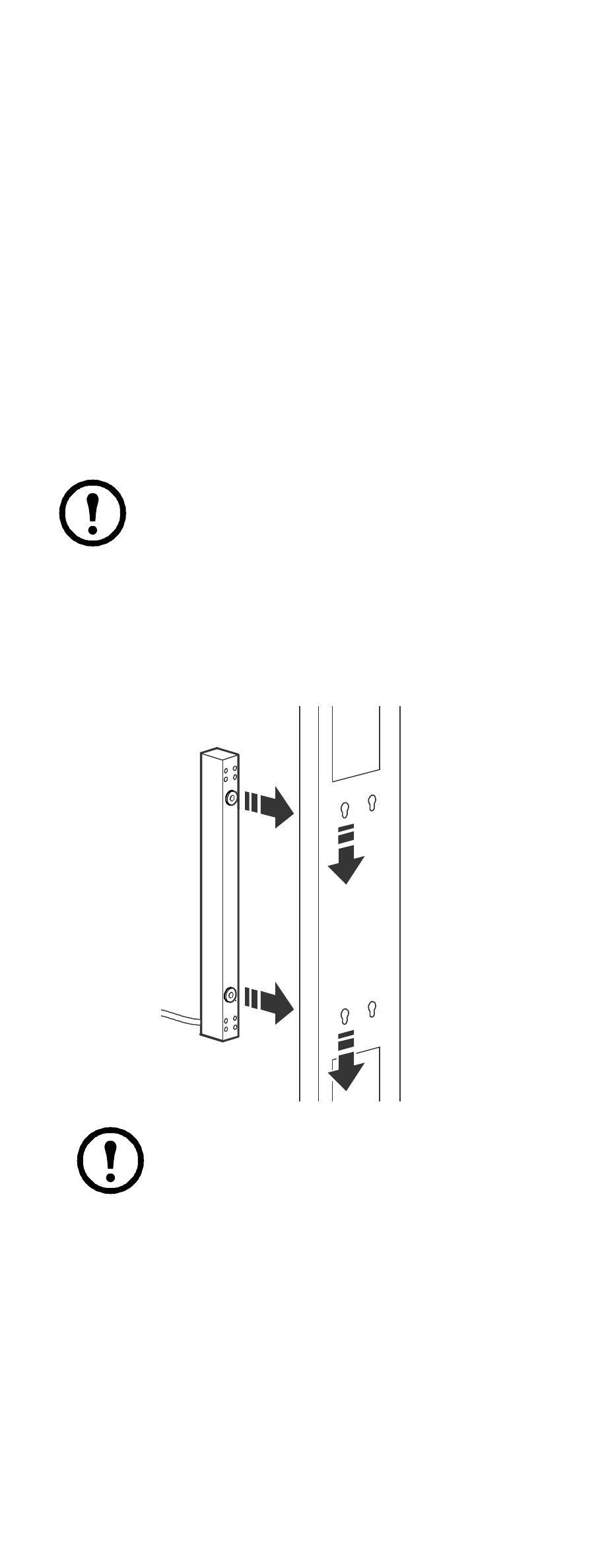
1. Slide both mounting pegs into the holes located
in the cable channel in the rear panel of the
enclosure.
2. Snap the Rack PDU into place by pushing it
downward until it locks into position.
Note:
You can mount two PDUs on one
side of the enclosure by using the toolless
mounting method.