Connecting external devices, Connecting & setting up – Samsung DVD-VR375A-XAA User Manual
Page 26
26_
connecting & setting up
connecting & setting up
CONNECTING EXTERNAL DEVICES
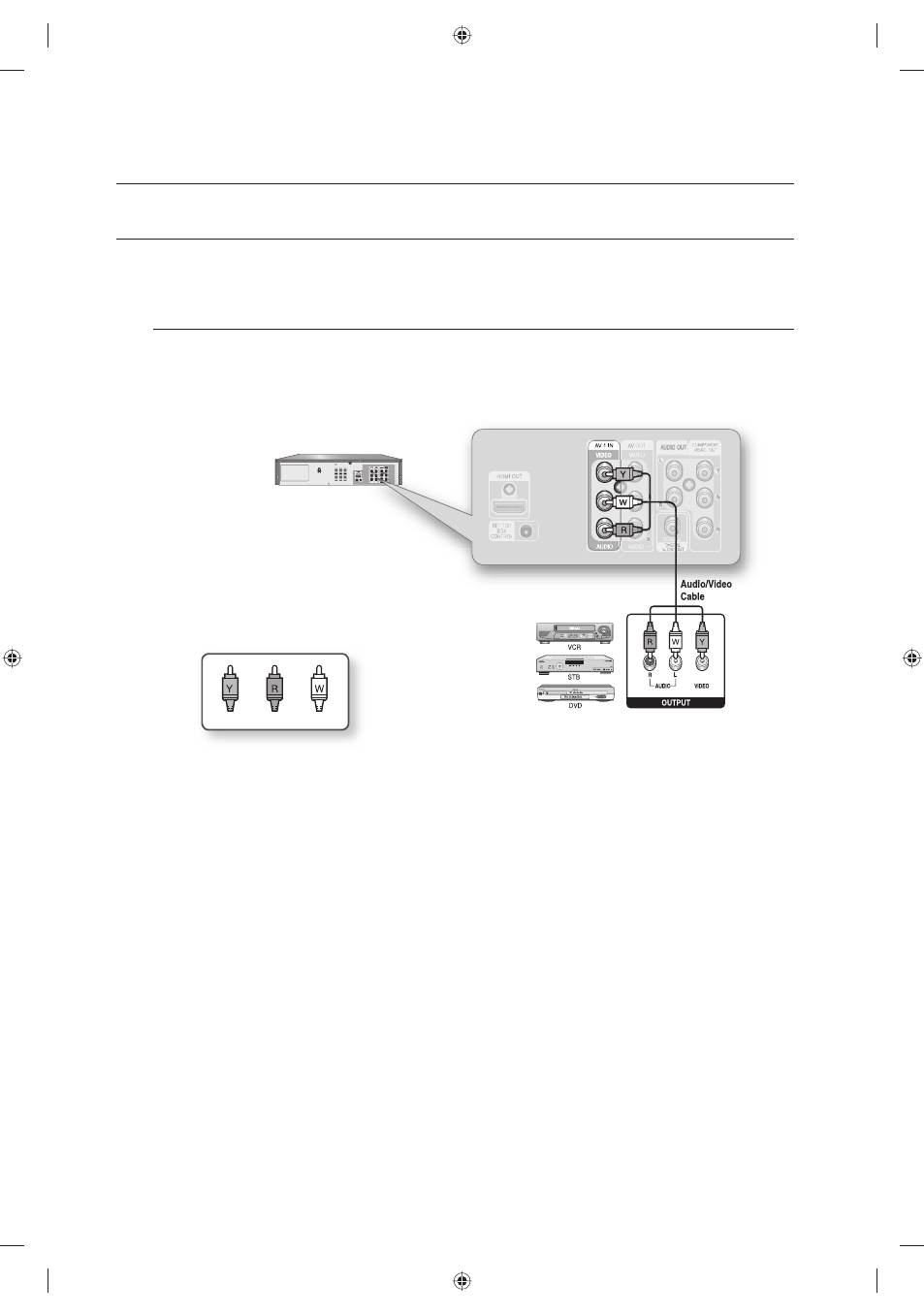
This allows you to connect your DVD Recorder & VCR to other external devices and view or record their outputs.
Connecting a VCR, Set top/Cable box, satellite receiver or DVD player
to the AV 1 IN Jack
Connecting a VCR or external device to AV 1 IN jacks of the DVD Recorder & VCR.
You can record from connected equipment (VCR, Set top/Cable box, satellite receiver or DVD).
You can also use the AV 2 IN jacks on the front panel of the DVD Recorder & VCR.
Press the INPUT SEL. button to select AV1.
Copy protected content cannot be recorded.
Depending on your input connection, you must choose AV 1 (Composite). (See page 44)
M
Red
Yellow
White
01613A-03-VR375-XAA-ENG.indb 26
01613A-03-VR375-XAA-ENG.indb 26
2008-06-11 오후 2:17:39
2008-06-11 오후 2:17:39