How to use the audioa^ideo input jacks (continued), How to, Udio – Philips COLOR TV 25 INCH TABLE User Manual
Page 21: Ideo, Nput, Acks, Ontinued
Attention! The text in this document has been recognized automatically. To view the original document, you can use the "Original mode".
How TO
U
se
the
A
udio
A^
ideo
I
nput
J
acks
(C
ontinued
)
o
T^M
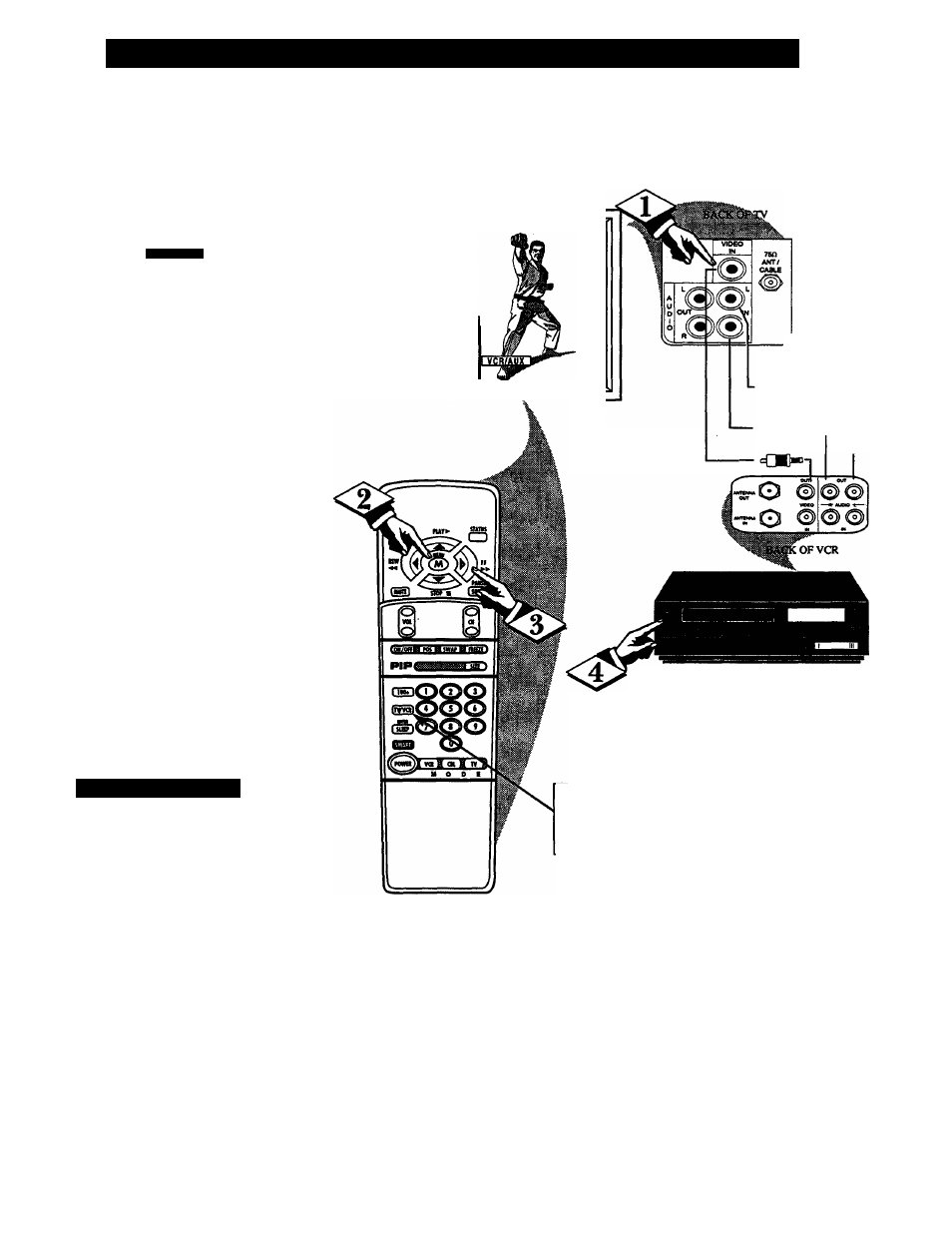
can view the playback of
X
VCR tapes (Video Disc
Players, camcorders, etc), by
using the AUDIO and VIDEO
INPUT jacks (on the rear of the
TV).
For example: to view the play
back of a VCR tape:
rn=Tl7)
<P
Connect the VIDEO and
AUDIO IN(put) jacks on the
TV to the AUDIO and VIDEO
OUT(put) jacks on the VCR.
<l>
Press the MENU (M) button
on the remote, then press the
MENU
A or T buttons to select
the word INPUT with the TV’s
on-screen arrow.
Note: You can press the CHAN
NEL
AT buttons to select
“VCR/AUX” (if it has been
added to the TV’s channel mem
ory.) See page 7 for details.
<^> Press the (+) button to select
the VCR/AUX(iliary) INPUTS
on the rear of the TV.
<j> 1)1111*0 VCR ON and
PLAY the VCR tape to be
viewed on the TV.
\
/ S
m a r t
H
e i
.
p
Remember, when you're
* through using the AJW
INPUT jacks, return the INPUT
display screen on the TV to
ANTENNA. If you leave the TV
in the VCR/AUX INPUT mode
and there is no signal source con
nected to the jacks, you will be
seeing only a blank screen on the
TV.
NOTE: If you have a mono (sin
gle audio OUTPUT) VCR, "Y"
Connectors are available (from
your dealer or Parts Information
Center 1 800 292-6066) to con
nect to the audio inputs on the TV.
PICTURE AND SOUND FROM PLAY
BACK OF VCR TAPE
STEREO
SAf>
SOUNSiMA&E
SPEAKER
dinput
CAELE
y
RCA PHONO PLUG
CABLES (NOT SUP-
PLIED)
--------
AUDIO IN
(RED/WHITE)
<=GB“—
VIDEO IN
(YELLOW)
VCR
(EQUIPPED WITH VIDEO AND
AUDIO OUTPUT JACKS)
NOTE: THE TVWCR" BUTTON
CAN ALSO BE USED TO PLACE
THE TV IN THE VCR/AUX MODE
(AS WELL AS SELECT CHANNELS
3 OR 4.)
21