Pip c, Onnections pi – Philips COLOR TV 25 INCH TABLE User Manual
Page 34
Attention! The text in this document has been recognized automatically. To view the original document, you can use the "Original mode".
Ql
M
ore
PIP C
onnections
pi
1
c
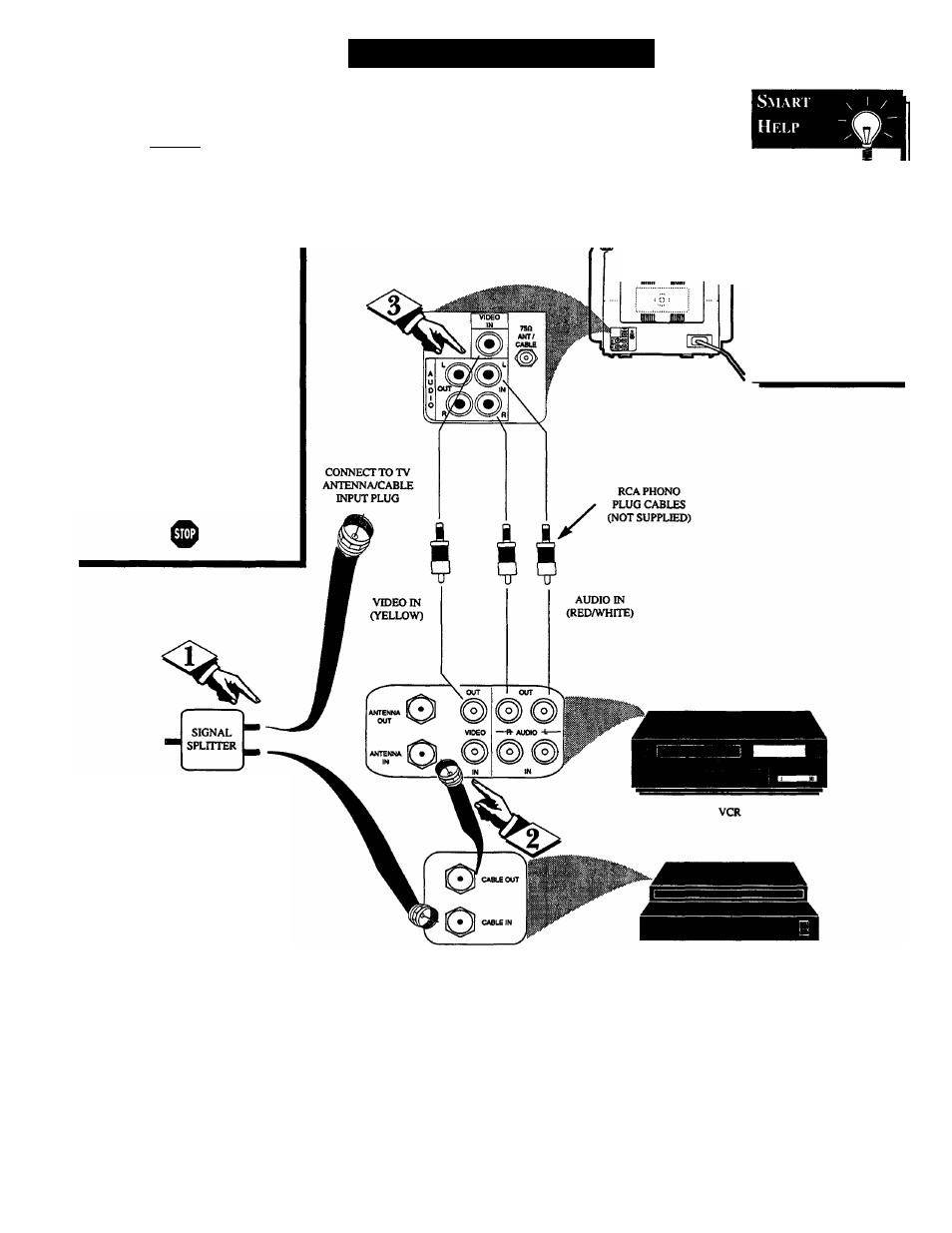
P hookup with Cable
Converter Box and VCR.
tBEQINJ
First use an optional signal
splitter and connect the original
cable TV signal to both the
CABLE IN on the Cable
Converter and the ANTENNA
plug on the rear of the TV.
<i> Connect the CABLE OUT
on the Cable Converter to the
ANT. IN on the VCR.
REAR OF TV
am
Connect the VIDEO OUT
jack on the VCR to the VIDEO
IN jack on the TV.
Also connect the AUDIO OUT
(R and L) jacks from the VCR to
the AUDIO IN jacks on the TV.
Remember, to
use the Cable TV
Converter Box to
select channels for
PIP, the VCR must
be set to the same
channel as the chan
nel selection switch
on the rear of the
Cable Converter
(either channel 3 or
4).
G>ntact the Parts
Information Center
1-800-292-6066
to order any optional
accessories.
CABLE TV CONVERTER
34