Specify fabric display from the settings screen, Saving scanned image to usb media – Baby Lock Destiny (BLDY) Instruction & Reference Guide-Part2 User Manual
Page 81
VARIOUS EMBROIDERING FUNCTIONS
274
g
Use
to align the pattern to the desired
embroidery position.
h
Press .
i
Press the “Start/Stop” button to start
embroidering.
*
See “Embroidering Patterns” on page 260.
→ When embroidery is finished, the fabric displayed in
the background disappears.
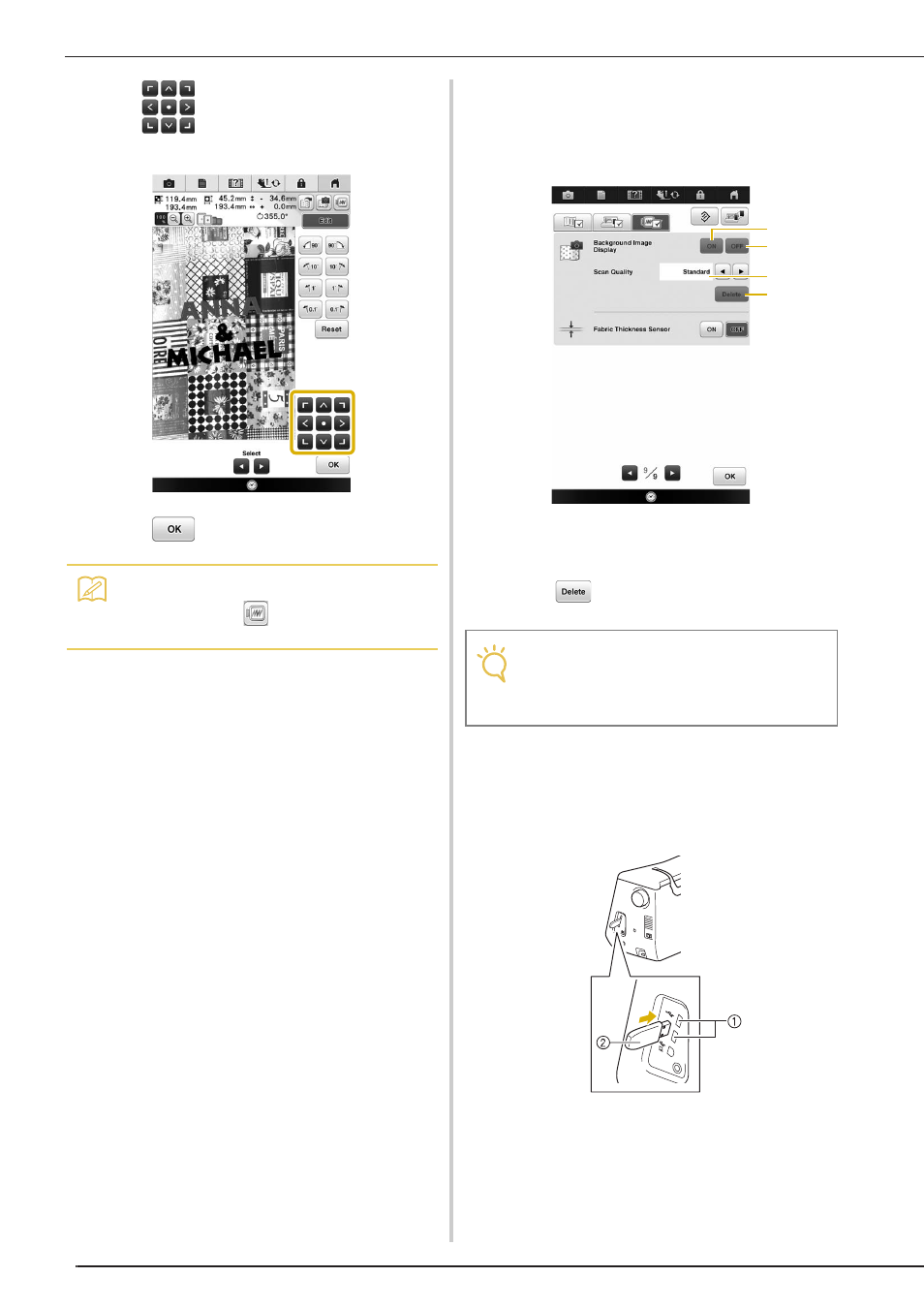
■ Specify Fabric Display from the
Settings Screen
Whether the fabric disappears or remains displayed
can be specified from the settings screen.
a Set to “ON” to leave the fabric displayed in the
background.
b When set to “OFF”, the background will disappear.
c Set to “Fine” to scan clearer than setting to “Standard”.
d Press
to remove the background image
completely.
■ Saving Scanned Image to USB Media
a
Insert the USB media into the USB port on
the machine.
a USB port
b USB media
Memo
• If necessary, press
to display a preview in
order to check the pattern position.
Note
• The fabric background will remain if the embroidery
is not finished. In this case, erase the background
image from the settings screen.
b
a
c
d