Skutch Electronics T-700 User Manual
Installation, Operation, Troubleshooting guide
•
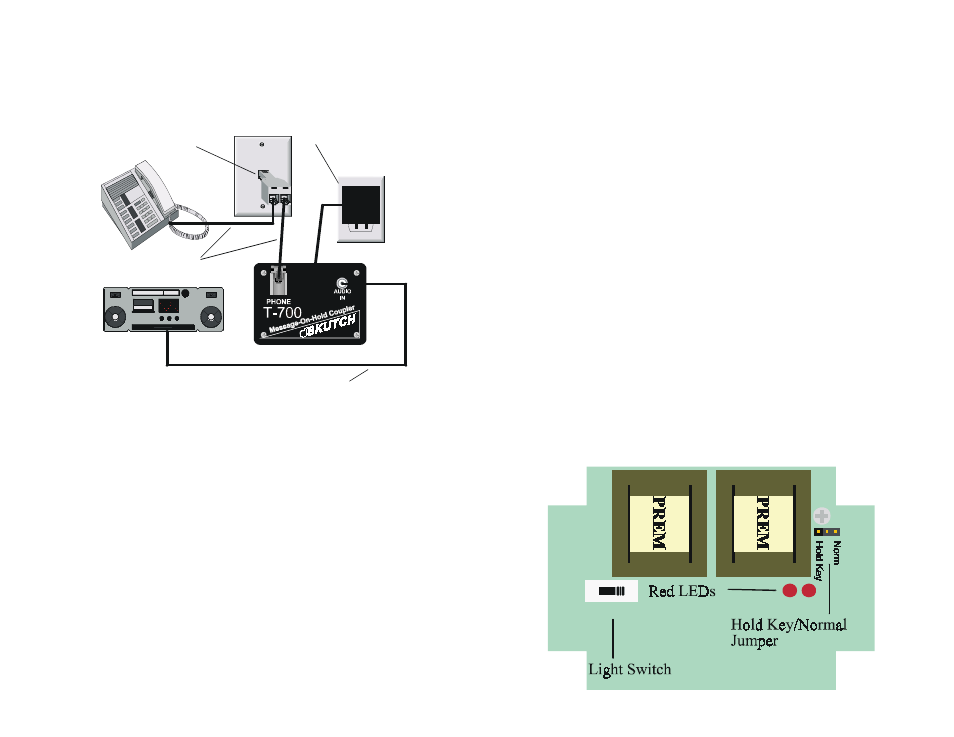
Installation
Follow the four steps below for connection to your single or two-line
telephones.
•
Operation
•
To place a call on hold
Do NOT press the hold button!!...simply press
*
and hang up the
phone. The caller will hear the audio source that you have connected to the
adapter. Note: if you do not hang up your phone within 4 seconds, the
adapter will automatically reset.
•
To release the hold condition
Pick up any phone that is connected to that line and the adapter will
automatically release the call.
•
Troubleshooting Guide
Open the lid by removing the 4 Phillips head screws; you will see the
circuit board to the right.
•
Lights on phone don't work when on hold
Change the "LIGHT SWITCH" to a different position. Try all three
positions if necessary. (see below)
•
No Audio
Open lid. Pick up phone and press the
*
key. The red LED for the
line you are on, in the T-700, (see below) should light for about 4 seconds.
Audio should be heard through the ear piece of the telephone. If no audio is
heard check the following:
! Make sure the audio source is playing.
! Make sure the volume on the audio source is turned up.
! Make sure that the audio cable is connected from the headphone
output of the audio source, to the audio jack on the T-700. Make
sure the type of jacks on the cable are the correct type. (male
phono or RCA for the T-700).
•
Music does not shut off when phone picked up
Open lid. Change the "LIGHT SWITCH" to a different position. Try all
three positions if necessary.
•
Music cuts off after placing call on hold
Hang the phone up after pressing the
*
key, do not press the hold
button on your telephone.
Phone Jack
AC Outlet
Plug "T Adapter"
into phone jack.
Connect Phone and
T-700 to "T Adapter"
1
Plug T-700 into
120V Wall Outlet.
Connect audio cable from
T-700 to Audio Source.
2
3
4
Audio Source
1 2 3