Sumix SMX-15M5x User Manual
Page 17
15
Last updated:
June 11, 2015
Sumix Video Camera: User Guide
I n s ta l l at io n an d U p d ate
•
Use another USB 3.0 cable — the problem might be due to the USB 3.0 cable mal-
function.
•
Connect other SMX-15Mxx camera (if any) to the same USB 3.0 port — the prob-
lem might be due to the camera malfunction.
•
Disconnect the camera and restart your computer.
If none of the above has helped and the device is not recognized yet, then try the fol-
lowing:
1
Connect the problematical camera to the computer.
2
Open the Device Manager window (right-click Computer desktop icon, select Proper-
ties, and then click Device Manager).
3
In Device Manager, select one of the following:
•
Imaging devices> SMX-15M5x Device with
Warning status, if it is available
there:
or
•
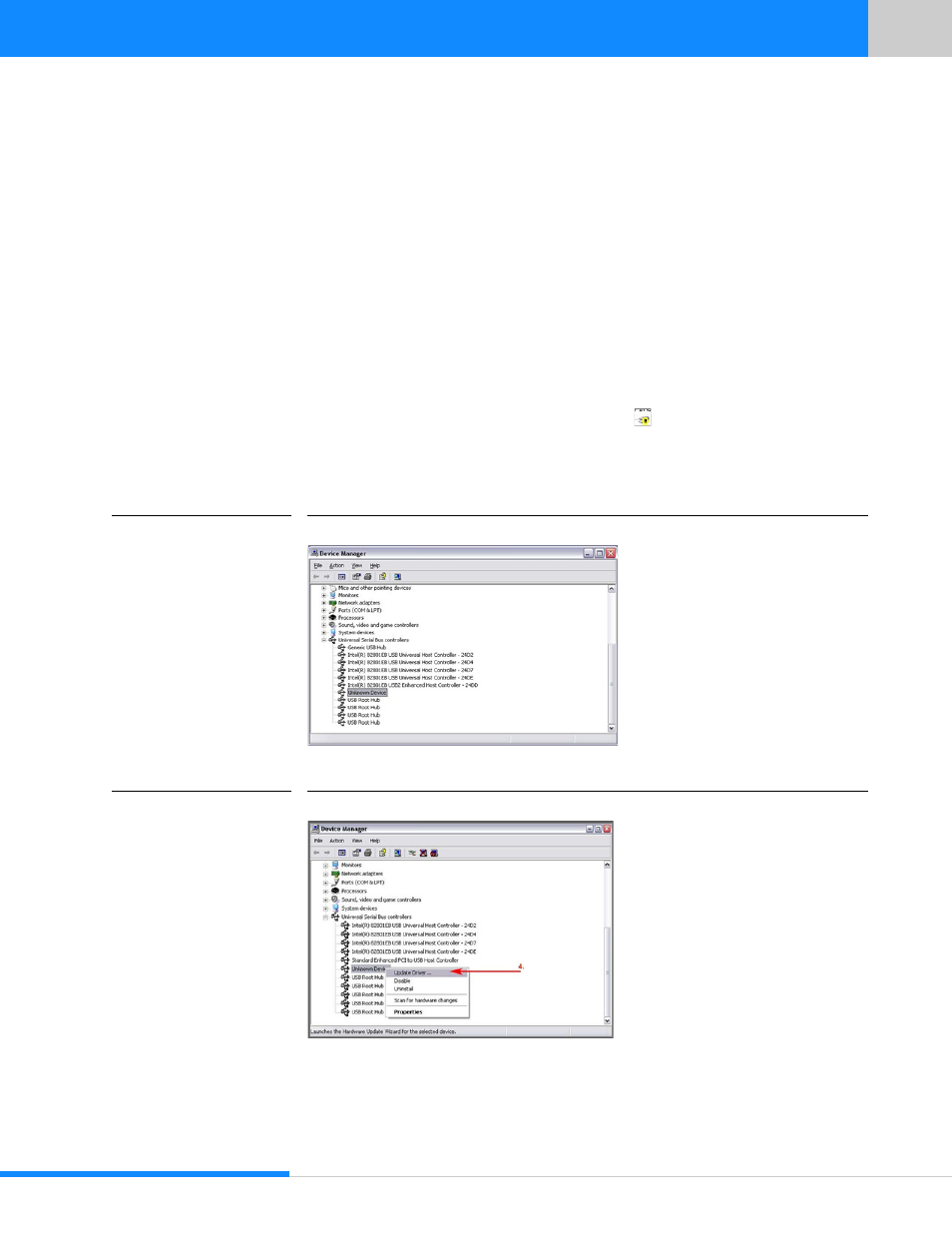
Universal Serial Bus controllers> Unknown device:
FIGURE 3.14
Device Manager: the SMX-15M5x Camera is Detected as Unknown Device
4
Right-click and select Update Driver…
FIGURE 3.15
Device Manager: Updating the SMX-15M5x Camera Driver
5
Run the Hardware Update Wizard the same way as the Found New Hardware Wiz-
ard by choosing the Install the software automatically (Recommended) option.