H3C Technologies H3C SecPath L1000-A Load Balancer User Manual
Page 41
33
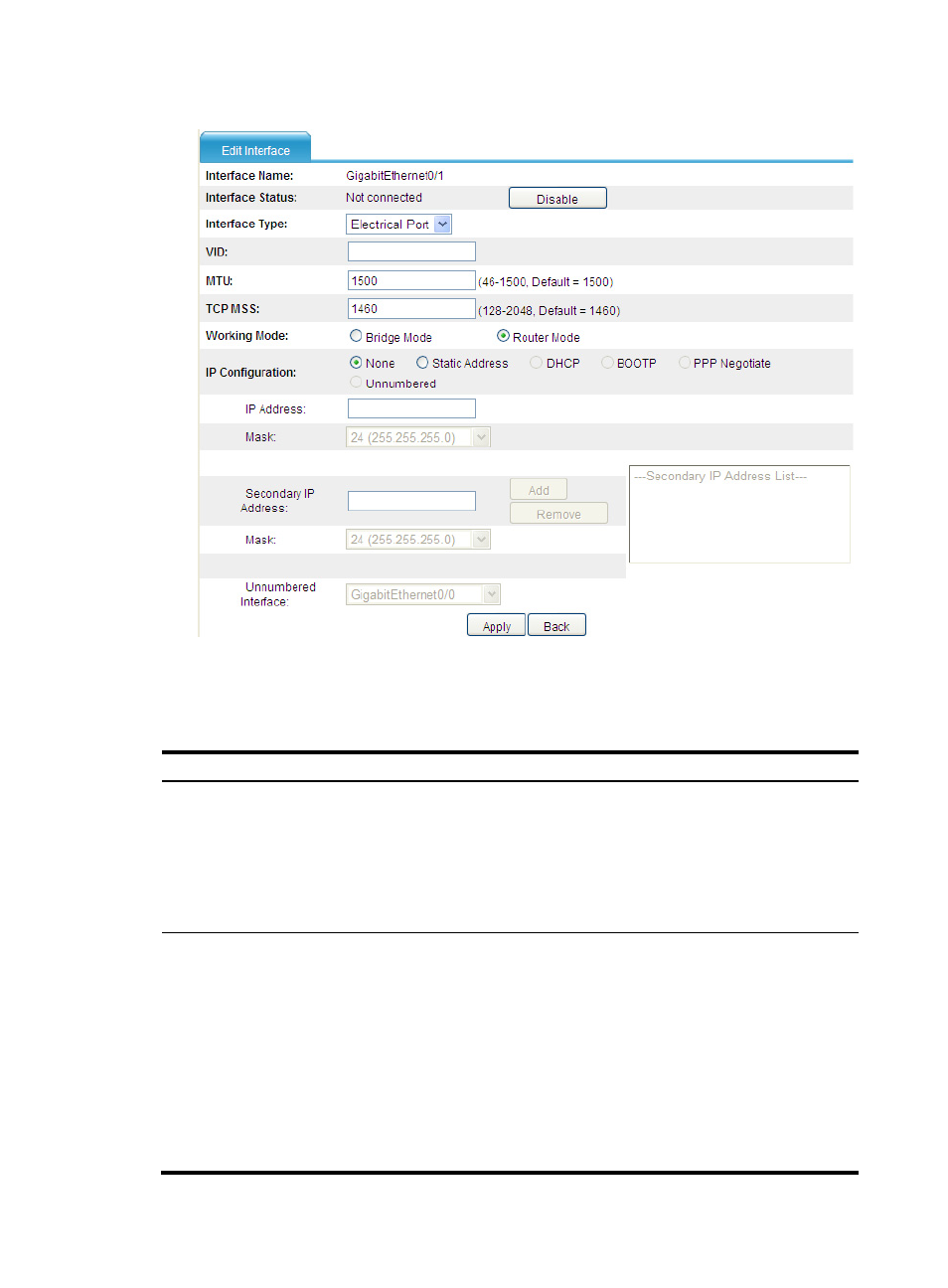
Figure 31 Modifying interface information
3.
Modify the interface as described in
4.
Click Apply.
Table 7 Configuration items
Item
Description
Interface Name
Set the name for the interface or its subinterface.
•
If you select a logical interface type from the list, such as LoopBack,
Vlan-interface, and Virtual-Template, set the interface number in the box
behind to create the logical interface.
•
If you select a specific Ethernet interface name from the list, such as
GigabitEthernet 0/1, set the subinterface number in the box behind to
create a subinterface of the Ethernet interface.
Interface Status
Display and set the interface status:
•
Connected—Indicates that the current interface is up and connected, click
the Disable button to shut down the interface.
•
Not connected—Indicates that the current interface is up, but not
connected, click the Disable button to shut down the interface.
•
Administratively Down—Indicates that the current interface is shut down
by a network administrator, click the Enable button to bring up the
interface.
After you click the Enable/Disable button, the page displaying interface
information appears automatically.
•
For an interface whose status cannot be changed, the Enable/Disable