Entering tool data (relative datums), X2 0, Datum setting – HEIDENHAIN ND 930 User Manual
Page 15
15
SPEC
FCT
ENT
Z
0
ENT
ENT
3
•
•
•
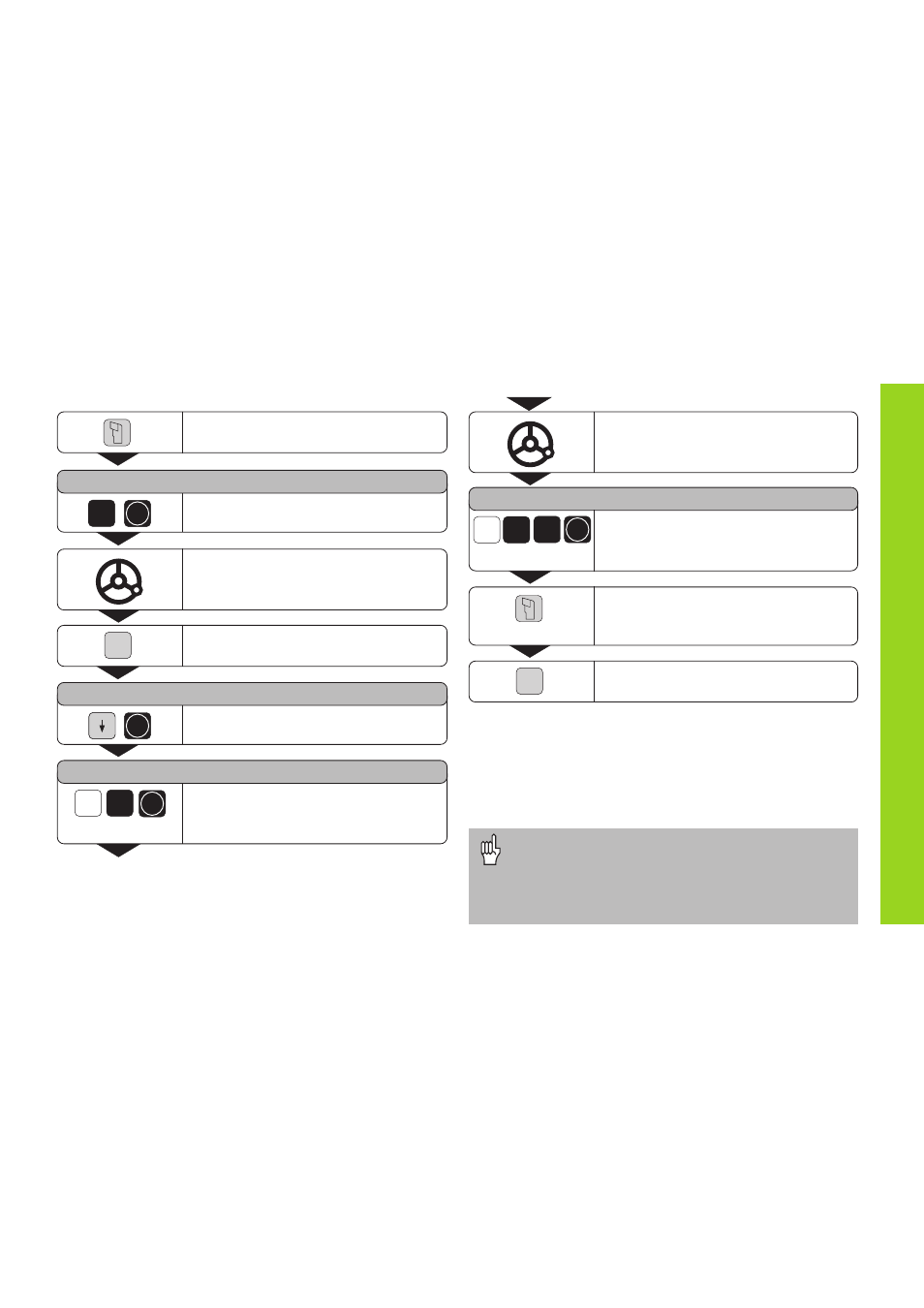
To enter tool data (relative datums)
Select the tool.
TOOL NUMBER =
Enter the tool number (for example 3)
and confirm with ENT.
Touch the workpiece with the tool.
Select Special Functions.
SET TOOL ?
Select Set Tool and confirm with ENT.
SET TOOL Z =
Select the axis (for example Z), enter
the position of the tool tip (for example
0 mm), and confirm with ENT.
SPEC
FCT
Touch the workpiece or turn the first
diameter.
SET TOOL Z =
Select the axis (for example X), enter
the position of the tool tip (for example
20 mm), and confirm with ENT.
To set additional tools, change the tool,
select a new tool number and enter
the data for the next tool.
End the function.
X
2
0
ENT
Datum Setting
•
When you work with the sum display, also set the
tool data when the sum display is active (ND 970
only).
•
Use the CL key to go back one level in the special
functions.
2 x