Getting started – Casio SE-C300 User Manual
Page 10
10
E
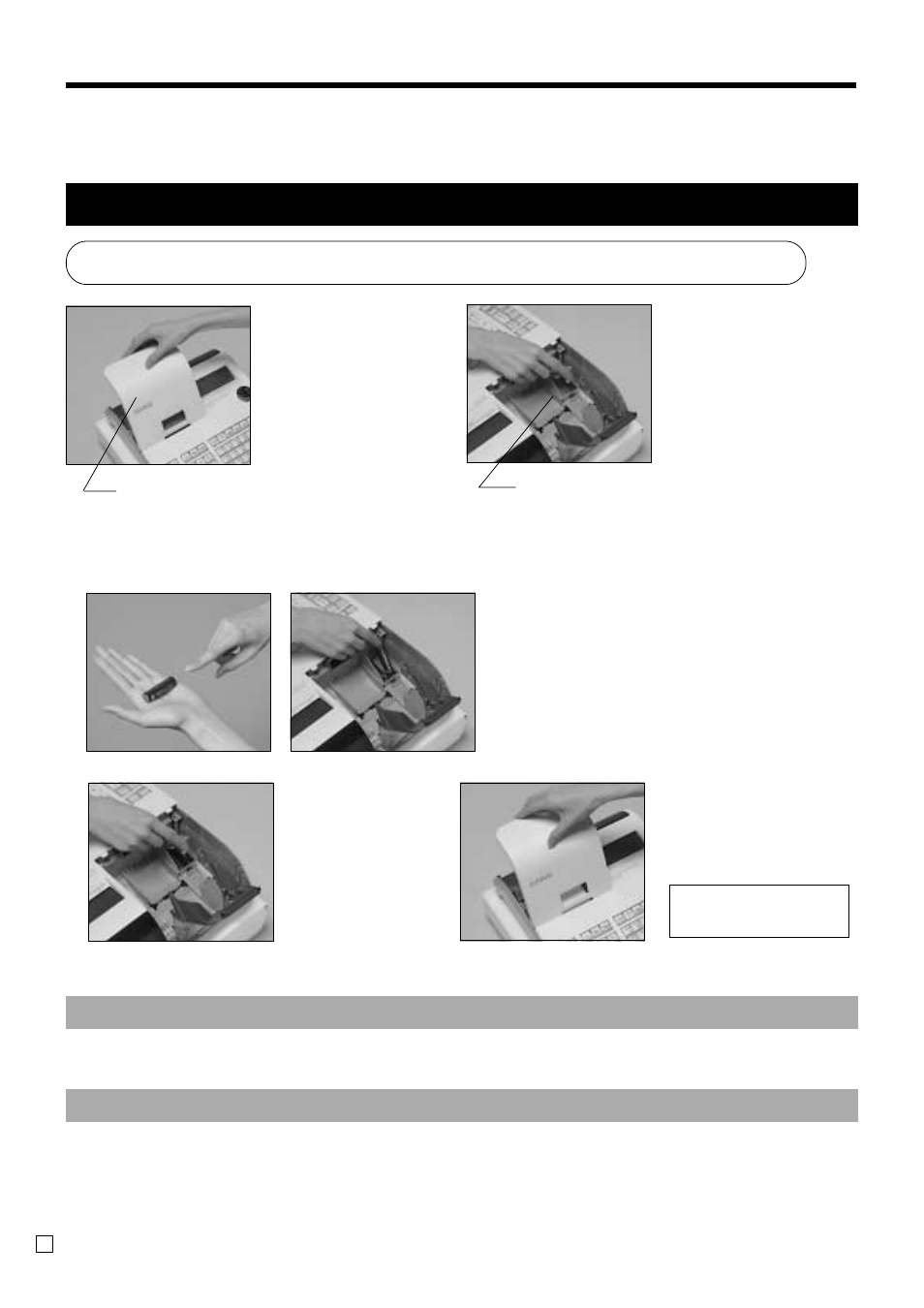
1. Remove the printer
cover.
2. Remove the battery
compartment cover.
1. Load the memory protection batteris and Paper rolls
Load the two memory protection batteries
3. Note the (+) and (–) markings in the battery
compartment. Load a set of two new alkaline
batteries so that their positive (+) and nega-
tive (–) ends are facing as indicated by the
markings.
Important!
These batteries protect information stored in your cash register's memory when there is a power
failure or when you unplug the cash register. Be sure to install these batteries.
4. Replace the battery compartment cover.
5. Replace the printer cover.
WARNING!
•
Never try to recharge the batteries supplied with the unit.
•
Do not expose batteries to direct heat, let them become shorted or try to take them apart.
Keep batteries out of the reach of small children. If your child should swallow a battery, consult a
physician immediately.
Getting Started
This chapter shows how to setup the cash register and get it ready to operate. Please read this chapter even
if you have used a cash register before.
printer cover
battery compartment cover
No battery is included
in the accessories.