PLANET CS-1000 User Manual
Page 102
Multi-Homing Security Gateway User’s Manual
User Name Displays the PPTP Client user’s name for authentication.
Server IP or Domain Name Displays the PPTP Server’s IP address or Domain name.
Encryption Displays the PPTP Client Encryption ON or OFF.
Uptime Displays the connection time between PPTP Server and Client.
Configure Click Modify to modify the PPTP Client settings or click Remove to remove the
item.
Adding a PPTP Client
Step 1. Select
VPN
→PPTP Client.
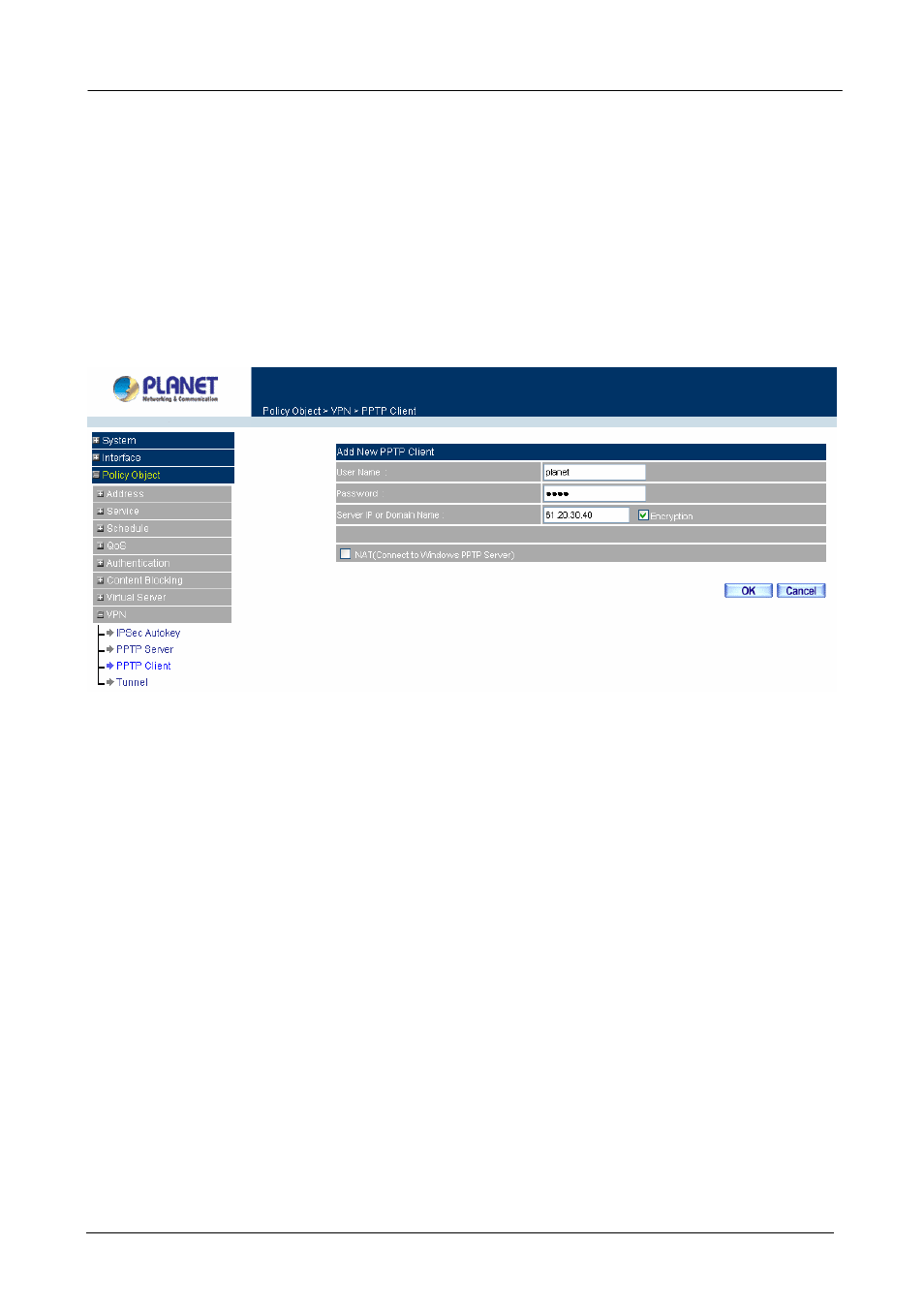
Step 2. Configure the parameters.
User name:
Specify the PPTP client. This should be unique.
Password:
Specify the PPTP client password.
Server IP or Domain Name:
Enter the PPTP Server’s IP address.
Encryption:
Enable or Disabled the Encryption.
WAN interface:
Check to select WAN interface to connect PPTP server.
NAT (Connect to Windows PPTP Server):
Select this function to setup the connection with
PPTP VPN Client of CS-1000 and Windows PPTP Server.
Modifying PPTP Client
Step 1. Select
VPN
→PPTP Client.
Step 2. In
the
PPTP Client
window, find the PPTP server that you want to modify and click Modify.
Step 3. Enter appropriate settings.
- 96 -