Product overview, Esp-880a, Front panel – Bose Professional ControlSpace ESP-880A Engineered Sound Processor User Manual
Page 12: Rear panel, Front panel rear panel
12
•
English
ControlSpace ESP-880A/880AD/1240A/1240AD
•
Installation Guide
pro.Bose.com
Product Overview
ESP-880A
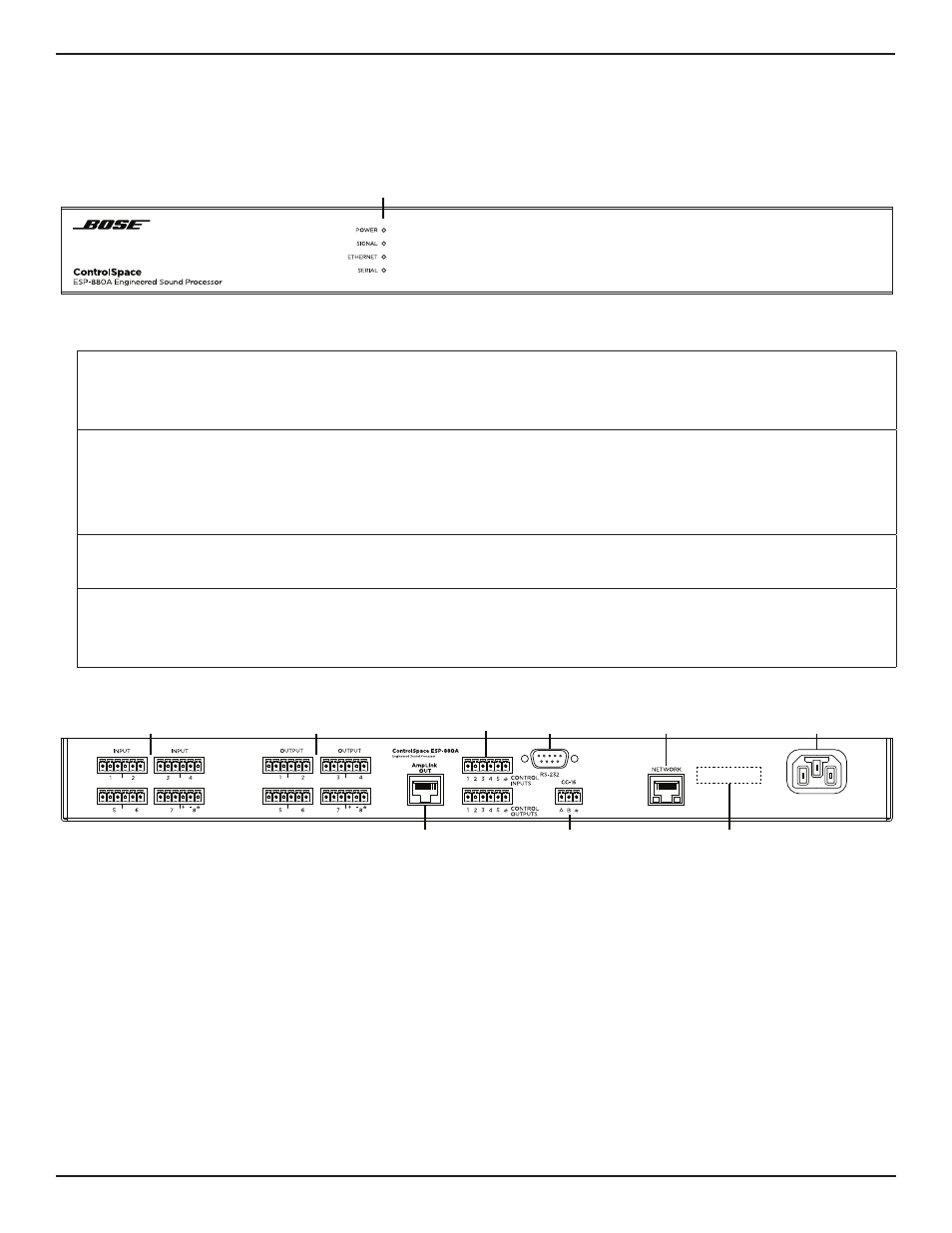
Front Panel
q
LED Indicators:
Power:
Power or fault state indication.
Green:
Power on, normal operation
Yellow:
Powering on
Red:
Error (see
Signal:
Signal status indication of all audio input
and output channels in order of signaling
priority. For precise metering and gain
control, connect using ControlSpace
Designer software.
Green:
Signal present (–60 dBFS to –20 dBFS)
Yellow:
Signal level optimal (–20 dBFS to –2 dBFS)
Red:
Clipping (–2 dBFS to 0 dBFS)
Ethernet:
Connection status indication of Ethernet
ports.
Green:
Ethernet link established
Yellow:
Active transmission/reception
Serial:
Serial command status indication for
CC-16 zone controller or RS-232 device.
Green:
CC-16 controller command transmitted
Yellow:
CC-16 controller command received
Red:
Active RS-232 transmission/reception
Rear Panel
q
Audio Inputs & Outputs:
Mic-/line-level inputs and line-level outputs balanced analog audio signals.
4. Connecting Analog Audio Devices
(page 18) for more information.
w
AmpLink Out port:
Ethernet connection for use with AmpLink-equipped PowerMatch amplifiers.
5. Connecting ControlCenter, AmpLink & Serial Control Devices
(page 18) for more information.
e
Serial number.
r
RS-232 port:
Five-wire, RS-232 (DTE) serial interface connection.
t
Power input:
Power cord connection (IEC 60320-C14 inlet).
y
Network port:
Ethernet network connection for up to 15 ControlCenter interfaces.
5. Connecting ControlCenter, AmpLink & Serial Control Devices
(page 18) for more information.
u
CC-16 connector:
RS-485 network connection for up to 15 CC-16 zone controllers.
5. Connecting ControlCenter, AmpLink & Serial Control Devices
(page 18) for more information.
i
Control Inputs & Outputs:
Five inputs and five outputs for general-purpose control. See
(page 20) for more information.
q
Product Overview
i
r
u
w
y
e
t
q
q