Connect with – Logitech M720 Triathlon Mouse User Manual
Page 5
Advertising
M720 Triathlon Mouse
CONNECT WITH
Requirements:
Your device has to support
Bluetooth Smart
–
Windows 8 or later
–
Mac OS X 10 10 or later
–
Android 5 0 or later
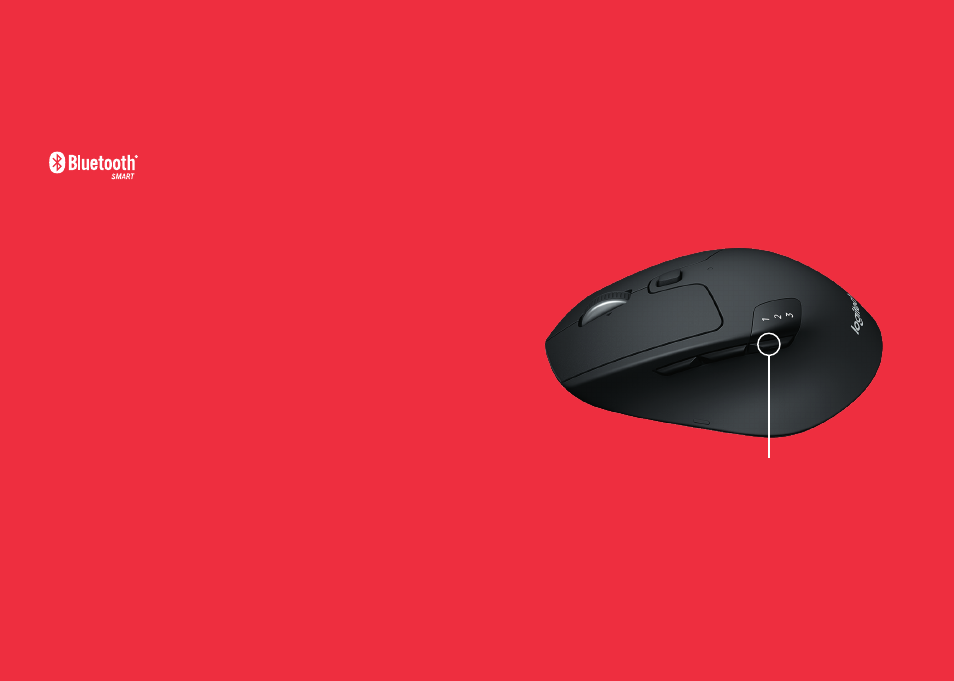
How to pair a Bluetooth device:
1.
Make sure your M720 is turned on
2.
Press and hold the toggle button below the display
for 3 seconds (the LED on selected channel will start
to blink fast)
3.
Open Bluetooth settings or Bluetooth device manager
on your device and pair with “M720 Triathlon Mouse”
Toggle Button
Advertising
See also other documents in the category Logitech The input devices:
- K350 (40 pages)
- Wireless M510 910-001822 (1 page)
- MK120 Desktop (60 pages)
- MK700 (72 pages)
- MK120 Desktop (48 pages)
- MK120 Desktop (32 pages)
- MK120 Desktop (52 pages)
- MK120 Desktop (92 pages)
- MK120 Desktop (9 pages)
- MK120 Desktop (32 pages)
- MK120 Desktop (36 pages)
- Wireless Keyboard K340 (34 pages)
- K750 Wireless Solar Keyboard (24 pages)
- K750 Wireless Solar Keyboard (20 pages)
- PRO 2000 (2 pages)
- K760 (12 pages)
- Cordless Desktop EX100 (2 pages)
- Mini Mouse m187 (2 pages)
- K750 Wireless Solar Keyboard (20 pages)
- Gaming G300 (64 pages)
- K360 (2 pages)
- Wireless Keyboard K800 (34 pages)
- CORDLESS LASER MOUSE V450 (2 pages)
- Wireless Desktop MK300 (60 pages)
- Cordless Desktop Wave Pro Ergonomic Keyboard and Mouse 920-000919 (28 pages)
- Rechargeable Cordless Laser Mouse for Business 1100R (112 pages)
- Premire utilisation Gaming Keyboard G510 (1 page)
- diNovo Edge (2 pages)
- MK300 (72 pages)
- MK300 (58 pages)
- M185 (2 pages)
- MK710 Wireless Desktop (76 pages)
- Wireless Combo MK360 (2 pages)
- Wireless M325 (2 pages)
- Laser Cordless for Notebooks V450 (2 pages)
- M325 (32 pages)
- M325 (36 pages)
- M515 (2 pages)
- Keyboard K760 (44 pages)
- M525 (64 pages)
- Premire utilisation Gaming Keyboard G105 (2 pages)
- Wireless Combo MK330 (2 pages)
- V270 (2 pages)
- Couch Mouse M515 (37 pages)
- MX600 (2 pages)