Setup instructions – Logitech G PRO Wireless Gaming Mouse User Manual
Page 3
Advertising
3
ENGLISH
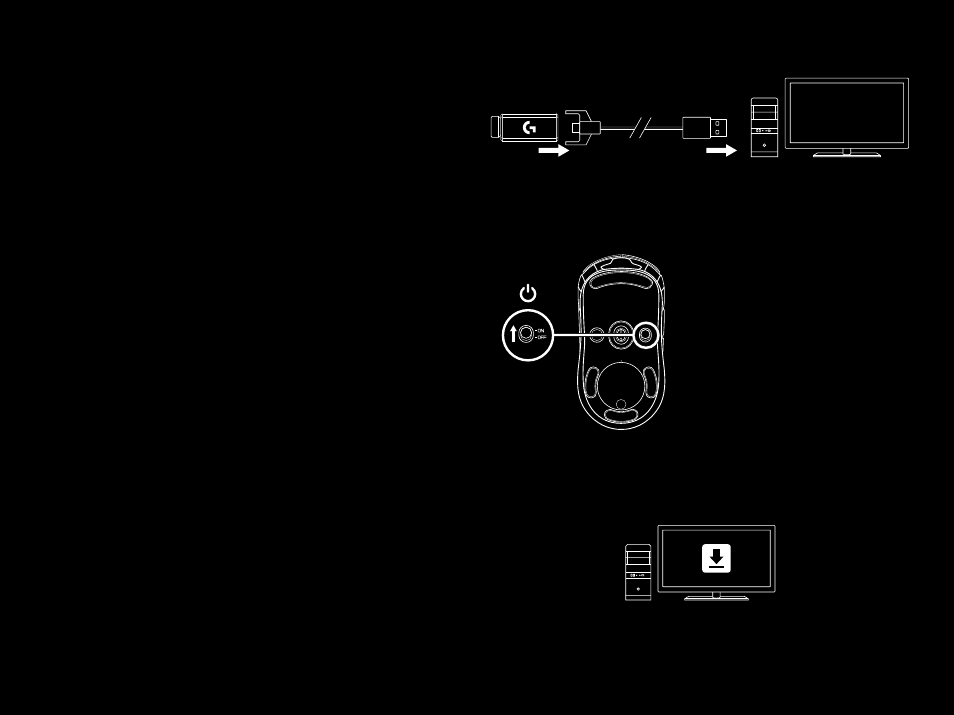
SETUP INSTRUCTIONS
1
A wireless receiver attached to the USB adapter can be found
in the accessory box Plug one end of the cable into your PC,
and the other end into the USB adapter and receiver
–
The receiver can also be used plugged directly into
your PC However, using the cable and adapter when
in wireless mode is recommended and allows for better
connectivity and easy access to the cable for recharging
2
Turn mouse on via the switch on the bottom of the mouse
3
Download Logitech Gaming Software
1
2
PRO
WIRELESS
3
www.logitechG.com/support/pro-wireless
Advertising
See also other documents in the category Logitech The input devices:
- K350 (40 pages)
- Wireless M510 910-001822 (1 page)
- MK120 Desktop (60 pages)
- MK700 (72 pages)
- MK120 Desktop (48 pages)
- MK120 Desktop (32 pages)
- MK120 Desktop (52 pages)
- MK120 Desktop (92 pages)
- MK120 Desktop (9 pages)
- MK120 Desktop (32 pages)
- MK120 Desktop (36 pages)
- Wireless Keyboard K340 (34 pages)
- K750 Wireless Solar Keyboard (24 pages)
- K750 Wireless Solar Keyboard (20 pages)
- PRO 2000 (2 pages)
- K760 (12 pages)
- Cordless Desktop EX100 (2 pages)
- Mini Mouse m187 (2 pages)
- K750 Wireless Solar Keyboard (20 pages)
- Gaming G300 (64 pages)
- K360 (2 pages)
- Wireless Keyboard K800 (34 pages)
- CORDLESS LASER MOUSE V450 (2 pages)
- Wireless Desktop MK300 (60 pages)
- Cordless Desktop Wave Pro Ergonomic Keyboard and Mouse 920-000919 (28 pages)
- Rechargeable Cordless Laser Mouse for Business 1100R (112 pages)
- Premire utilisation Gaming Keyboard G510 (1 page)
- diNovo Edge (2 pages)
- MK300 (72 pages)
- MK300 (58 pages)
- M185 (2 pages)
- MK710 Wireless Desktop (76 pages)
- Wireless Combo MK360 (2 pages)
- Wireless M325 (2 pages)
- Laser Cordless for Notebooks V450 (2 pages)
- M325 (32 pages)
- M325 (36 pages)
- M515 (2 pages)
- Keyboard K760 (44 pages)
- M525 (64 pages)
- Premire utilisation Gaming Keyboard G105 (2 pages)
- Wireless Combo MK330 (2 pages)
- V270 (2 pages)
- Couch Mouse M515 (37 pages)
- MX600 (2 pages)