8 fully programmable buttons – Logitech G PRO Wireless Gaming Mouse User Manual
Page 8
Advertising
8
ENGLISH
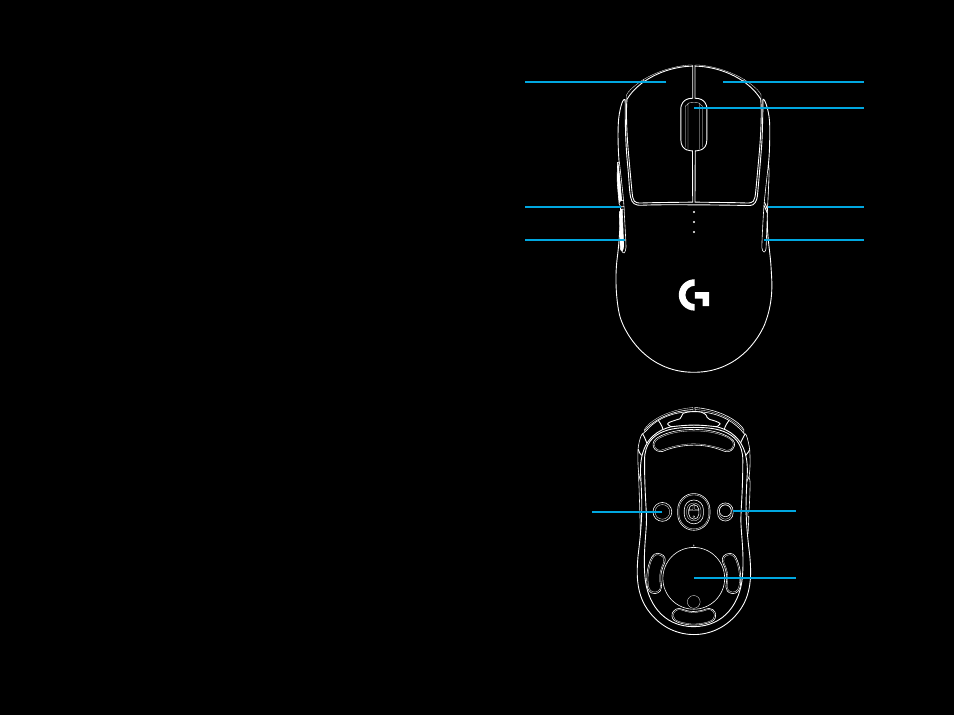
8 FULLY PROGRAMMABLE BUTTONS
1
Left (Button 1)
2
Right (Button 2)
3
Wheel click (Button 3)
4
Back (Button G4)
5
Forward (Button G5)
6
Back (Button G6)
7
Forward (Button G7)
8
DPI cycle (bottom of mouse, Button 8)
9
Receiver storage door + Powerplay module enclosure
(bottom of mouse)
10
On/Off switch (bottom of mouse, not programmable)
PRO
WIRELESS
1
4
5
2
7
6
3
8
10
9
Advertising
See also other documents in the category Logitech The input devices:
- K350 (40 pages)
- Wireless M510 910-001822 (1 page)
- MK120 Desktop (60 pages)
- MK700 (72 pages)
- MK120 Desktop (48 pages)
- MK120 Desktop (32 pages)
- MK120 Desktop (52 pages)
- MK120 Desktop (92 pages)
- MK120 Desktop (9 pages)
- MK120 Desktop (32 pages)
- MK120 Desktop (36 pages)
- Wireless Keyboard K340 (34 pages)
- K750 Wireless Solar Keyboard (24 pages)
- K750 Wireless Solar Keyboard (20 pages)
- PRO 2000 (2 pages)
- K760 (12 pages)
- Cordless Desktop EX100 (2 pages)
- Mini Mouse m187 (2 pages)
- K750 Wireless Solar Keyboard (20 pages)
- Gaming G300 (64 pages)
- K360 (2 pages)
- Wireless Keyboard K800 (34 pages)
- CORDLESS LASER MOUSE V450 (2 pages)
- Wireless Desktop MK300 (60 pages)
- Cordless Desktop Wave Pro Ergonomic Keyboard and Mouse 920-000919 (28 pages)
- Rechargeable Cordless Laser Mouse for Business 1100R (112 pages)
- Premire utilisation Gaming Keyboard G510 (1 page)
- diNovo Edge (2 pages)
- MK300 (72 pages)
- MK300 (58 pages)
- M185 (2 pages)
- MK710 Wireless Desktop (76 pages)
- Wireless Combo MK360 (2 pages)
- Wireless M325 (2 pages)
- Laser Cordless for Notebooks V450 (2 pages)
- M325 (32 pages)
- M325 (36 pages)
- M515 (2 pages)
- Keyboard K760 (44 pages)
- M525 (64 pages)
- Premire utilisation Gaming Keyboard G105 (2 pages)
- Wireless Combo MK330 (2 pages)
- V270 (2 pages)
- Couch Mouse M515 (37 pages)
- MX600 (2 pages)