Sony VGN-FW170J User Manual
Page 56
Advertising
56
Using Your VAIO Computer
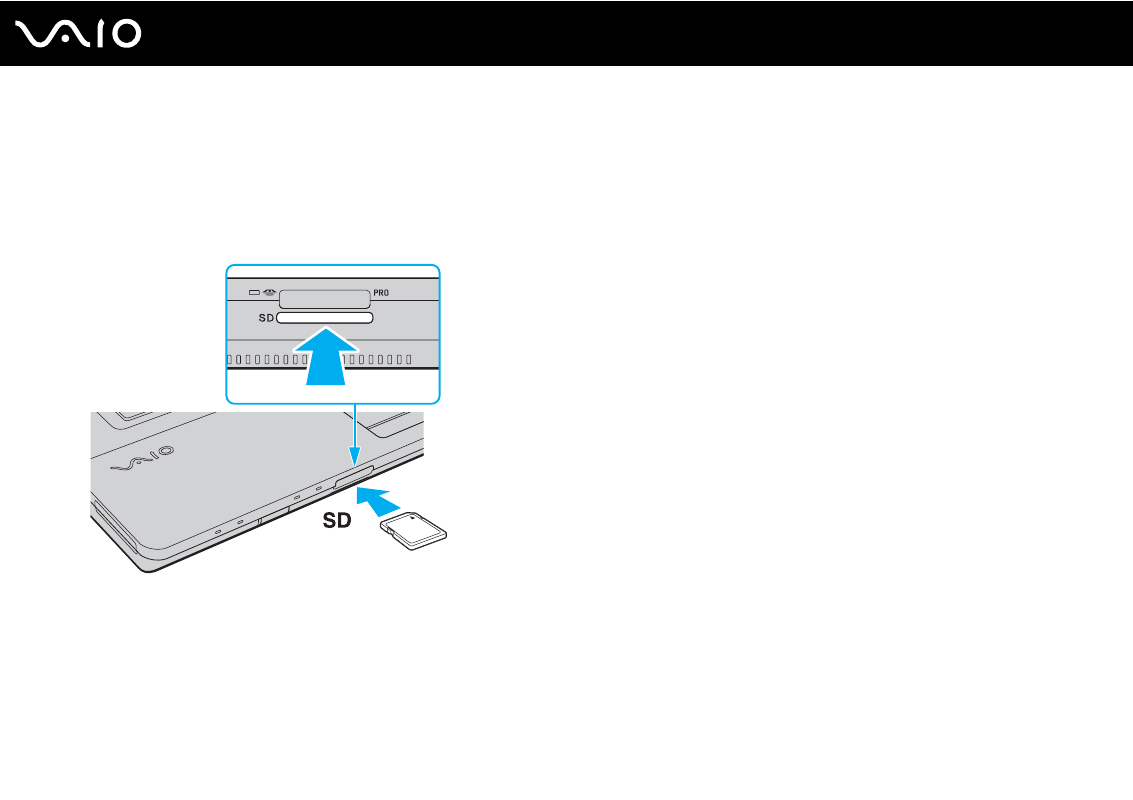
Inserting a Memory Card
To insert a memory card
1
Locate the
SD
memory card slot.
2
Hold the memory card with the arrow facing upward and pointing toward the memory card slot.
3
Carefully slide the memory card into the slot until it clicks into place.
Do not force the card into the slot.
✍
If the memory card does not go into the slot easily, remove it gently and verify you are inserting it in the proper direction.
Advertising
See also other documents in the category Sony Notebooks:
- SGPT21 (168 pages)
- DG1 (20 pages)
- A8N-SLI (3 pages)
- VPCS137GX/B (2 pages)
- PCG-FX170 (136 pages)
- A8N-VM CSM (2 pages)
- BX540-BTO (3 pages)
- VPCZ21SHX/X (4 pages)
- MVS8000SF-C (72 pages)
- PCG-505TR (104 pages)
- PCG-FX190K (136 pages)
- 10.4 (3 pages)
- P5SD2-X SE (3 pages)
- VPCL2 (190 pages)
- VAIO Notebook PC (Packing Instructions) (2 pages)
- SGPT11 (161 pages)
- MAC OS X 10.4 (2 pages)
- C1VPK (20 pages)
- VPCZ13EGX (217 pages)
- ORBITER SM4000 (6 pages)
- VPCF22BFX/B (4 pages)
- VPCF236FM (16 pages)
- VPCS13DGX/B (2 pages)
- DSC-W330 (104 pages)
- DSC-W330 (60 pages)
- PCG-838 (121 pages)
- VPCS131FDS (2 pages)
- A240P CTO (1 page)
- DVR SERVER VER.5.05/REL.092507 (2 pages)
- VPCF21AFX (4 pages)
- VGN-SZ3HP (80 pages)
- VGN-SZ3HP (40 pages)
- VPCW11S1E (127 pages)
- VPCS11A7E (196 pages)
- VGN-N31S (40 pages)
- VGN-N31S (88 pages)
- VGN-N31S (60 pages)
- VGN-N31S (88 pages)
- VAIO (Recovery, Backup and Troubleshooting Guide) (2 pages)
- PCG-X18 (53 pages)
- VGN-UX280P7 (2 pages)
- VGN-UX280P7 (194 pages)
- VGN-UX180P (2 pages)
- SVF15A1BCXB (32 pages)
- VPCB11KGX (3 pages)