Lenco XEMIO-858 User Manual
Page 3
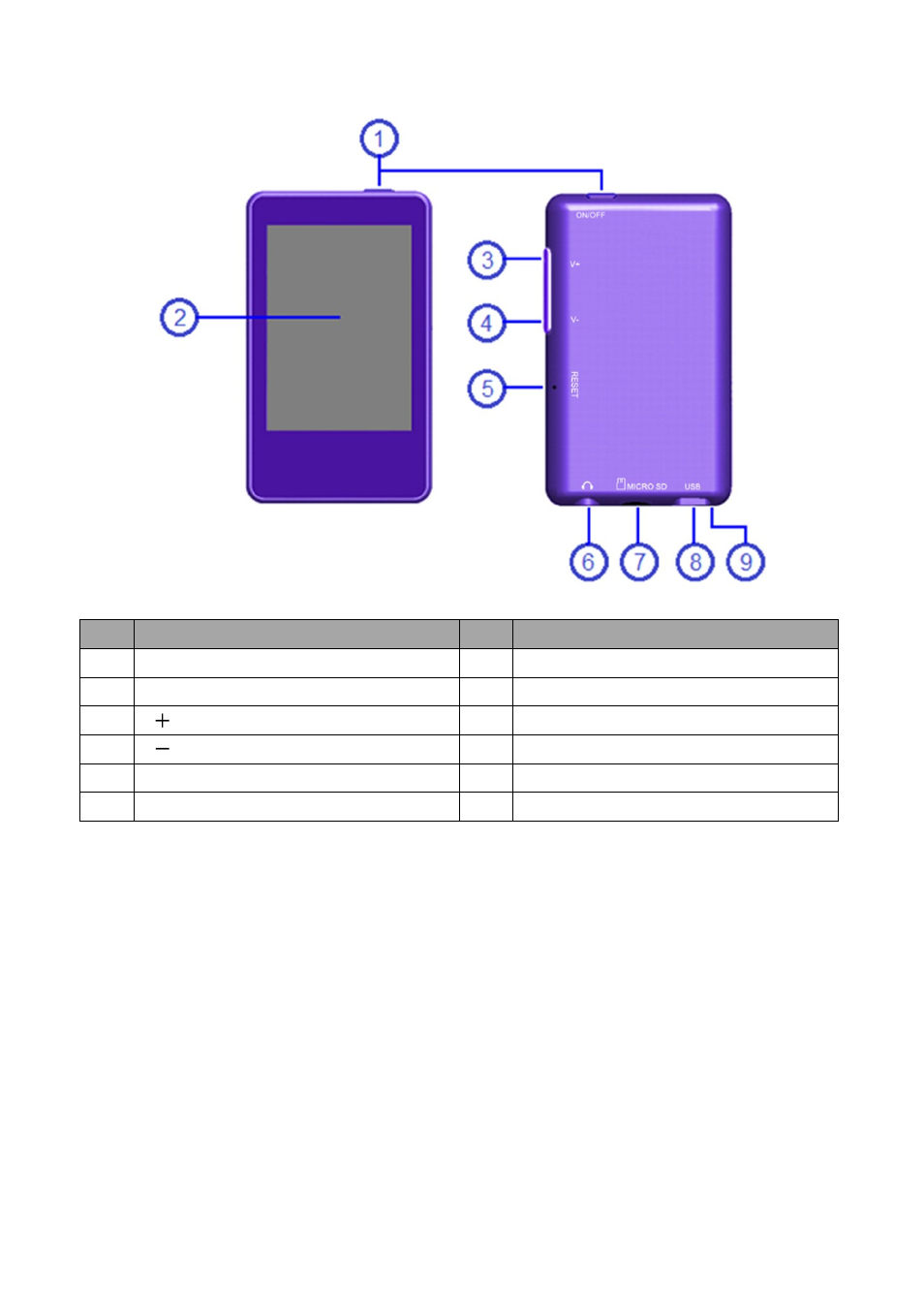
1.
Basic controls and interfaces of the player
Item Description
Item Description
1
ON / OFF Button
(Power)
6
Earphone Output Jack
(3.5mm Stereo)
2
TFT Display
(Touch Function)
7
Memory Card Slot
(Micro SD Card)
3
V Button
8
Mini USB Port
(PC Connection / Charge)
4
V Button
9
Microphone
(mono)
5
Reset
(Built-In Tact Switch)
2.
Internal Battery
The player has an internal battery. When using the unit for the first time, charge it for 3 hours or until the
battery icon is show the battery is in full.
Note: The player continues to use battery power after it’s been turned to off, if unit isn’t used for a while, the
battery might need to be charged.
3.
Connection and Charging
•
Once you have connected player with computer / Power charger, then you will see the “Opening” >
“Connect” or “Charging” screen.
•
In connect screen, the battery is in charging at background.
•
In charging screen, the bar levels are running in battery icon, the battery is in charging.
•
The battery icon will show “Full” when the charging is completed. Disconnect it when it is done.