2 parts and tools needed, More, 3 removing the cover – Asustor AS7009RD User Manual
Page 12: Parts and tools needed, Removing the cover
Advertising
ASUSTOR NAS Quick Installation Guide
3
3
.
.
3
3
.
.
2
2
P
P
a
a
r
r
t
t
s
s
a
a
n
n
d
d
T
T
o
o
o
o
l
l
s
s
N
N
e
e
e
e
d
d
e
e
d
d
•
Phillips head screwdriver
• Memory for AS70 series devices may be purchased from local dealers or the online ASUSTOR
Accessories Stor
M
M
o
o
r
r
e
e
3
3
.
.
3
3
.
.
3
3
R
R
e
e
m
m
o
o
v
v
i
i
n
n
g
g
t
t
h
h
e
e
C
C
o
o
v
v
e
e
r
r
•
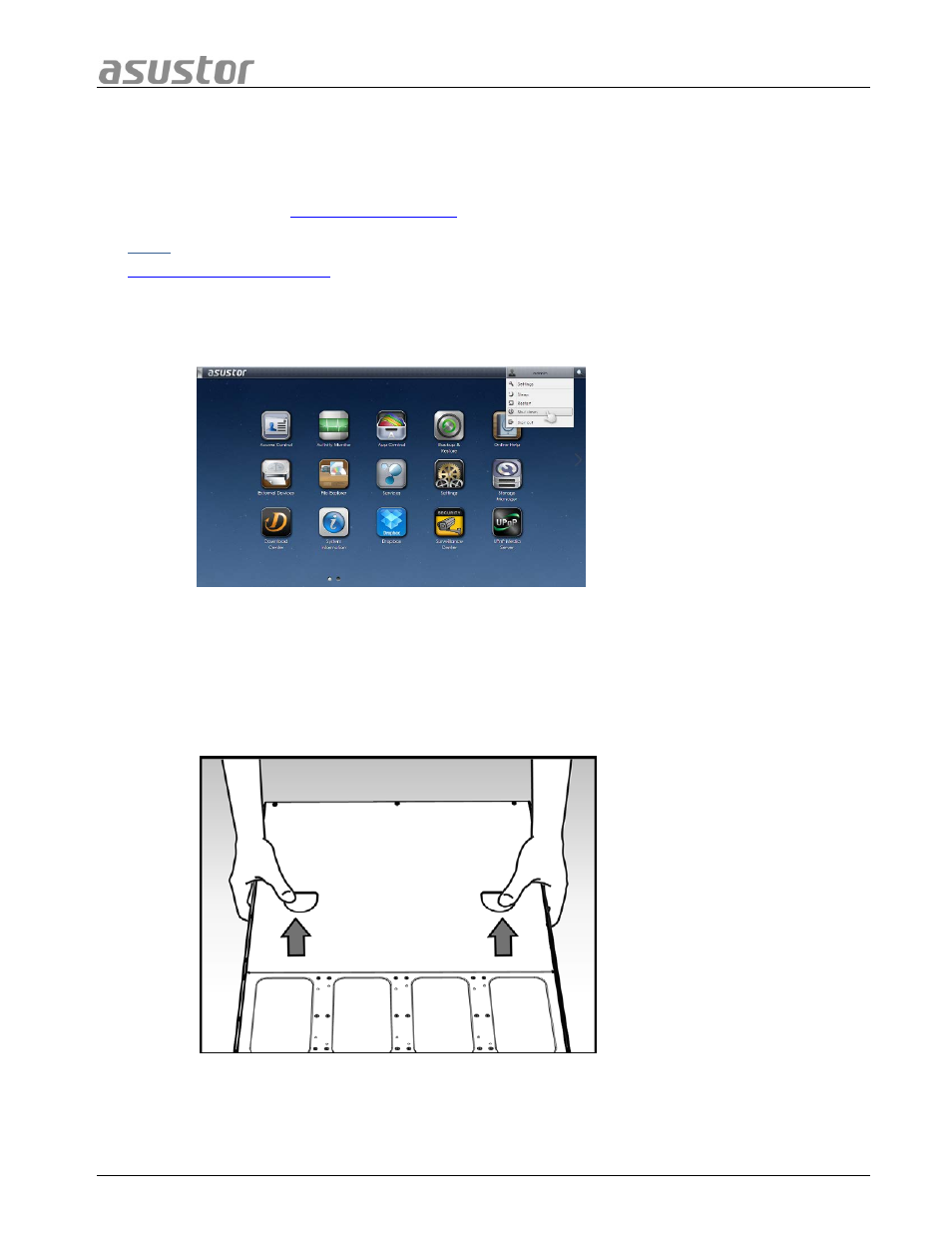
Shutdown the NAS by selecting [Shut down] from the ADM User Menu.
•
Disconnect all cables and devices connected to the NAS including the power cord.
•
Use a screwdriver to loosen the three screws found on the rear of the NAS as shown
in the illustration.
•
Grip the cover from both sides with two hands and then gently push it back to
remove it from the chassis.
Page 12 of 25
Advertising