NEXCOM NDiS B842 User Manual
Page 112
Advertising
Copyright © 2013 NEXCOM International Co., Ltd. All Rights Reserved.
98
NDiS B862/B842 User Manual
Appendix D: Display Continuity Installation
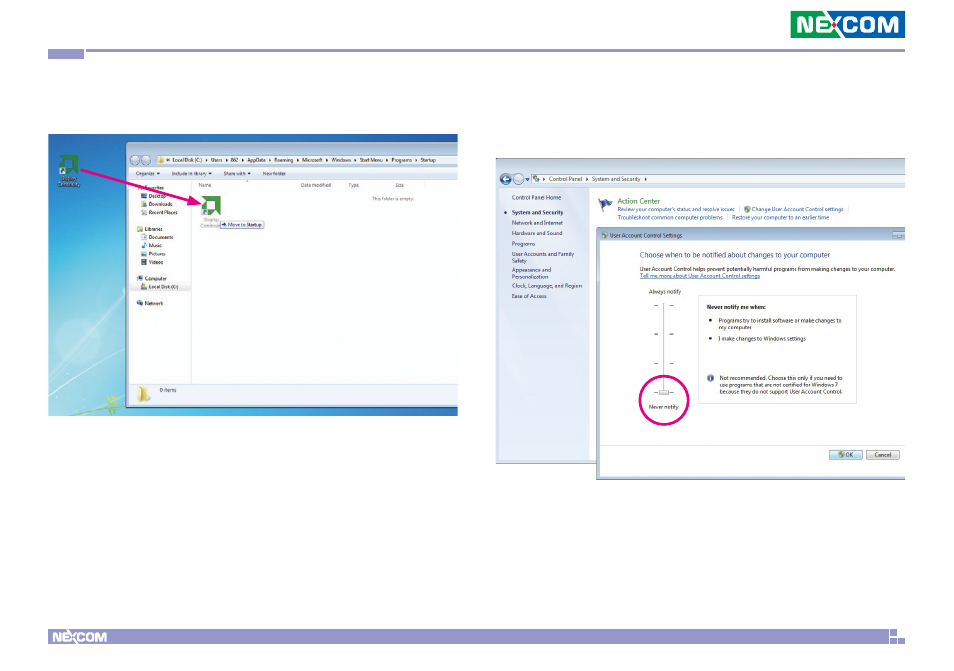
16. Once the Startup folder is opened, click and drag the Display Continuity
shortcut to the folder.
17. Go to Control Panel
→ System and Security → Change User Account
Control settings, and adjust the security level bar to Never notify, then
press OK and reset the system.
Advertising
This manual is related to the following products: