Connection, Connection 31 – Samsung VM55B-U 55" Video Wall Display User Manual
Page 31
Advertising
31
Connection
―
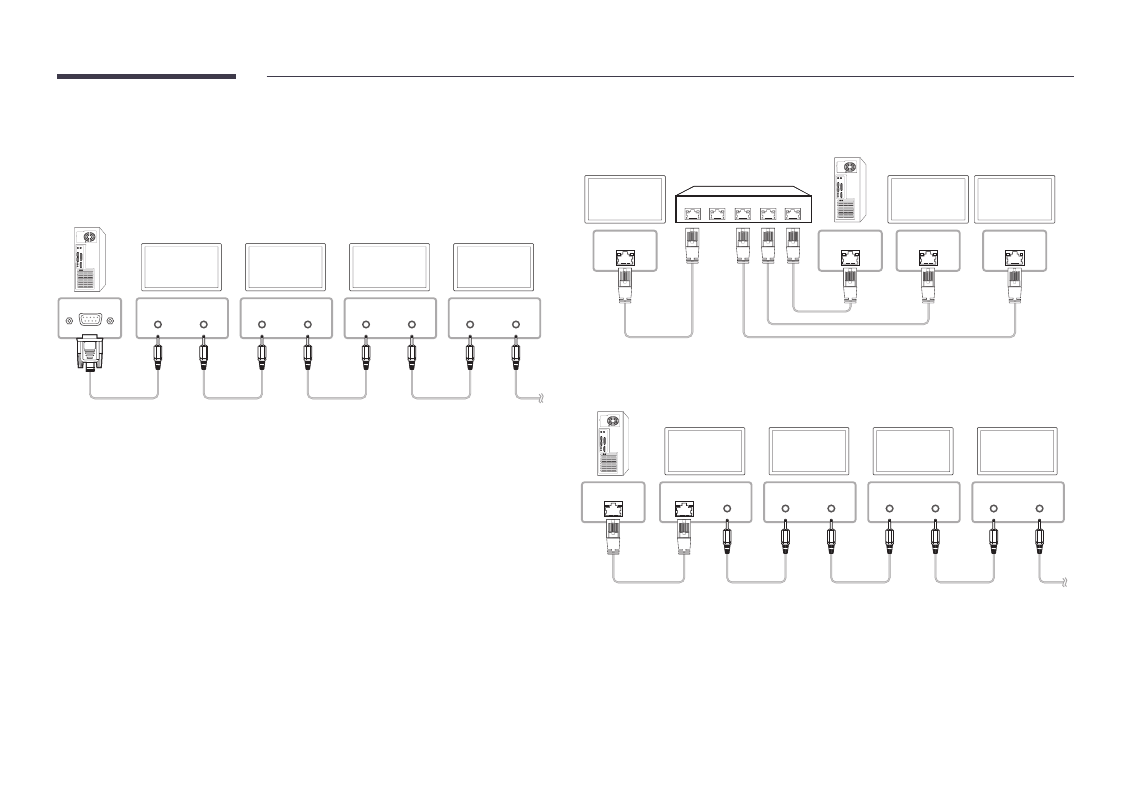
Ensure you connect each of the adapters to the correct RS232C IN or OUT port on the
product.
•
Connection 1
RS232C IN
RS232C OUT
RS232C IN
RS232C OUT
RS232C IN
RS232C OUT
RS232C IN
RS232C OUT
Monitor 1
Monitor 2
Monitor 3
Monitor 4
PC
•
Connection 2
RJ45
RJ45
RJ45
RJ45
5
4
3
2
1
Monitor 2
Monitor 1
PC
Monitor 3
•
Connection 3
RS232C OUT
RS232C IN
RS232C OUT
RS232C IN
RS232C OUT
RS232C IN
RS232C OUT
RJ45
RJ45
Monitor 1
Monitor 2
Monitor 3
Monitor 4
PC
Advertising
This manual is related to the following products: