Midi & wifi connectivity – Torso Electronics T-1 16-Track Algorithmic Desktop Sequencer User Manual
Page 169
169
The T-1 Notebook : Reference & Guide
NOTES
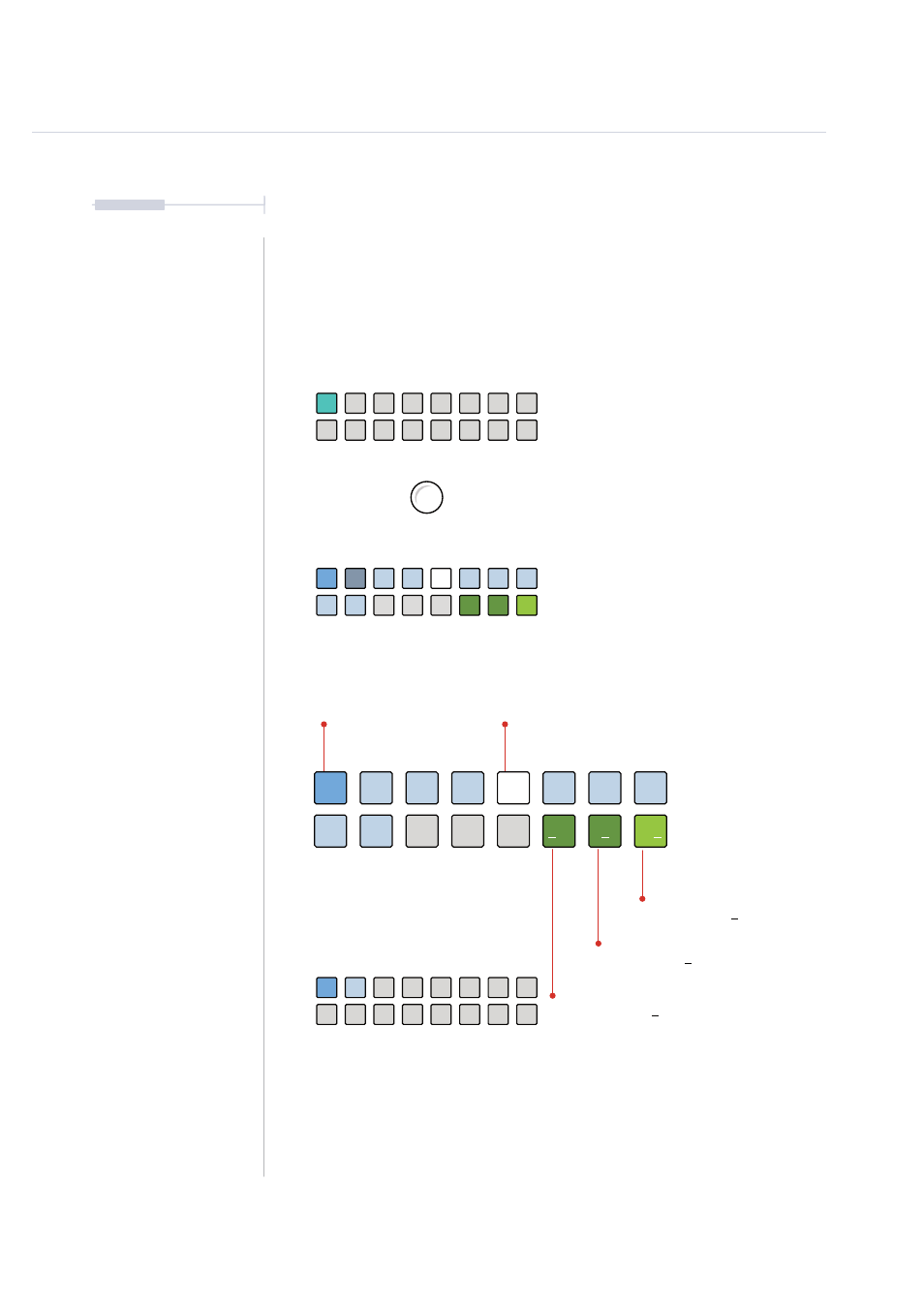
Changing a CC Assignment
While T-1 has a set of predefined MIDI CC numbers per track, these can be
changed. This is useful to match up T-1 Tracks to different devices and
parameters and ensure maximum versatility in working with other CC’s.
Hundred option toggles between 1xx lit
WHITE
⬛
and 0xx BLUE
⬛
CC Edit View
WHITE
⬛
Selected Value for Digit
GREEN
⬛
Unit Digit - ‘000’ - Selected
DARK GREEN
⬛
Tens Digit - ‘000’ - Not Selected
DARK GREEN
⬛
Hundred Digit - ‘000’ - Not Selected
BLUE
⬛
Unit Numbers
CC assignments for knobs can be made in
CC mode for the track.
To select editor view, with knob parameter
value view selected;
Hold [CTRL] + [PATTERN].
Knobs can be assigned a new CC number.
Double press (Knob) to select for editing
and to lock the value display view.
0
8
1
9
4
2
5
100
3
6
100
7
100
MIDI & WiFi Connectivity
8