Screen transition, 3 screen transition – Sekonic Speedmaster L-858D-U Light Meter User Manual
Page 28
14
3. Screen Operations
3-3
Screen Transition
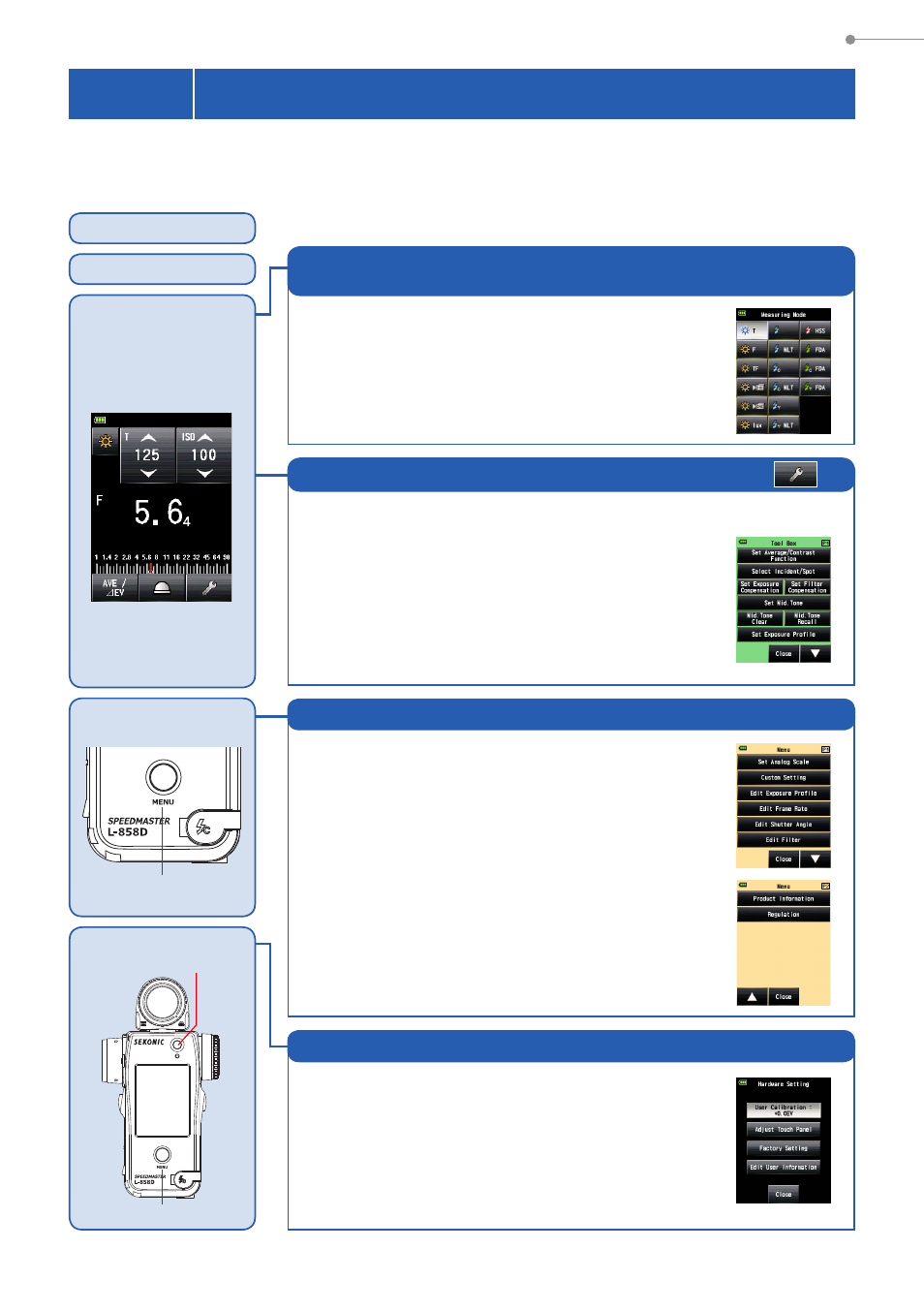
The basic screen transition is as follows.
A change in the Measuring Mode or settings can be made on the Measuring Screen.
Power ON
Startup Screen
Measuring Screen
Menu
Menu Button
9
Hardware Setting
Menu Button
9
Power Button
5
Set the Measuring Mode that matches your intended
use.
●
Ambient light
●
Flash light
●
HSS flash
●
Flash duration analysis
Measuring Mode
*
The modes displayed can be selected in Custom Setting.
Set, recall and clear meter/measuring functions to fit your needs.
●
Set Average/Contrast Function
●
Select Incident/Spot
●
Set Exposure Compensation
●
Set Filter Compensation
●
Set Mid. Tone
●
Mid. Tone Clear
●
Mid. Tone Recall
●
Set Exposure Profile
●
Memory Clear
●
Memory Recall
●
Number of Pre-flash
●
Multi Clear
●
Flash Duration Analysis t Value
●
Radio CH/Zone
Tool Box
Select, edit, and customize meter operations and
displayed measuring functions.
●
Set Analog Scale
●
Custom Setting
●
Edit Exposure Profile
●
Edit Frame Rate
●
Edit Shutter Angle
●
Edit Filter
View information about your meter.
●
Product Information
●
Regulation
Menu Function
While the meter's power is off, hold down the Menu
Button
9
, then press the Power Button
5
to display
the Hardware Setting Screen.
●
User calibration of measured value
●
Touch panel display position adjustment
●
Reset to Factory settings (default settings)
●
User information editing
Hardware Setting