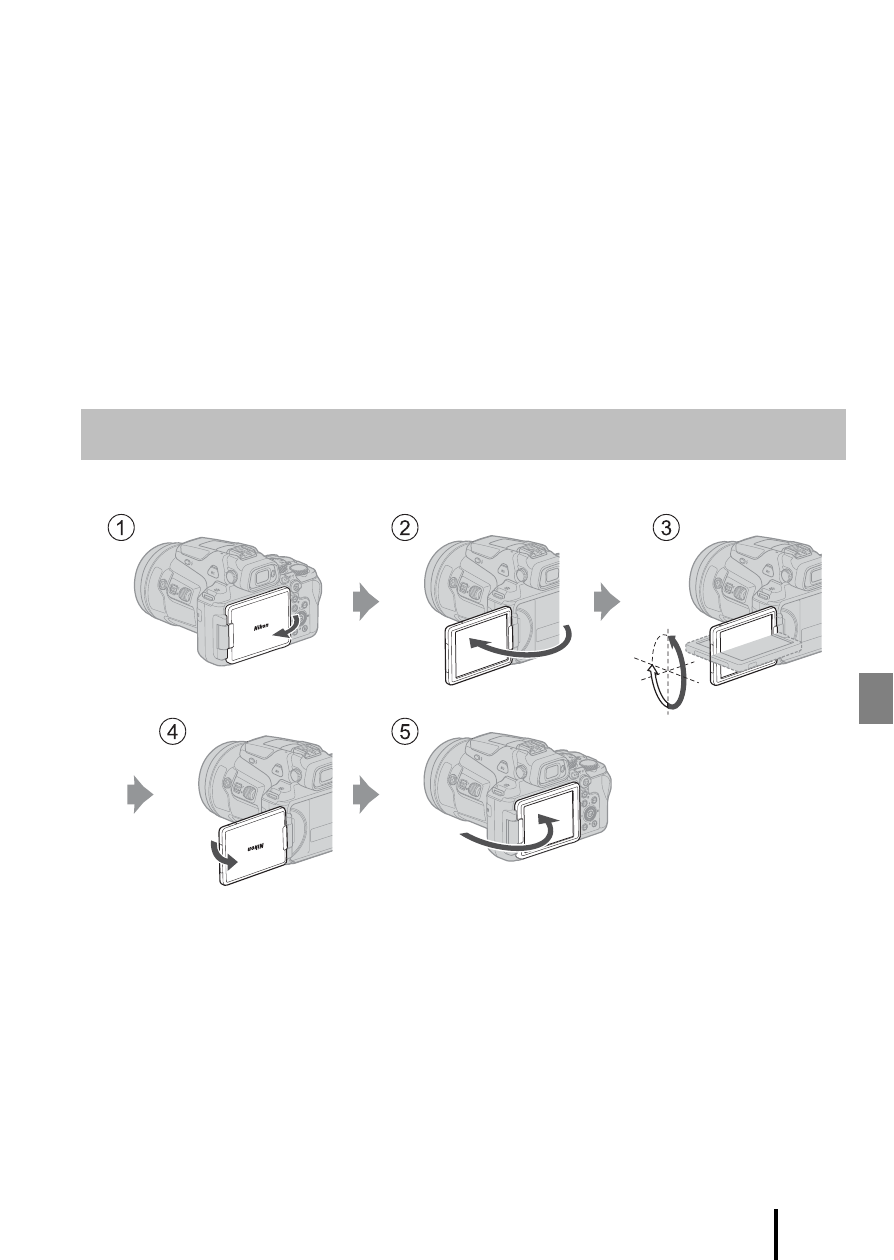
Opening the monitor – Nikon COOLPIX P950 Digital Camera User Manual
Page 15
5
Getting started
B
Notes about the USB cable
•
Do not use a USB cable other than the UC-E21. Using a USB cable other than the UC-E21
could result in overheating, fire, or electric shock.
•
Check the shape and direction of the plugs and do not insert or remove the plugs at an
angle.
B
Notes about charging the battery
•
Do not, under any circumstances, use another make or model of AC adapter other than
the EH-73P Charging AC Adapter, and do not use a commercially available USB-AC
adapter or a battery charger for a mobile phone. Failure to observe this precaution could
result in overheating or in damage to the camera.
•
If the camera is turned on while the battery is charging, charging stops.
•
You can adjust the direction and angle of the monitor. For normal shooting, fold
the monitor against the back of the camera, facing out (
5
).
•
When you are not using or carrying the camera, fold the monitor against the
camera body with the screen facing in (
1
).
B
Notes about the monitor
•
The monitor’s adjustable range may be limited when a cable or accessories are attached
to the camera.
•
When moving the monitor, do not apply excessive force and move slowly within the
monitor’s adjustable range so that the connection will not be damaged.
Opening the monitor