Installation instructions – Brandmotion 9002-8838 User Manual
Page 4
INSTALLATION INSTRUCTIONS
8838 Instructions 10-7-14.docx
Page 4 of 5
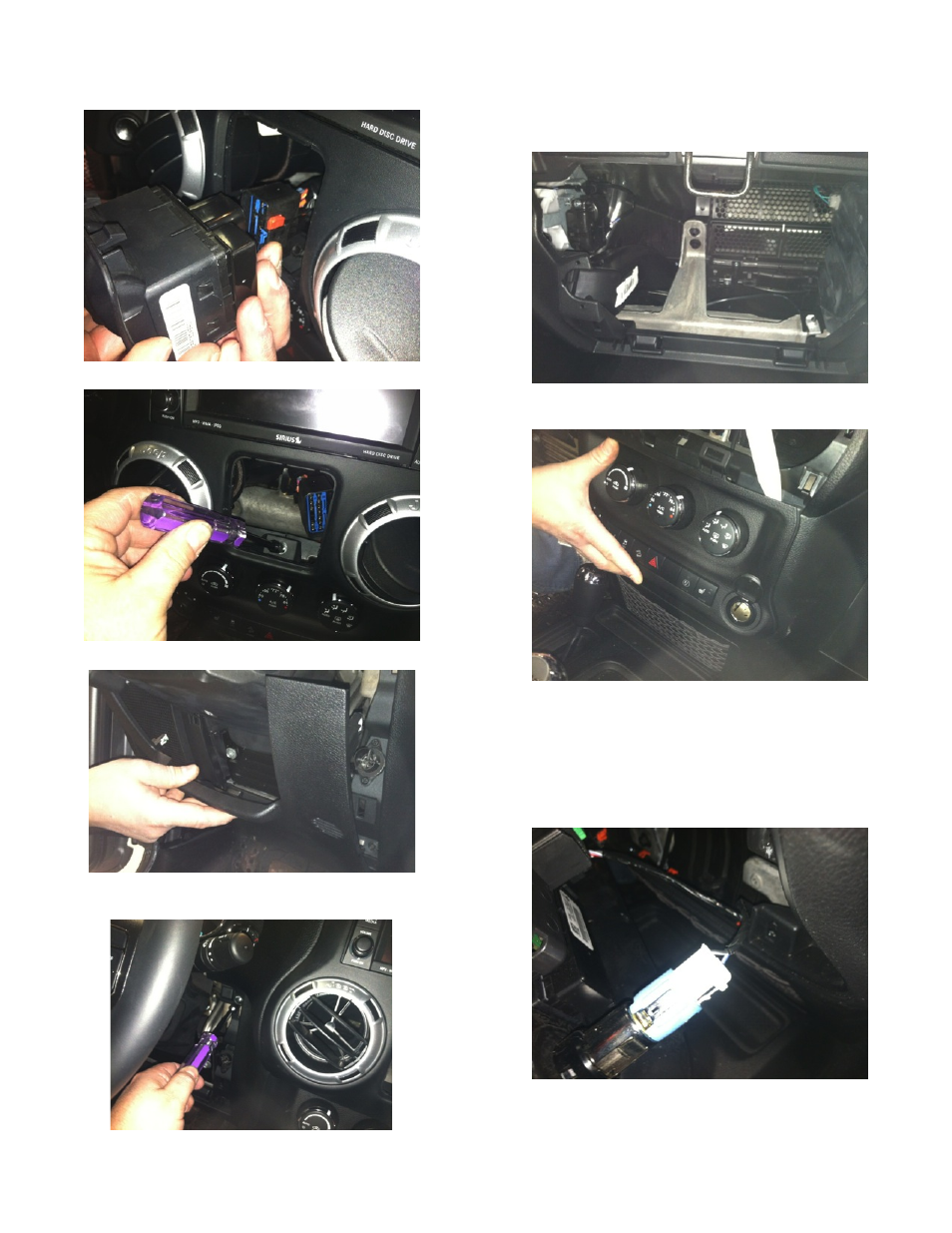
Step 21: Disconnect harness from window switches.
Step 22: Remove 7mm bolt.
Step 23: Remove driver knee bolster cover.
Step 24: Remove (2) 7mm bolts on both sides of the
steering column.
Step 25: Remove center stack/cluster surround.
Step 26: Remove glove box for access and run Mirror
Harness toward center of dash.
Step 27: Using a plastic trim removal tool, remove
HVAC panel.
Step 28: Run Red 12v+ ignition wire of supplied Mirror
Harness to ignition controlled power point on HVAC
panel power point.
Step 29: Splice Red power wire to Blue/Red wire on
back of power point. RECOMMENDED: Use solder and
cover with heat shrink tubing or use T-taps as an
alternate connection method.
Step 30: Plug the Chassis Harness RCA connector into
your aftermarket display.